JTran07
Members
-
Joined
-
Last visited
-
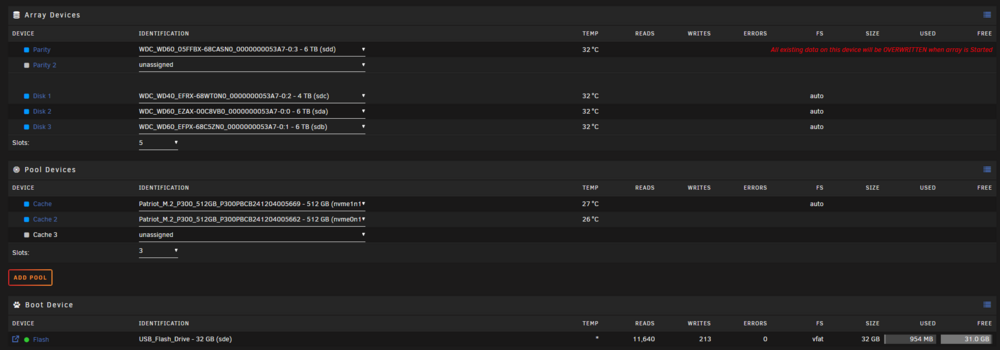
Oh my... that worked thank you so much lol, I overlooked that because for some reason my server always says 3 cache pool when i only have 2 but before it wouldn't let me change it to 2. But i think after starting the new config it worked. Thank you so much. New drives are now formatted. currently doing parity sync.
-
Hi recently changed my parity drive from 4tb to 6tb, I also changed 2 of my 3 array hdd. All larger drives. I kept one of my array drives that had all my files the other drives I replaced were empty. My 2 cache drives are still the same as well as my USB boot drive. I went to tools -> new config, then tried to start my array and it asks me parity disk will be overwritten, after clicking proceed nothing happens, it kinda freezes and I'm unable to scroll up or down but i can click on other tabs like settings/tools etc. Any ideas why i can't start my array or what i can do to fix it? Thank you P.S (I am fairly new to all of this) jtran-server-diagnostics-20250919-1315.zip