--someone--
Members
-
Joined
-
Last visited
-
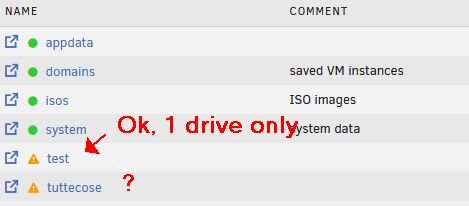
Thanks everyone. I must have messed up my first attempt. I redid everything from scratch, and now the SSD cache is seen as the only unprotected share.
-
I understand but the main share seems to have nothing to do with the cache pool, and: grep -E "shareUseCache|shareCachePool" /boot/config/shares/tuttecose.cfg reports shareUseCache="no" shareCachePool="" shareCachePool2="" what I am missing ?

-
attached file below,tnx
-
Good morning. A "strange" question on unraid 7.1.4 I just added a single ssd cache drive, and created a share on it. No redundancy, of course, and the share is called "test". As soon I started the array the only other custom share (called "tuttecose") raised an alert, "some or all files unprotected". But: Compute on the share tuttecose reports 0bytes on cache-ssd (the name of the pool) pool Primary storage (for new files and folders) of the tuttecose share is on array only grep -E "shareUseCache|shareCachePool" /boot/config/shares/tuttecose.cfg reports shareUseCache="no" shareCachePool="" shareCachePool2="" so, as far as I understand, the main share "tuttecose" is not using the ssd-cache pool. So, why I have "some or all files unprotected" on the main "tuttecose" share ? Thanks in advance