




Skip to content
View in the app

A better way to browse. Learn more.

Unraid

A full-screen app on your home screen with push notifications, badges and more.

To install this app on iOS and iPadOS
  1. Tap the Share icon in Safari
  2. Scroll the menu and tap Add to Home Screen.
  3. Tap Add in the top-right corner.
To install this app on Android
  1. Tap the 3-dot menu (⋮) in the top-right corner of the browser.
  2. Tap Add to Home screen or Install app.
  3. Confirm by tapping Install.

TomaszKoc

Members
  • Joined

  • Last visited

Everything posted by TomaszKoc

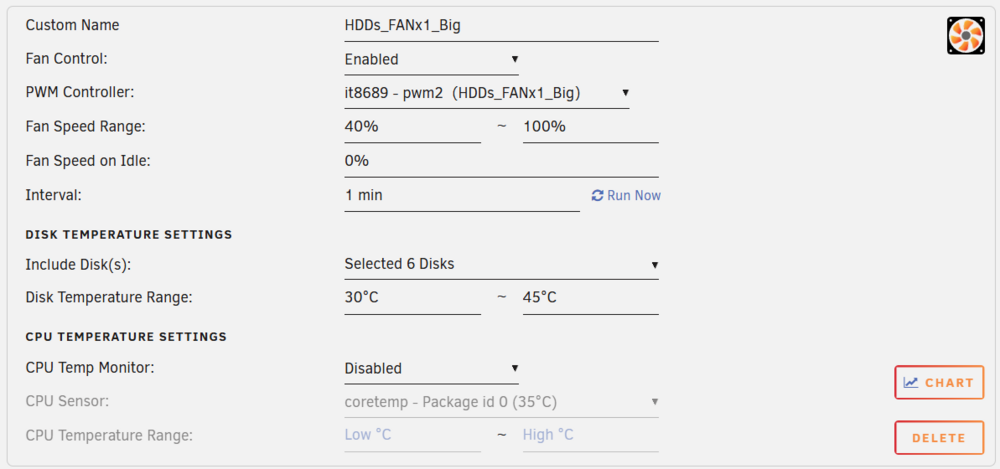
  1. Great plugin! It works awesome when you figure out how to set BIOS to give away control to the system. I am missing one option though. It has been discussed here previously to include the option to keep the fans spinning when the drives are spun down ("Fan Speed on Idle" option) But can we have also the possibility to stop the fans when the temperature is lower than defined range minimum? Like in the example below, I would like to have an option to stop the fans completely if all drives are cooler than 30°C and kick in with 40% only when this temp is reached... (right now all my fans connected to SYS_FAN2 header controlled by PWM2 keep spinning even if all the drives are cold and they stop only when all drives are spun down)
Account

Navigation

Search

Search

Configure browser push notifications

Chrome (Android)
  1. Tap the lock icon next to the address bar.
  2. Tap Permissions → Notifications.
  3. Adjust your preference.
Chrome (Desktop)
  1. Click the padlock icon in the address bar.
  2. Select Site settings.
  3. Find Notifications and adjust your preference.