




Skip to content
View in the app

A better way to browse. Learn more.

Unraid

A full-screen app on your home screen with push notifications, badges and more.

To install this app on iOS and iPadOS
  1. Tap the Share icon in Safari
  2. Scroll the menu and tap Add to Home Screen.
  3. Tap Add in the top-right corner.
To install this app on Android
  1. Tap the 3-dot menu (⋮) in the top-right corner of the browser.
  2. Tap Add to Home screen or Install app.
  3. Confirm by tapping Install.

ferretgr

Members
  • Joined

  • Last visited

Everything posted by ferretgr

  1. New check shows no errors. I genuinely appreciate your help!
  2. cheers, I appreciate your help. I am indeed on Unraid 7.20 and will make backups before tackling it. I'm new to Unraid and Linux in general and so I'm trying to be extra cautious! Thank you for your quick response!
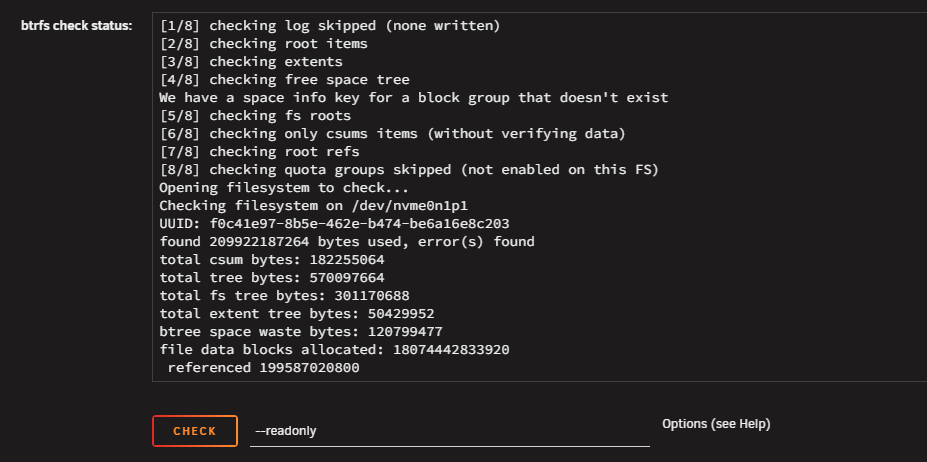
  3. Hi folks, I was investigating network traffic using Netdata when it brought to my attention BTRFS errors. I mounted the drives in maintenance mode and ran the filesystem check and got the following result: I ran a full SMART check and got no errors, and spent last night running Memtest and got no errors. I have read that running the above check with --repair option is risky, so I'm not sure what my next move is. I'm hoping someone can help. Thanks in advance!

Account

Navigation

Search

Search

Configure browser push notifications

Chrome (Android)
  1. Tap the lock icon next to the address bar.
  2. Tap Permissions → Notifications.
  3. Adjust your preference.
Chrome (Desktop)
  1. Click the padlock icon in the address bar.
  2. Select Site settings.
  3. Find Notifications and adjust your preference.