





Draculord
Members
-
Joined
-
Last visited
-
I did something similar but with a bracket to hold the fan directly underneath the board. Kinda janky but hopefully does the job!
-
Just confirming that a new HBA card fixed things. Ordered the same card, from the same eBay seller and things work now. I think the most likely cause is that my initial card overheated and failed. I have added a couple of fans below this new card to hopefully keep that from happening again. Thank you for the help on this JorgeB!
-
I will give that a try. I didn’t have a dedicated fan on the HBA so it is possible if failed from heat. I ordered a similar card along with fans and brackets for cooling this next unit just in case that will solve the issue. Will report back with results.
-
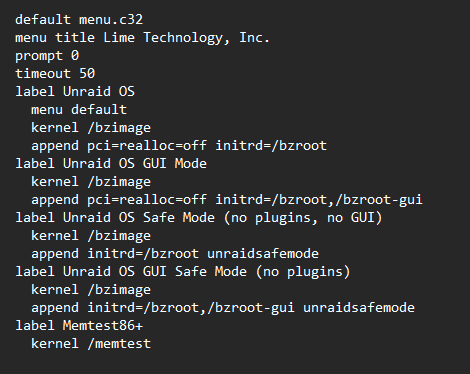
Unfortunately, that did not appear to fix anything. I put the Unraid flash drive onto another computer, opened the syslinux.cfg file (in the folder of the same name) to look like this: But am still not seeing my drives attached to the HBA. Do you happen to have any other ideas to try? Or did i not interpret the other thread correctly for this fix? Thank you again.
-
Thank you for the clarification! I will try this as soon as I am home from work.
-
I did try a different PCIe and saw the same behavior (no drives showing up but the HBA still showed in the hardware devices). Just to clarify, are you saying to try the BIOS settings for pci=realloc=off mentioned in that thread? I did not see that BIOS setting on my MOBO (Gigabyte Z790 Aorus Pro X Wifi7) when i checked this morning before work. However, i did see SR-IOV, which was disabled by default.
-
Hello! I am currently using Unraid version 7.1.4 and have been running into some issues with getting things setup. I have built several computers in the past but this is my first experience with Unraid and with using an HBA to add additional drives; so forgive me if i have missed some easy step/setting. My first issue (now solved) was that I was dealing with a corrupted flash drive that was causing boot issues (constant freezing of the GUI under heavy loads, boot with no video, etc.). I had somehow missed that the Sandisk Cruzer Glides have had issues in the past. This is now fixed and I have consistently clean startups/shutdowns and operation. However, I mention this issue because in the back and forth of getting a proper drive working I transferred my license to a new flash drive but ended up overwriting it with an older backup which has locked me out of my setup for the time being. I am currently on a free trial version (with none of my setup configuration) until this can be fixed through a support ticket. That being said, my issue with the LSI HBA still exists in a similar manner. Although it shows up in my listed Hardware, and in the BIOS, the six drives attached to it are no longer showing up. They were there, and operation yesterday; however, a restart of my system seems to have wiped out any connection to the drives themselves. Drives are spinning up, i have triple checked their connections to both power and to the LSI 9207, i have moved the card to a different PCIE slot on the motherboard, i have checked all recommended BIOS settings, BIOS is updated to the latest version, but nothing seems to change the behavior. I am not ruling out that I may have missed some fundamental setting for having things consistently work, but at this point am at a loss as to what that may be. I do not believe the card has failed, since it is consistently recognized anywhere that hardware is listed on the system. I have attached diagnostics; however, they are for a setup with no shares, no users, an array that has not been setup, and a free trial while I wait for my license to be transferred to a new flash drive. Please let me know if any further information is needed, and thank you for reading this mess i have been trying to solve on my own!! tower-diagnostics-20251118-2314.zip

