



Skip to content
View in the app

A better way to browse. Learn more.

Unraid

A full-screen app on your home screen with push notifications, badges and more.

To install this app on iOS and iPadOS
  1. Tap the Share icon in Safari
  2. Scroll the menu and tap Add to Home Screen.
  3. Tap Add in the top-right corner.
To install this app on Android
  1. Tap the 3-dot menu (⋮) in the top-right corner of the browser.
  2. Tap Add to Home screen or Install app.
  3. Confirm by tapping Install.

suryadysujono

Members
  • Joined

  • Last visited

  1. it only shows as ""USB drive" on windows explorer and couldnt access it, but I managed to access it via unraid main, and download some of the files there, but I have no idea if the files downloaded are the correct ones, and I dont know how to check the integrity of those files
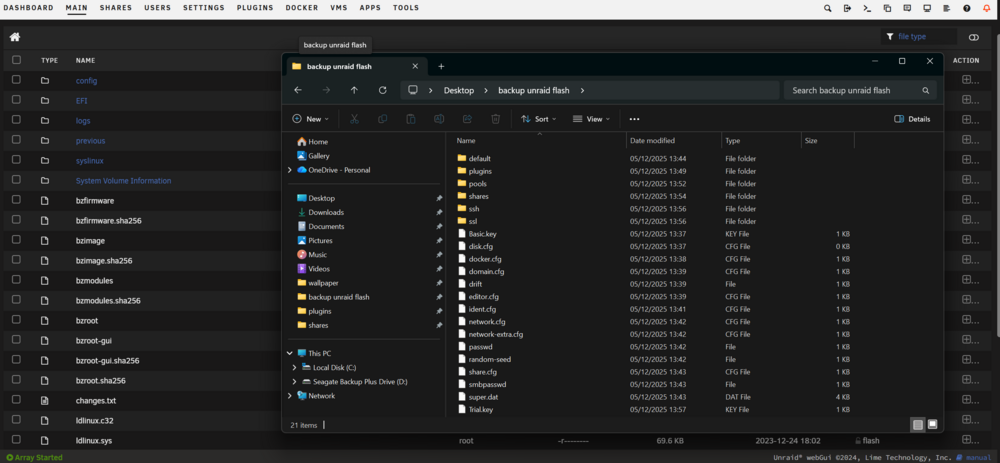
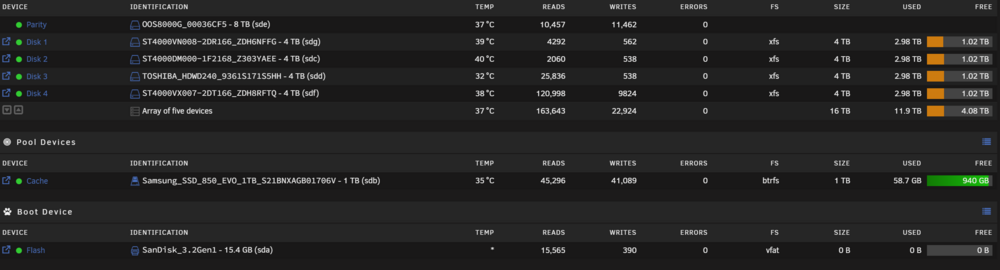
  2. Hello, I've been experiencing several blackouts in the last couple days, unraid server shows some errors in sda when started and now my flash drive shows 0 capacity in the unraid main screen, thus making the flash backup via main screen giving me error "Insufficient free disk space available" is there any other way I can copy the /config folder? thank you in advance andhika-diagnostics-20251205-1331.zip
Account

Navigation

Search

Search

Configure browser push notifications

Chrome (Android)
  1. Tap the lock icon next to the address bar.
  2. Tap Permissions → Notifications.
  3. Adjust your preference.
Chrome (Desktop)
  1. Click the padlock icon in the address bar.
  2. Select Site settings.
  3. Find Notifications and adjust your preference.