Zaiquiri
Members
-
Joined
-
Last visited
-
I appreciate the help!
-
Yeah, it was part of a used workstation tower I picked up for cheap to mess around with stuff, so it would have already been set up for windows.
-
Oh, that's weird, I thought when I was setting stuff up, I just left it default, but idk why it would have defaulted to that. Maybe I was following some random tutorial or something. I think I'll just move off the media to my desktop, backup my functioning containers, and reformat to XFS. I don't have so much on there yet that it'll be that much more effort. Any tips or tricks for any of that process?
-
Gotcha, here ya go! zlab-diagnostics-20260112-1804.zip
-
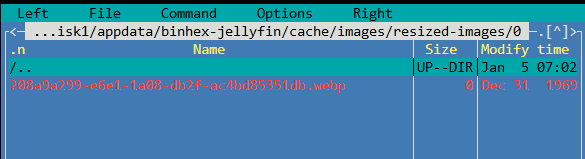
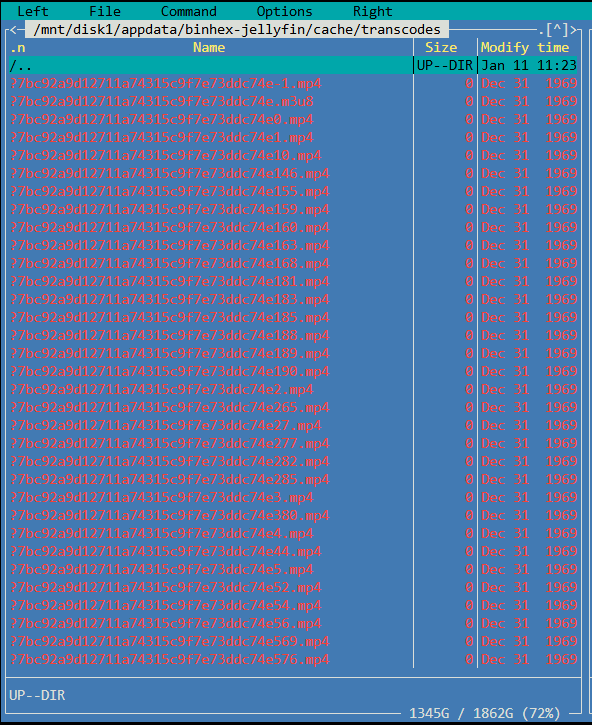
Hey all, Relatively new to self hosting. After upgrading to 7.2.3, I had Jellyfin and a couple Arr containers break (corrupted db as far as I could tell). Unfortunately I hadn't backed anything up, and I learned my lesson there. Either way, I'm trying to clean up in the aftermath, but I've found that the appdata folder for jellyfin can't be deleted. (attempting to install a clean version, from a different repo). Worst case scenario, I can probably just abandon these files, but I like clean folders where I can manage to have them. Here's what I've tried so far: Attempted to use CA Cleanup Appdata plugin. Attempted to remove via terminal (rm -rf), and I got "rm: cannot remove... ...invalid argument" Attempted to use MC to manually locate and remove corrupt files, and I get "cannot stat... ...invalid argument (22)" Started the array in maintenance and ran both a read-check and a ntfsfix_ status check, and both came back without any issues. Mounting volume... OK Processing of $MFT and $MFTMirr completed successfully. Checking the alternate boot sector... OK NTFS volume version is 3.1. NTFS partition /dev/md1p1 was processed successfully. read-check - 0 errors In MC, and via exported files in my network, all the folders appear blank, but if I use MC to go into the disk1 appdata instead of the appdata under user, I can see corrupt files. See screenshot I've attached. Any insights you can offer would be much appreciated!