



Skip to content
View in the app

A better way to browse. Learn more.

Unraid

A full-screen app on your home screen with push notifications, badges and more.

To install this app on iOS and iPadOS
  1. Tap the Share icon in Safari
  2. Scroll the menu and tap Add to Home Screen.
  3. Tap Add in the top-right corner.
To install this app on Android
  1. Tap the 3-dot menu (⋮) in the top-right corner of the browser.
  2. Tap Add to Home screen or Install app.
  3. Confirm by tapping Install.

gallahad0226

Members
  • Joined

  • Last visited

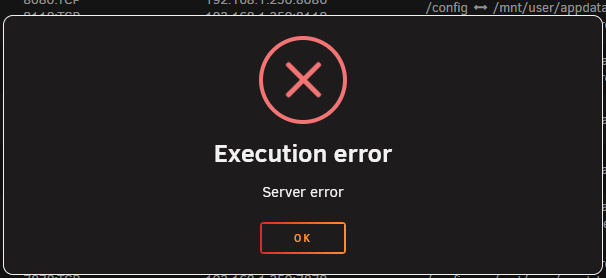
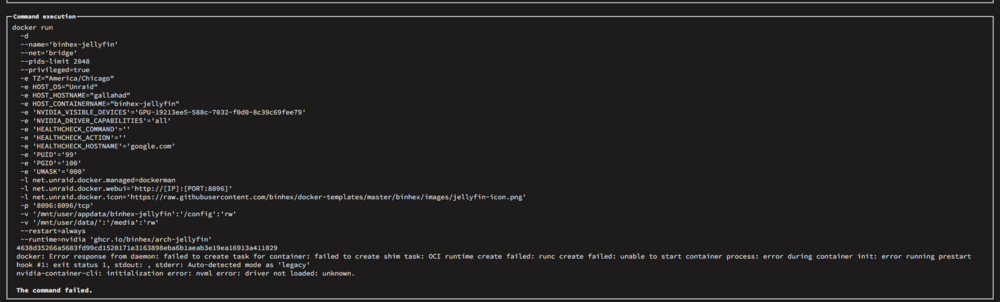
  1. I attempted to install 3 new HDDs in my system. Something is wrong with power delivery or my SATA cables and I didnt feel like messing with it. So I just put it all back together Upon launching unraid. It booted successfully and all my containers started except for my tdarr node docker and jellyfin. I deleted jellyfin ran CA app cleaner. Then reinstalled it and restored it from a previous backup. Everything seemed normal until I got a phone call that no media would play. It kept giving fatal playback error. Upon looking over my container, i saw that it did not have the correct media path. I changed the media path and it has failed to start now. I would provide the container logs but it shows nothing in the JF logs.
Account

Navigation

Search

Search

Configure browser push notifications

Chrome (Android)
  1. Tap the lock icon next to the address bar.
  2. Tap Permissions → Notifications.
  3. Adjust your preference.
Chrome (Desktop)
  1. Click the padlock icon in the address bar.
  2. Select Site settings.
  3. Find Notifications and adjust your preference.