conjuror3726
Members
-
Joined
-
Last visited
-
Finished the parity check with 9503 errors fixed, wonder if that might have been part of the problem. Tried restarting again and the array persisted, so hopefully all looking good now 🤞
-
That seems to have stuck this time after a reboot! It looks like there are quite a few sync errors corrected - 151 so far, 0.7% completed thank you so much for your help! 😀
-
I believe the parity was valid before this happened. I haven't run the parity check since initialising it though, I haven't manually run a sync but nothing said it was out of sync (apologies I'm a noob at unraid, coming from synology where it is all done for you) I did have reconstruct write enabled though previously. I've done that and everything seems to have mounted fine with the full partition size it's understandably complaining that the shares aren't protected The parity drive still has no partitions currently, would it be an idea to run sgdisk on it again or just rebuild parity? I guess that's where your question about parity is leading to? Before doing any parity checks, would it be worth trying a restart just to make sure the partitions stuck this time?

-
Yeah just unassigning, mounting via UD to check the data and re-assigning back to the same slot in the array I think the last diagnostic I sent was after a reboot but I've rebooted again just to be sure tower-diagnostics-20251215-1357.zip
-
I just tried mounting the drives with valid partitions via Unassigned Devices and can see all the data there and the correct partition capacity, however when I moved the drive back into the array, it's no longer showing as Wrong again and has the incorrect partition size I can also mount the drive on my computer too, which is definitely a big step forward from before I ran sgdisk -o -a 8 -n 1:32K:0 /dev/sdf as well on the last drive that had no partitions and that's now readable, however was still showing as wrong with the 4GB partition size, the only one remaining is the Parity which I'm not sure if that needs to be treated differently tower-diagnostics-20251215-1216.zip
-
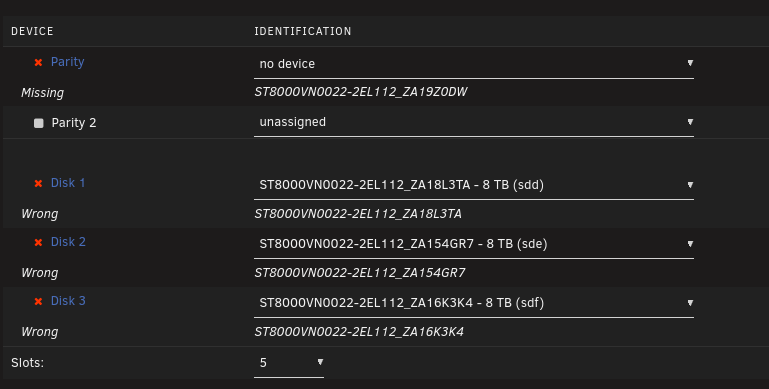
Amazing! that seems to have recovered the drive back to normal thank you!! Just before I go all gung ho and do the same to the other drives, is that the right approach? Even with the Parity drive which is showing as Missing instead of just 'Wrong'? Diagnostics after doing that: tower-diagnostics-20251215-1106.zip Disk 1 looks to have partitions in GPT: 4KiB-aligned, however Disk 3 (and the Parity Drive I think) has no partitions like with Disk 2
-
Actually just thinking back, I did attempt to format them with my Startech HDD eraser after the 50% size issue, but it showed a warning 'No Device Exist' and wouldn't continue (so this did nothing to the drives) - didn't think anything of it, but maybe that should have been some bad omens from the start
-
I don't unfortunately, as all was looking fine pre-reboot I initially formatted the drives using UD plugin to try and clear them out in advance, but had some weirdness with partition sizes which caused the drives to look half as big as they actually were when adding to the array (showing 4TB when the drives are 8TB) I resolved this by formatting each drive by setting it as the parity before properly setting up the array, then properly initializing the array - then formatting the drives as part of array initialization. That gave me the full 8TB with GPT: 4KiB-aligned on each However... looking at the partition size of one of those drives, it does look the same as before, which matches what you're seeing there I wonder if the partition tables didn't properly reset from Synology

-
I just set up my NAS a week or so ago, moving from Synology and rebooted it today, only to find that the array won't start back up again Admittedly the drives are very old, but aren't showing any SMART errors My Parity drive shows in Unassigned Devices below Thankfully I have backups of all the important stuff (first thing I set up thankfully) but wondering (hoping) if there's any way I might be able to recover from this? The disk logs are essentially showing no partitions for all drives tower-diagnostics-20251214-1854.zip I mounted one of the drives to my computer and it does indeed show no partitions :( My cache pool still seems to be okay, so I'm seriously wondering if these drives have finally given out (I think I bought them at the same time...), however as I mentioned before, they haven't shown any SMART errors or warnings (other than one of them was a little hotter than the rest) EDIT: just to clarify, I'm not asking for a miracle, I can rebuild the array if it's utterly unrecoverable - not the end of the world, but wondering if there is a way to recover this...