




Skip to content
View in the app

A better way to browse. Learn more.

Unraid

A full-screen app on your home screen with push notifications, badges and more.

To install this app on iOS and iPadOS
  1. Tap the Share icon in Safari
  2. Scroll the menu and tap Add to Home Screen.
  3. Tap Add in the top-right corner.
To install this app on Android
  1. Tap the 3-dot menu (⋮) in the top-right corner of the browser.
  2. Tap Add to Home screen or Install app.
  3. Confirm by tapping Install.

JohnW

Members
  • Joined

  • Last visited

Everything posted by JohnW

  1. Ancient (82) Newbie , how do I assign devices please - in simple terms!
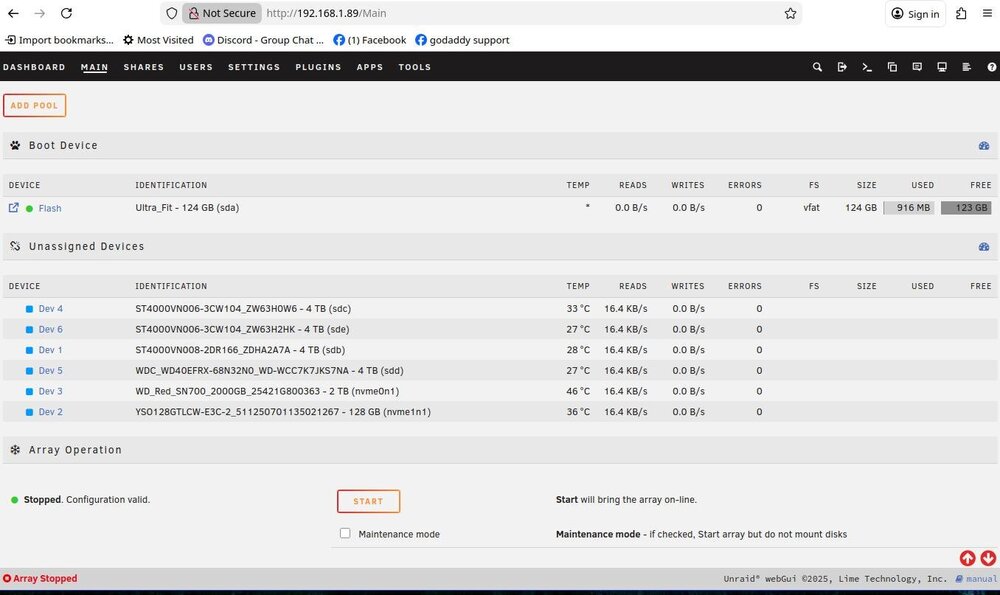
  2. Hi, Problem solved , was a router setting , hadnt thought of that , thanks
  3. OK , couldn't login. changed ip address to http://192.168.1.87 now get a black screen . I have only just started with UNRAID wondering if it would be easier to do a reinstall
  4. Inadvertently lost power to My UGREEN NAS 4800 + . Power restored . I can get this - https://account.unraid.net/settings/general but putting https://192.168.1.91 gets Me UNABLE TO CONNECT . Please advise

Account

Navigation

Search

Search

Configure browser push notifications

Chrome (Android)
  1. Tap the lock icon next to the address bar.
  2. Tap Permissions → Notifications.
  3. Adjust your preference.
Chrome (Desktop)
  1. Click the padlock icon in the address bar.
  2. Select Site settings.
  3. Find Notifications and adjust your preference.