




Skip to content
View in the app

A better way to browse. Learn more.

Unraid

A full-screen app on your home screen with push notifications, badges and more.

To install this app on iOS and iPadOS
  1. Tap the Share icon in Safari
  2. Scroll the menu and tap Add to Home Screen.
  3. Tap Add in the top-right corner.
To install this app on Android
  1. Tap the 3-dot menu (⋮) in the top-right corner of the browser.
  2. Tap Add to Home screen or Install app.
  3. Confirm by tapping Install.

redbear97

Members
  • Joined

  • Last visited

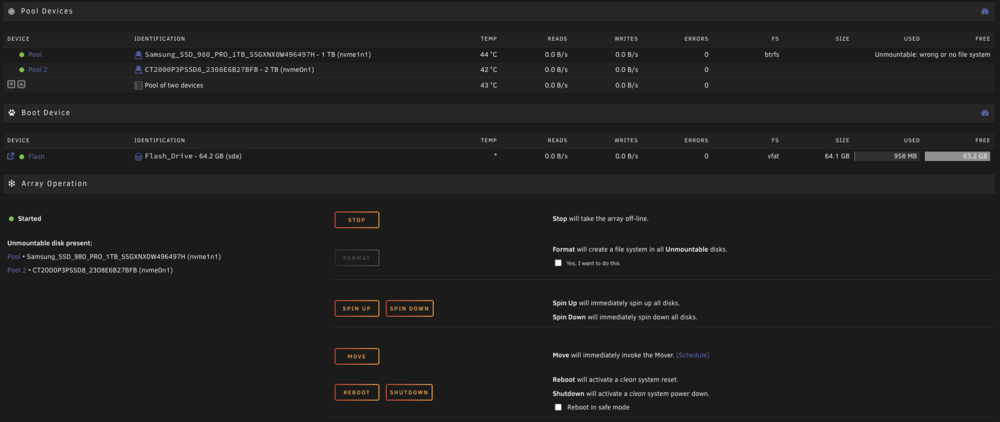
  1. I couldn't add any comments at that time, but I'll keep it in mind! Thanks! So I tried adding it to the pool and now I'm getting this: b-node-diagnostics-20260115-2013.zip
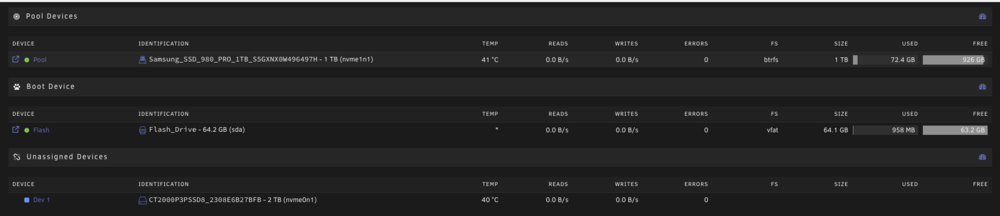
  2. Hey, I just started learning about selfhosting and managed to get an unraid server up and running with some containers running immich, jellyfin, adguard, vaultwarden,... When I started I only had one drive, now I have a second drive but I'm not sure how to install it. This is the setup now: Is there a way for me to use these drives as an array without formatting them? Or use the current pool and just add the new one in an array? I'm kind of lost about this. Thanks for any help or explanation! EDIT:I've added the diagnostics zip on request of the MODS b-node-diagnostics-20260115-1945.zip
Account

Navigation

Search

Search

Configure browser push notifications

Chrome (Android)
  1. Tap the lock icon next to the address bar.
  2. Tap Permissions → Notifications.
  3. Adjust your preference.
Chrome (Desktop)
  1. Click the padlock icon in the address bar.
  2. Select Site settings.
  3. Find Notifications and adjust your preference.