





gavelek
Members
-
Joined
-
Last visited
-
I have now change the name od trailkey and reboot... and now i have somthing else...
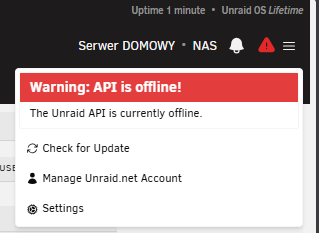
-
On NAS i have the key. But i see
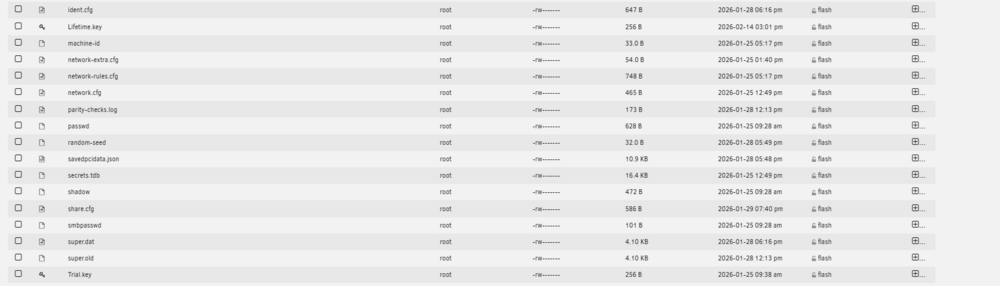

-
Hi everyone, I just purchased a Lifetime license ($249) and I'm having trouble activating it properly. WHAT I DID: 1. Purchased Lifetime license from account.unraid.net 2. Received email with registration key 3. Copied the key URL from the email 4. Navigated to Tools → Registration in WebGUI 5. Pasted the URL into "Key file URL" field 6. Clicked "Install" 7. System confirmed installation was successful THE PROBLEM: The top-right corner of WebGUI still shows "Trial" instead of my Lifetime license. QUESTIONS: 1. Do I need to restart the array or reboot the server? 2. Should I manually copy the .key file to /boot/config/ instead? 3. Is there a way to verify the key was installed correctly? SYSTEM INFO: - Unraid version: 7.2.3 - License purchased: Lifetime (Unlimited devices) Any help would be appreciated! Thanks!
-
Is there somebody that can help me with this?
-
Hi Unraid community! I'm planning to build a family document management system on my Unraid server and would love to get your input on the architecture and OCR implementation before I dive in. ## Hardware & Current Setup Server: - Aoostar WTR PRO MAX - AMD Ryzen 9 7940HS (8C/16T) - AMD Radeon 780M iGPU - 32GB RAM DDR5 (expandable to 64GB if needed) - 3x Samsung 990 PRO 1TB NVMe (Cache RAID1 + SSD pool) - 2x 8TB HDD (Parity + Data) - Unraid 7.2.3 Currently running: - Immich (photo management with AI/ML using the iGPU) - Jellyfin (media streaming with VAAPI hardware transcoding) - Tailscale (remote access) ## Planned System Goals Use case: - Family of 3 (me, wife, daughter) - ~10-20 documents per month (invoices, contracts, medical records, receipts) - Mix of document types: - 50% electronic PDFs (invoices from utilities, banks) - 30% phone camera scans (receipts, paper documents) - 20% medical documents (some handwritten notes) What I want to achieve: 1. Easy upload from phones (iOS/Android) 2. OCR with Polish + English language support 3. Smart tagging/classification (invoices, medical, contracts, etc.) 4. Table extraction from invoices (for potential budget automation) 5. Full-text search through archived documents 6. Long-term archival with metadata ## Proposed Architecture I'm considering a hybrid setup: NEXTCLOUD - File sync & temporary upload hub - Mobile apps for easy document upload - Office file preview/editing (optional Collabora) - Folder: /Scan/Inbox → auto-consumed by Paperless PAPERLESS-NGX - Document management system (DMS) - OCR & archival - AI-powered tagging & classification - Consume folder monitors Nextcloud uploads - Full-text search & metadata management Database layer: - Separate PostgreSQL + Redis for each stack (isolated Docker networks) - Similar to my existing Immich setup ## The OCR Question - This is where I need your advice! I'm torn between different OCR approaches: ### Option 1: Built-in Tesseract OCR (simple) Pros: - Zero additional setup - Works out of the box with Paperless - Good for clean PDFs - Low RAM usage (~50-100MB) Cons: - Struggles with table structure (loses layout) - Poor handwriting recognition - Medium quality on phone camera scans ### Option 2: DeepSeek OCR v2 / AI-powered OCR (advanced) Pros: - Excellent table structure preservation - Good handwriting recognition (medical notes!) - Better accuracy on poor quality scans - Context-aware processing Cons: - Requires custom Docker implementation - AMD GPU (ROCm) support may be tricky - More RAM (~2-3GB) - Maintenance overhead on Paperless updates - No official Docker image available ### Option 3: Alternative AI OCR (middle ground?) Someone mentioned Surya OCR or PaddleOCR as potentially easier alternatives with Docker images and AMD GPU support. ## Questions for the Community 1. Has anyone implemented Paperless-ngx with custom OCR backends? - How did you integrate it? - Was it worth the extra complexity? 2. AMD Radeon 780M iGPU users: - Any success running ROCm-based OCR in Docker containers? - Should I just stick to CPU inference for OCR? 3. Tesseract vs AI OCR real-world experience: - For mixed document types (PDF + scans), is Tesseract's accuracy sufficient? - Does table structure extraction really matter in practice? 4. Docker images recommendations: - Any ready-to-use OCR service containers that work well with Paperless? - Surya OCR, PaddleOCR, or other alternatives you'd recommend? 5. Architecture feedback: - Does the Nextcloud → Paperless workflow make sense? - Any gotchas I should be aware of? - Alternative approaches I should consider? ## My Current Thinking I'm leaning towards: - Phase 1: Start with Tesseract (built-in) and test with real documents for 2-4 weeks - Phase 2: Upgrade to AI OCR only if Tesseract proves insufficient But if there's a ready-to-use Docker solution that works well with AMD GPUs and doesn't require heavy customization, I'd rather set it up correctly from the start. ## RAM Considerations With 32GB RAM, current usage is: - Unraid OS: ~2GB - Immich stack: ~800MB - Jellyfin: ~400MB - Planned Nextcloud stack: ~600MB - Planned Paperless stack: ~500MB - Total: ~4.3GB (plenty of headroom) Adding AI OCR would bring it to ~6-7GB total, which is still comfortable. I can expand to 64GB if needed. --- TL;DR: Building Nextcloud + Paperless-ngx DMS on Unraid with AMD Radeon 780M iGPU. Seeking advice on OCR approach (Tesseract vs AI OCR), Docker implementations, and overall architecture feedback. Thanks in advance for any insights! This community has been incredibly helpful so far.
-
So in your opinion, I currently have the disks paired correctly... thank you. I will definitely change the settings you mention for security, come on, the scripts are light. I'm not posting them yet, but they will eventually be there. I will finish the immich configuration, then paperless along with AI and LLM is in the plan. Automatic backup of home devices... there are a lot of plans so I hope that everything will be grasped correctly... I thought that the 7.2.3 system has the ability to boot from M.2 and so I wanted to configure it as well, but I don't see it anywhere at the moment, which is a pity... if you have any other suggestions regarding my approach to the subject, feel free to write. I am open to suggestions, especially of people who are more experienced. At the same time, I thank everyone for their commitment.
-
This is the file nas-diagnostics-20260128-1456.zip
-
Thank you so much for your previous help and for analyzing my diagnostics. I just wanted to do one final check with you to be 100% sure before I start loading my data onto the server. Current status of my Unraid (7.2.3): • Array: 1x Parity (8TB WD) and 1x Disk 1 (8TB WD). • Pool: 2x Samsung 990 PRO 1TB in a Mirror. • Status: Both array disks currently show grey dots (standby/spun down), which I believe is normal. • Mounting: Disk 1 is now showing its full capacity (8TB) and the "Unmountable" error has disappeared. Based on your experience, does this look like a healthy, "ready-to-go" production setup? Is there anything else I should check in the settings (like Docker or VM paths) to make sure they use the Cache pool correctly? Thank you once again for your time and expertise!
-
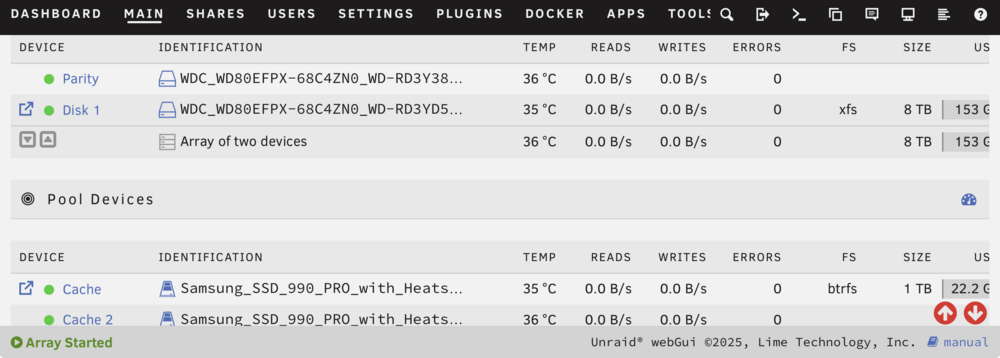
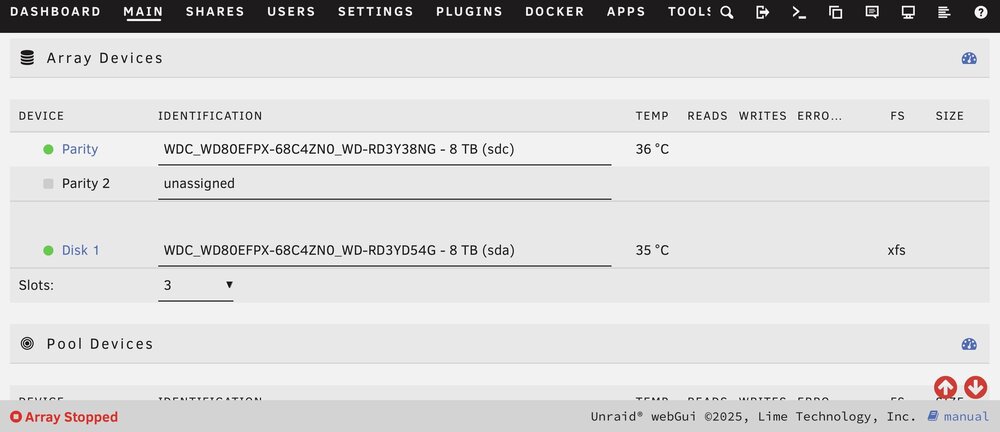
By creating the system base and installing two new disks, I wanted to make a 1:1 protection so that in the event of a HDD failure, there would still be an image to recover. So out of two 8+8 disks, only one 8 has a real surface area. I'm sorry but I don't know what it's called. I deal with programming in Python and the unraid system is new to me. It shows a further screenshot... I don't know if I understand correctly, but my parity doesn't have FS markings. I'm afraid that both disks are not connected to each other. And this is the main problem. If I misunderstand something, please explain it to me. On those screenshots disc is not on green light because they are sleeping after 30min
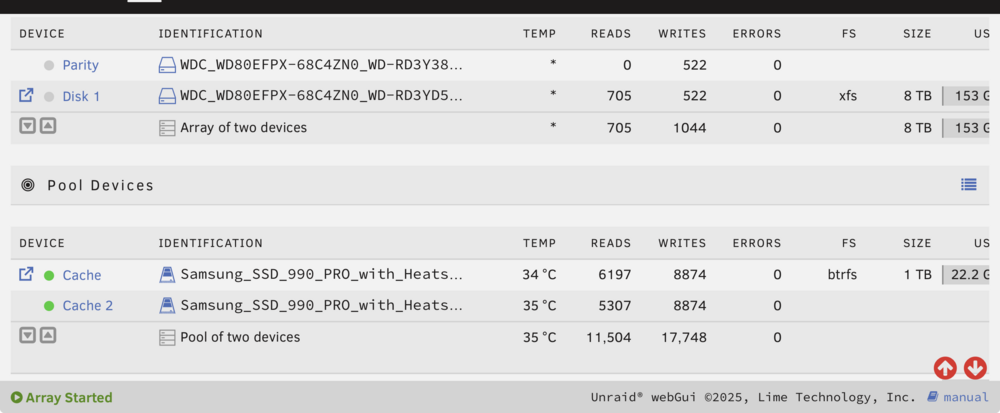
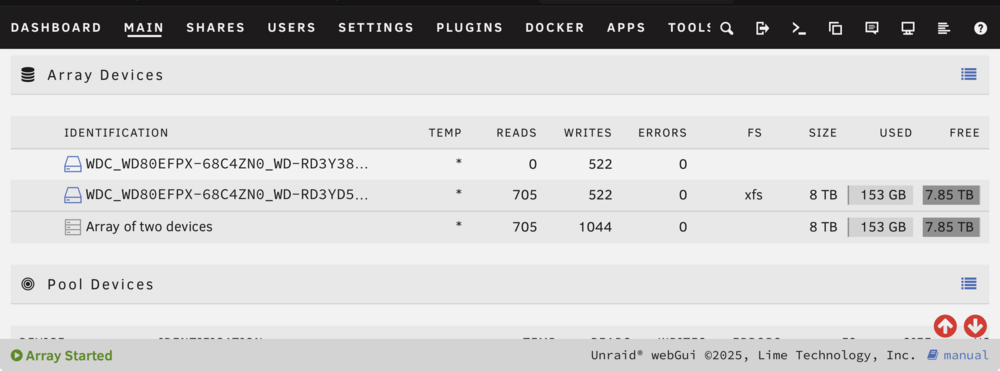
-
You're right that there are no cables there. However, I was doing the reconstruction of the disks for the second time. It went through 13h processes again without a problem on the same slots. 0 errors so are you sure it's the hardware's fault? I don't know how to make this format now. Please help me. My hands drop on this topic. It should be simple and it's not...
-
Job is done. I don t see any option to format the hdd… i don t know why… Please help me with this… nas-diagnostics-20260128-1233.zip
-
This is the file for now Already i have more then 98% of rebuild od hdd with 0 error nas-diagnostics-20260128-1114.zip
-
gavelek joined the community
-
Hi Community, I am a new Unraid user and I’m encountering a persistent issue with my Disk 1 being disabled immediately after attempting to format it. I would appreciate any insight into whether this is a hardware limitation of my enclosure or a software configuration issue. My Setup: • Hardware: Aoostar WTR MAX Pro • OS: Unraid 7.2.3 (Free Tier). • Drives: * Parity: 1x WD Red Plus 8 TB (WDC_WD80EFPX-68C4ZN0). • Disk 1: 1x WD Red Plus 8 TB (WDC_WD80EFPX-68C4ZN0). • Cache: 2x NVMe SSDs (Lexar 1TB & 512GB). The Problem: 1. Initial Parity-Sync completed 100% successfully. 2. When I clicked "Format" to create the XFS file system on Disk 1, the operation failed instantly. 3. Disk 1 was immediately marked as "Disabled" (Red X), reporting 64 write errors. 4. SMART attributes for Disk 1 show [199] UDMA_CRC_Error_Count value of 28. 5. Interestingly, the blue activity LED for Slot 1 on the Aoostar chassis remains off/static, even during heavy operations, while Slot 2 (Parity) blinks normally. What I have tested so far: • Terminal Test: I ran dd if=/dev/sda of=/dev/null bs=1M count=2000 iflag=direct which completed successfully at ~226 MB/s with no new CRC errors. • Slot Swap: Swapping drives between slots showed that the issue (and the lack of LED activity) follows the slot/logic, not necessarily the physical drive itself. • Current State: I am currently performing a Data-Rebuild after re-enabling Disk 1. As of now, it is at 68% progress with a speed of 221 MB/s and 0 Errors reported in the Unraid GUI. Question: Why does a sequential Data-Rebuild (writing terabytes of data) work perfectly fine, but a simple Format (writing XFS metadata) triggers a Disk Disabled state? Could this be an issue with the SATA controller/backplane in the Aoostar WTR MAX under specific I/O bursts, or is there a known sensitivity in Unraid 7.2.3 regarding CRC errors during formatting?


