




Skip to content
View in the app

A better way to browse. Learn more.

Unraid

A full-screen app on your home screen with push notifications, badges and more.

To install this app on iOS and iPadOS
  1. Tap the Share icon in Safari
  2. Scroll the menu and tap Add to Home Screen.
  3. Tap Add in the top-right corner.
To install this app on Android
  1. Tap the 3-dot menu (⋮) in the top-right corner of the browser.
  2. Tap Add to Home screen or Install app.
  3. Confirm by tapping Install.

Guamy

Members
  • Joined

  • Last visited

Everything posted by Guamy

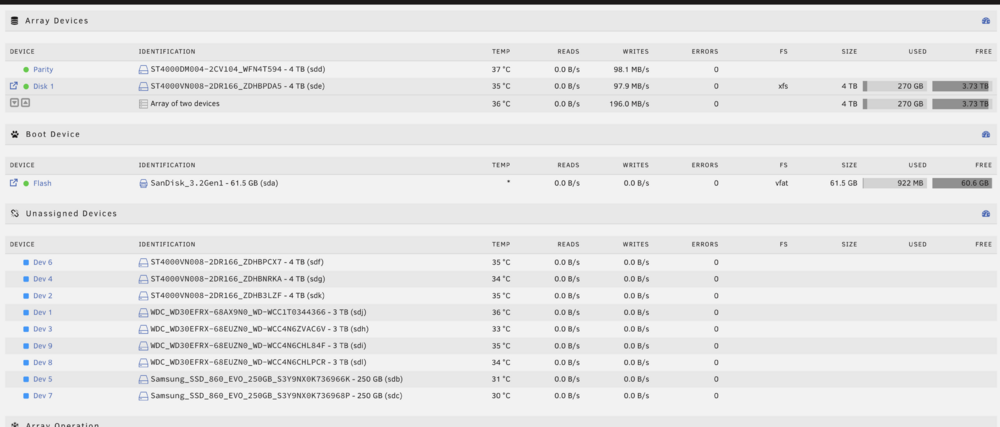
  1. Hi All, I'm brand new to Unraid (have switched over from TrusNAS) I have noticed that my hard drives aren't reporting the correct capacity or brand/model correctly. I have only 1x 4TB drive and the rest of the 8 drives are a mix of 2TB + 3TB - just wondering if anyone else has seen that before? I made sure to delete + recreate the partition + format each drive but still not correct. The Samsung SSDs can be ignored: unraidy-diagnostics-20260213-2047.zip
Account

Navigation

Search

Search

Configure browser push notifications

Chrome (Android)
  1. Tap the lock icon next to the address bar.
  2. Tap Permissions → Notifications.
  3. Adjust your preference.
Chrome (Desktop)
  1. Click the padlock icon in the address bar.
  2. Select Site settings.
  3. Find Notifications and adjust your preference.