kecarbaugh1
Members
-
Joined
-
Last visited
-
I rebooted and rebuilt Disk 3 with a brand new drive. As suspected, Disk 5 didn't reflect the moved files until the rebuild was complete and the data was written properly. All of the files transfered to Disk 3. I started another move to clear Disk 6 to Disk 3 in preparation of converting Disk 6 to xfs. We'll see if I get any other errors that would point to the Mavell drivers. I have performed multiple parity checks after upgrading to v7.2.3 and this has been the only hiccup encountered, so I'm hoping not to replace the controllers if possible. Attached is another diagnostic capture after the Disk 3 rebuild. Thanks for all the explanations and help with this issue! fileserver-diagnostics-20260225-1724.zip
-
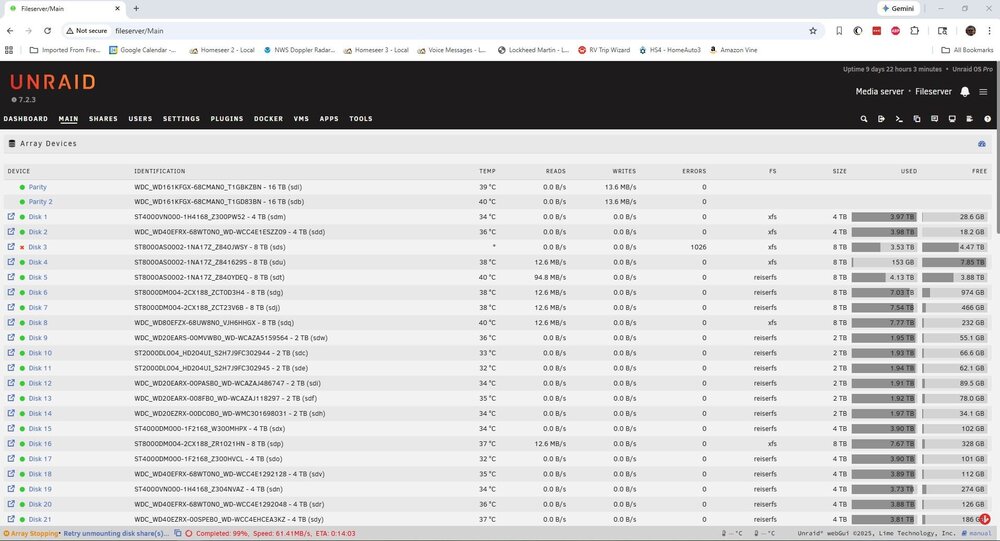
I tried to issue the "mover stop" command from SSH, but it returns with "mover: not running". What is the process name that it uses? Should I find it and issue a kill command? Other options? I know that Marvell controllers were not recommended, but I purchased and installed them before the guidance came out. Been running Unraid for a long time. I really haven't experienced any negative problems with these controllers, unless my current issue is somehow associated with these controllers. If mover was still moving the files to emulated Disk 3, wouldn't I see the Disk 5 source disk utilization go down?? It has been at 4.13TB since Disk 3 failed and hasn't changed. If I let mover take its course and finish populating emulated Disk 3, what will happen when Disk 3 gets rebuilt? Will it just populate the current 3.53TB before the failure and I'll have to move the remainder?
-
Attached are the diagnostics.fileserver-diagnostics-20260222-1307.zip
-
I was halfway moving 8TB of data from one disk to another (Disk 5 to Disk 3) with mover in order to convert disk 5 from rsiserfs to xfs when disk 3 appeared to fail and got marked as disabled. I attempted to stop the array but it won't stop and it appears that both my parity drives are regenerating parity. I attempted to SSH into the machine and issued a "mover stop" command, but it said that mover wasn't running despite the summary on the bottom of the main page indicating that it was ongoing. Why is the system regenerating parity? Will the array stop when it is finished? Is the system trying to regenerate the partiy to not include Disk 3? I don't want to loose almost 4 TB of data. Will the system recreate Disk 3 properly when I replace it?