





bobylein
Members
-
Joined
-
Last visited
Everything posted by bobylein
-
Hello, I am pretty sure this has been asked before and I found some very old topics (from before the new docker UI) so I guess a new thread makes sense? I got a Newt container (from the app repository) running that regulary (once to twice a day) keeps crashing/exiting with error 2 and then just keeps being stopped. I know I should probably solve the problem right there, yet for now I would just like the "simple & temporary TM" solution. - "Autostart" in docker overview is on but I am not even sure what it should do, is it meant to autostart crashed containers or only after the start of the docker service? - I tried using --restart=always as extra parameters (I am aware of unless-stopped) but it seems to do nothing? At least the container keeps being stopped, when I stop it manually, which isn't the expected behaviour from docker So I am wondering, am I doing something wrong or does Unraid have some special scripts stopping a automatic restart or is it some software bug? Thanks for any advice in advance!
-
I am going to do that now but I can't choose disk1 to be excluded in global share settings, I guess I could set 2 and 3 to be included or that the disk is excluded automatically? Thanks for the support so far!
-
Well it looks like the drive is done for... So is there a way to "shrink" the array down while one drive is missing? I wasn't finding information on that scenario inside the documentation WDC_WD40EFRX-68WT0N0_WD-WCC4E0483893-20260227-0034.txt
-
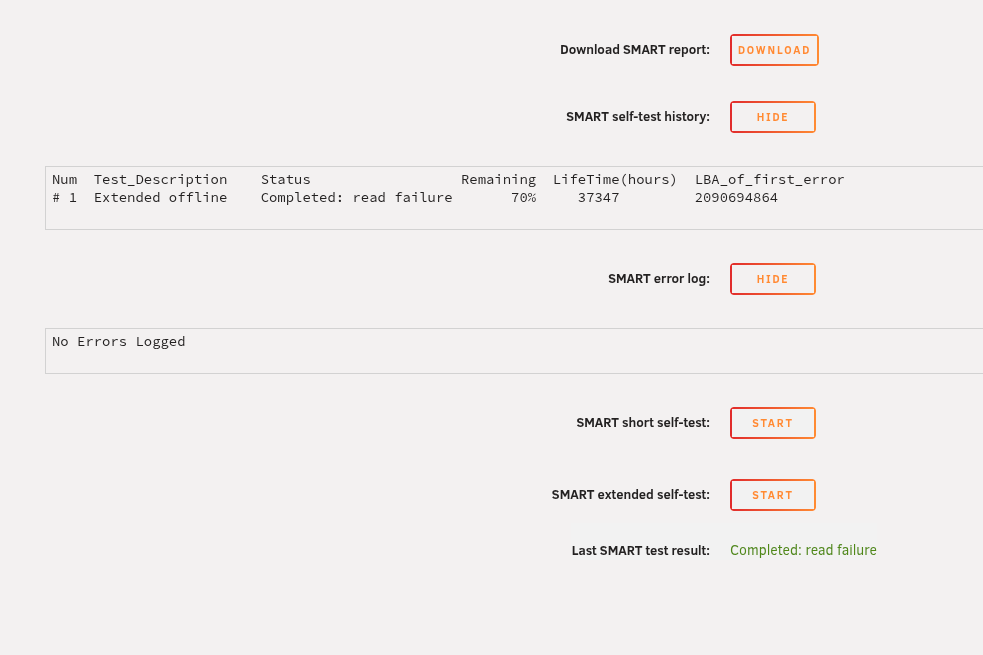
Yea that's why I tried changing the sata cable, though I can't find it under unassigned drives anymore until after a restart of the NAS. I still got the old device but when I plug it into the docking station of my main PC it just clicks a few times and also doesn't show up in GParted, so it seems it really was the drive that failed. (It's also 10 years old now) I am running the extended test right now, I guess it'll take a few hours on a 4tb drive?
-
Hello, My system ran for several years without problems and I happy with Unraid, thanks for that! But now I got a problem with a failing drive, so I got another (used) drive from a friend which on badblocks and smart says it's all fine. But once I try to rebuild the old drive on it, it failed two times at around 50-60% with 1024 errors, after the first fail I tested it again and changed the sata cable (which worked with another drive for months before) Should I assume the it's the drives fault or am I missing something? Now I can't afford buying a new replacement drive at the current prices... and considering I got free space, I am thinking alternatively to move the data from the failed drive onto the others, and ditch it. Is this possible in the current state of the array? Thanks for any help in advance! tower-diagnostics-20260226-2036.zip

