fightingillini5
Members
-
Joined
-
Last visited
Everything posted by fightingillini5
-
Thank you trurl. Can you please confirm the below and then I think I'm all set? Step1: Shut down array Step2: Assign Disk 1 Step3: Start Array Step4: Run extended self-test Step5: If test passes, do nothing (but probably keep a close eye on the disk). If test fails, replace disk using these instructions.
-
Here are the diagnostics. diagnostics-20260227-1427.zip
-
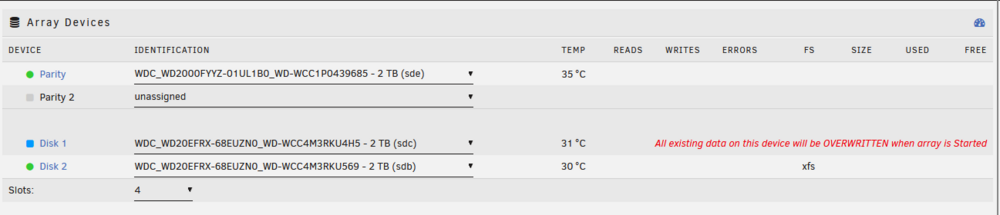
I am fairly new to Unraid so I apologize if this is an elementary question. I have tried looking in the forums and online for answers, but I am getting a bit confused. I found this old post and still need help. I shutdown my array to make some changes and when I did, I noticed the message "All existing data on this device will be OVERWRITTEN when array is Started." I am very hesitant to do anything because I am 1) new to Unraid and 2) just moved a lot of data to the array. I do not show a red "x" by Disk 1 or see anything about it being emulated so I'm not sure exactly what is going on. I have attached my diagnostics file. THANK YOU IN ADVANCE! diagnostics-20260227-1010.zip