





ActionJackson
Members
-
Joined
-
Last visited
-
Ok. Thank you so much for all of your help!
-
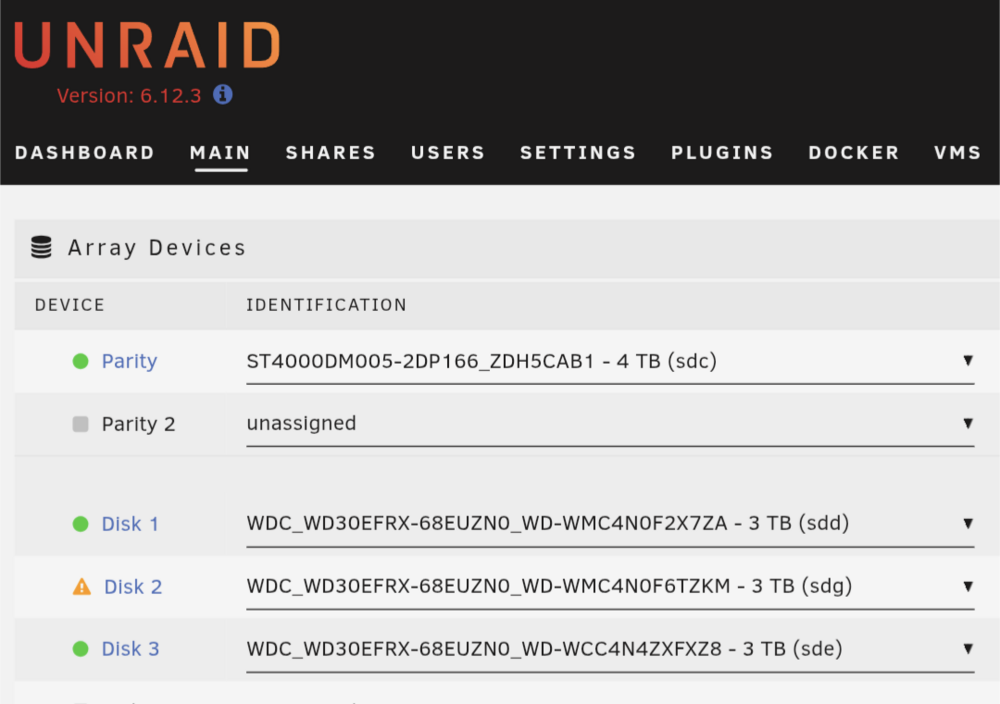
Disk 2 has been replaced. Zero errors are showing now. Is there something I can attempt to do to salvage to old disk 2 that was showing errors? storemore-diagnostics-20260312-0912.zip
-
my mistake i missed the part where it said to start the array. i started it and it looks like the new disk2 is re-building
-
The copying is complete, but it says disk 2 is being emulated. The array is not on storemore-diagnostics-20260311-2034.zip
-
parity copying is half done, i know you're so eager Trurl :)
-
Last night I did not realize I could do the parity replacement and a disk swap at the same time (sorry, this is all pretty new to me), and because everything takes like 6-8 hours I just started the array so parity would rebuild, and it seemed to. Currently, Yes, I am doing the parity swap you mentioned, and replacing disk 2 at the same time so I can get it out of there. Once that's done, we should have 4 error free disks, albeit a bit on the old side.
-
I will post new diagnostics once the parity drive has been replaced, and disk 2 is removed. See you in a few hours
-
I removed disk4 from the array last night so that it could be scanned, and started the array without it so that parity could be rebuilt, which is now done. I plan on upgrading the parity drive to 4TB, replacing disk 2 with the current parity drive, and eventually moving disk4 back into the array once I've pulled the data off of the recovered drive, which is currently in progress
-
ok, I installed a new(er) 4TB hard drive, did "new config", did not select a disk 4, did not select the new 4TB drive, and started the array so that parity would rebuild. In the morning, I will check it, and if all goes well I will swap parity drive to the 4TB drive, and put the old parity drive in my array. I know these drives are old, and failing. Financially I'm not really able to do much about it.
-
I am now running UFS explorer and doing a storage scan. I only selected XFS and did not do a content search, I left everything else to default. While that runs, is there any harm in starting my array with the 3 drives? I have a 4TB I would like to install as a new parity drive, and depending on what is going on with that disk 2 I may need to replace it with my current 3TB parity drive.
-
almost done, at 93%, but not something you want to see: storemore-diagnostics-20260310-1929.zip

-
oh it's ABSOLUTELY my fault. I'm not pretending it isn't. I definitely dropped the ball here. Most of the data is replaceable, some of it may not be, but it also may not be that important. I wish I had a list to know for certain, so I will be implementing status alerts and regular offsite data backups (not all the data, just metadata really) to help me moving forward. Most of (if not all) of the critical stuff is not stored on this drive.
-
says 6 hours, see you this evening lol
-
ok, great. what sort of indication will I have when its done
-
ok so should i stop it? or jsut let it go


