RossM
Members
-
Joined
-
Last visited
-
Reboot didn't work, but another user suggested trying the wipefs and sgdisk commands which did the trick. Thanks for the support and guidance.
-
Done, and here's the updated results: NAME MAJ:MIN RM SIZE RO TYPE MOUNTPOINTS loop0 7:0 0 651.8M 1 loop /usr loop1 7:1 0 173.4M 1 loop /lib loop2 7:2 0 1G 0 loop /etc/libvirt sda 8:0 1 3.8G 0 disk └─sda1 8:1 1 3.7G 0 part /boot sdb 8:16 0 23.6T 0 disk └─sdb1 8:17 0 23.6T 0 part sdc 8:32 0 1.8T 0 disk └─sdc1 8:33 0 1.8T 0 part sdd 8:48 0 7.3T 0 disk └─sdd1 8:49 0 7.3T 0 part md1p1 9:1 0 23.6T 0 md /mnt/disk1 mmcblk0 179:0 0 116.5G 0 disk mmcblk0boot0 179:8 0 4M 1 disk mmcblk0boot1 179:16 0 4M 1 disk zram0 252:0 0 0B 0 disk nvme1n1 259:0 0 3.6T 0 disk └─nvme1n1p1 259:4 0 3.6T 0 part nvme2n1 259:1 0 3.6T 0 disk └─nvme2n1p1 259:6 0 3.6T 0 part nvme3n1 259:2 0 3.6T 0 disk └─nvme3n1p1 259:5 0 3.6T 0 part nvme0n1 259:3 0 7.3T 0 disk └─nvme0n1p1 259:7 0 7.3T 0 part Bedtime for me, but will gratefully continue tomorrow if you're still game. Thanks again.
-
NAME MAJ:MIN RM SIZE RO TYPE MOUNTPOINTS loop0 7:0 0 651.8M 1 loop /usr loop1 7:1 0 173.4M 1 loop /lib loop2 7:2 0 1G 0 loop /etc/libvirt sda 8:0 1 3.8G 0 disk └─sda1 8:1 1 3.7G 0 part /boot sdb 8:16 0 23.6T 0 disk ├─sdb1 8:17 0 200M 0 part └─sdb2 8:18 0 23.6T 0 part sdc 8:32 0 1.8T 0 disk └─sdc1 8:33 0 1.8T 0 part sdd 8:48 0 7.3T 0 disk └─sdd1 8:49 0 7.3T 0 part md1p1 9:1 0 23.6T 0 md /mnt/disk1 mmcblk0 179:0 0 116.5G 0 disk mmcblk0boot0 179:8 0 4M 1 disk mmcblk0boot1 179:16 0 4M 1 disk zram0 252:0 0 0B 0 disk nvme1n1 259:0 0 3.6T 0 disk └─nvme1n1p1 259:4 0 3.6T 0 part nvme2n1 259:1 0 3.6T 0 disk └─nvme2n1p1 259:6 0 3.6T 0 part nvme3n1 259:2 0 3.6T 0 disk └─nvme3n1p1 259:5 0 3.6T 0 part nvme0n1 259:3 0 7.3T 0 disk └─nvme0n1p1 259:7 0 7.3T 0 part
-
I honestly haven't locked in anything yet, so that's still up for grabs. Like I said, I'm new to this and still figuring it out 😂 I'll happily and gratefully take recommendations as to a better setup for my drives.
-
Thanks. tower-diagnostics-20260319-1936.zip
-
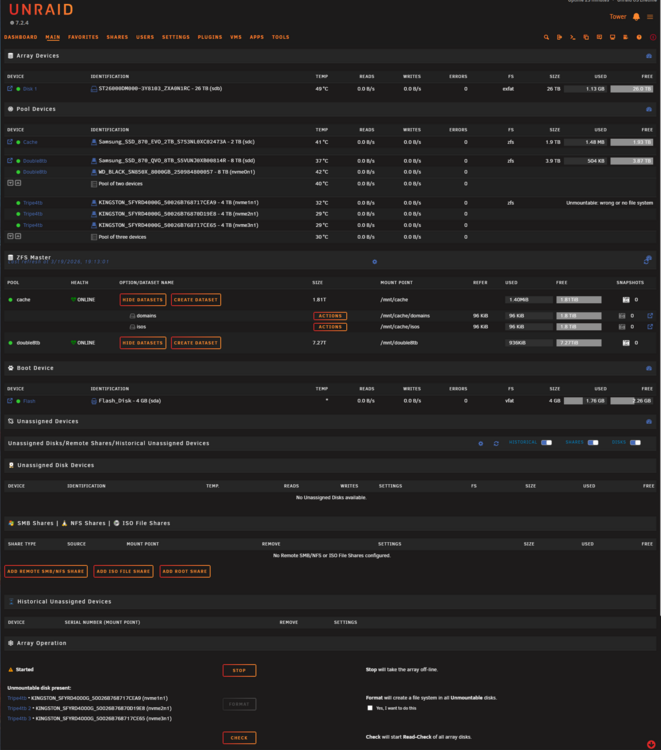
First of all, I am new to this so please be gentle and speak to me like a newborn. I am setting up my first NAS and have decided to create the following based on the drives I have available: Array: 1 x 26tb HDD Cache: 1 x 2tb SSD ZFS Pool 1: 2 x 8tb SSD RaidZ1 Pool 2: 3 x 4tb SSD RaidZ1 My issue is that one of the 4tb SSD drives refuses to accept ZFS and will only mount in XFS. When adding the one 4tb to the array it has no issue, but trying to make it part of the ZFS pool it refuses to mount the pool. I also have gone through the format process at the bottom of the main page. I have done a little research and installed Unassigned Devices and UD+, making sure they are in destructive mode. I have also installed the ZFS Master plugin, and run the drive through PreClear, all to no avail. The drive is the same brand as the other two of the same size. I must be missing something, and would love any help you all could offer.