Radioman0
Members
-
Joined
-
Last visited
-
Ahh my mistake, I missed your reply to someone earlier that stated that. Thanks for the quick reply.
-
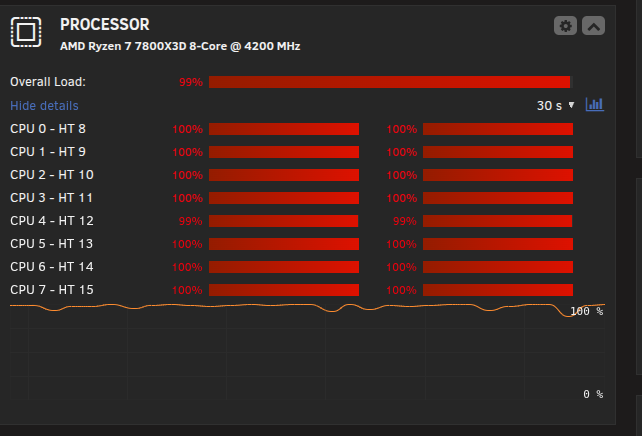
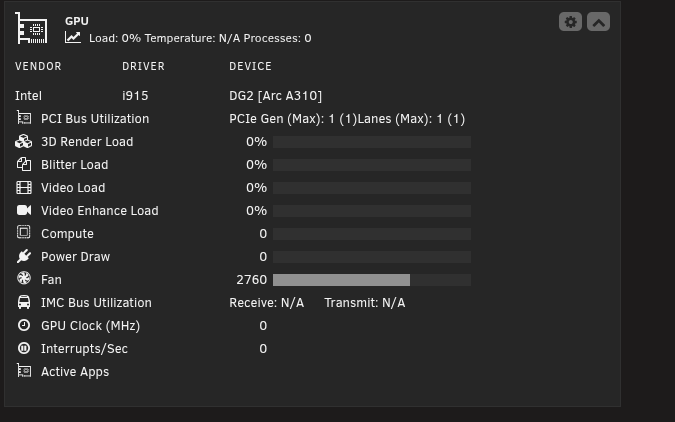
Hello, I've been struggling to get hardware acceleration working for generation with my Intel Arc A310 for few days now. I've got the correct supported codecs showing up in the logs 26-03-20 17:17:26Info [InitHWSupport] Supported HW codecs [4]: H264 Intel Quick Sync Video (QSV) - h264_qsv H264 Intel Quick Sync Video (QSV) Compatibility profile - h264_qsv H264 VAAPI - h264_vaapi VP9 VAAPI - vp9_vaapi 2026-03-20 17:17:24Info Version v0.30.1 (b23b0267) is already the latest released 2026-03-20 17:17:24Info stash is running at http://localhost:9999/ 2026-03-20 17:17:24Info stash is listening on 0.0.0.0:9999 2026-03-20 17:17:24Info stash version: v0.30.1 (b23b0267) - Official Build - 2025-12-18 04:56:47 2026-03-20 17:17:24Info using config file: /config/config.yml Here's my docker command: docker run -d --name='stash-s6' --net='bridge' --pids-limit 2048 -e TZ="America/New_York" -e HOST_OS="Unraid" -e HOST_HOSTNAME="mediasvr" -e HOST_CONTAINERNAME="stash-s6" -e 'PUID'='911' -e 'PGID'='911' -e 'AVGID'='22' -e 'AUTO_AVGID'='TRUE' -e 'TZ'='Etc/UTC' -e 'MIGRATE'='FALSE' -e 'STASH_STASH'='/data/' -e 'CUSTOM_CERT_PATH'='/config/certs' -l net.unraid.docker.managed=dockerman -l net.unraid.docker.webui='http://[IP]:[PORT:9999]' -l net.unraid.docker.icon=''" -p '6969:9999/tcp' -v '/mnt/user/data/media/extra/':'/data':'rw' -v '/mnt/user/appdata/stash-s6':'/config':'rw' -v '/mnt/user/appdata/stash-s6/pip-install':'/pip-install':'rw' --device='/dev/dri' 'ghcr.io/feederbox826/stash-s6:hwaccel' dcf4b203b6284be58bf894dc41aeaa93cc7ec7c9cdd88a344fa0c29a45394f5f The command finished successfully! But when I go to generate files, it's still loading my CPU instead of my GPU Thanks for any help!