xel87
Members
-
Joined
-
Last visited
-
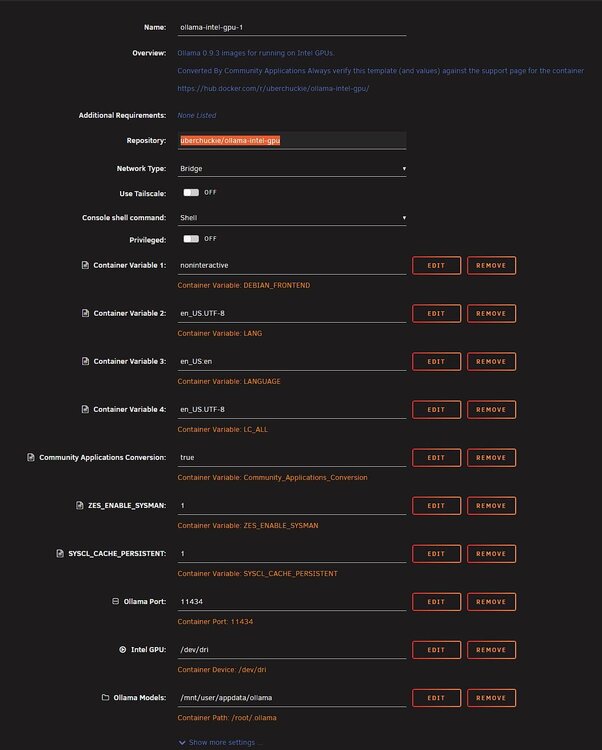
Hi everyone, I picked up an Intel Arc B70 for Ollama and others. Since I haven’t found anything about this in the forum yet and it wasn’t exactly plug-and-play, here’s how I got it working. I’m no expert and got a lot of help from gemin; it took me about two days to get it up and running. 1. Check if your motherboard even supports the Intel Arc B70—for me, it only worked after a BIOS update. 2. Configure the BIOS: - Re-Size BAR Support: Enabled - Above 4G Decoding: Enabled - CMS: Disabled - Boot Mode: UEFI - Secure Boot: Disabled I’m not 100% sure if the last three settings have to be this way, but I have them set this way in any case 3. Unraid: I’m using Unraid 7.3.0-Beta.2 because the current version apparently doesn’t yet include the new Linux kernel that supports the card 4. The Intel-GPU-TOP plugin does detect the card, but not yet. 5. Ollama Docker: The official ones in the Unraid App Store didn’t work for me. Maybe I did something wrong, but I couldn’t get them to run—I always got error 2 in Ollama. I’m currently using uberchuckie/ollama-intel-gpu from Docker Hub. Repository: uberchuckie/ollama-intel-gpu Settings to add: Type: Variable Name: ZES_ENABLE_SYSMAN Key: ZES_ENABLE_SYSMAN Value: 1 Type: Variable Name: SYSCL_CACHE_PERSISTENT Key: SYSCL_CACHE_PERSISTENT Value: 1 Type: Port Name: Ollama Port Container Port:11434 Host Port:11434 Connection Type: TCP Type: Device Name: Intel GPU Value: /dev/dri Type: Path Name: Ollama Models Container Path:/root/.ollama Host Path:/mnt/user/appdata/ollama Access Mode: Read/Write I don't know if you really need all these variables, but it works and I'm just happy right now :D More info: - Gemini said you could also get the B70 to run with Vulkan; in his estimation, the card would then run at 30–50% performance. I decided to go with IPEX-LLM. So if anyone's having trouble, it seems there are several ways to do it. - Also, it’s apparently recommended to enable ASPM in the BIOS to save power, but I’m not sure if it’s on or off for me right now. - By the way, the card is listed as renderD128 when I run ls /dev/dri. I hope this helps someone, and that an update comes soon for the Intel GPU TOP plugin, as well as drivers or an official plug-and-play Docker container for apps :) And please don't forget—I'm no expert either. I spent ages trying to get this to work, but this is how it's currently running for me. Maybe I have something in there that's too much or too little—feel free to leave a comment about it. Greetings from here to there Translated with DeepL.com (free version)