



Skip to content
View in the app

A better way to browse. Learn more.

Unraid

A full-screen app on your home screen with push notifications, badges and more.

To install this app on iOS and iPadOS
  1. Tap the Share icon in Safari
  2. Scroll the menu and tap Add to Home Screen.
  3. Tap Add in the top-right corner.
To install this app on Android
  1. Tap the 3-dot menu (⋮) in the top-right corner of the browser.
  2. Tap Add to Home screen or Install app.
  3. Confirm by tapping Install.

mmoget21

Members
  • Joined

  • Last visited

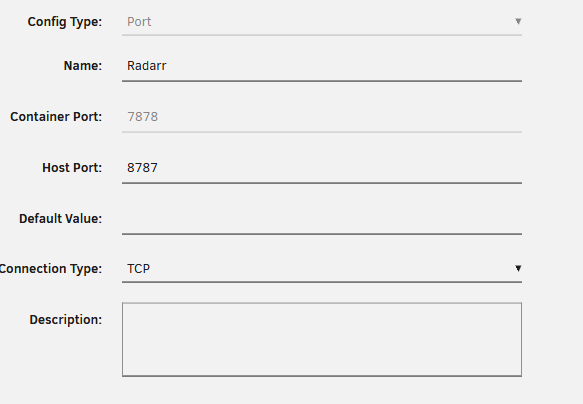
  1. With VPN_INPUT_PORTS being 7878. Ifconfig is now showing same as vpn. I can only connect to the radarr by manually typing in the ip address with port. No option to use the Web UI.
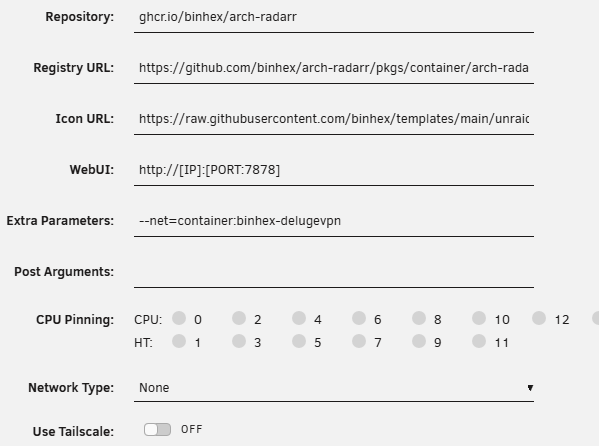
  2. I am new to unraid/arr stack. I got deluge working (ifconfig showing datacenter). I got a custom network and have deluge connected to it. I tried connecting radarr to it and ifconfig showing real ip. I moved it to the deluge vpn container and there is no webui showing up. I watched Alien's newest vid and it seems like he didnt have an issue. What am I doing wrong?
Account

Navigation

Search

Search

Configure browser push notifications

Chrome (Android)
  1. Tap the lock icon next to the address bar.
  2. Tap Permissions → Notifications.
  3. Adjust your preference.
Chrome (Desktop)
  1. Click the padlock icon in the address bar.
  2. Select Site settings.
  3. Find Notifications and adjust your preference.