





jparrott3
Members
-
Joined
-
Last visited
Everything posted by jparrott3
-
Rebuild finished after about 13 hours without error. At this point if I want to try the UFS recovery (mainly to avoid re-ripping everything) is there anything else I need to do in Unraid before shutting down and pulling Disk 1?
-
OK, I've followed the steps you gave and it's started rebuilding again. I really appreciate all your help so far. If I do start over, I don't suppose you have any recommendations on how to best use a Minisforum NAB9?
-
OK. Shutdown, DAS and PC powered off and disconnected from each other. Everything plugged back in and powered back up. It is very upset.
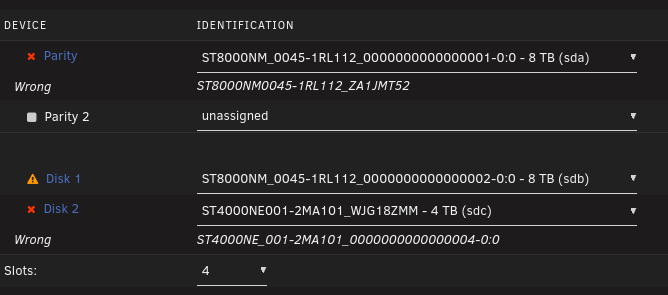
-
Correct. I did not preclear the new disk. I don't remember if I did a New Config at that point but I've had to do a couple after reboots. Rebooted just now and Disk 2 is again showing errors. For some reason Disk 1is also spun down and won't spin up. unraid-diagnostics-20260503-1626.zip
-
Original setup: Parity - 8TB Barracuda SMR Disk 1 - 4TB Ironwolf Pro I swapped the Barracuda out for an 8TB Exos and once that process was done added a second 8TB Exos data drive so the setup was: 8TB Exos (Parity) 8TB Exos (Disk 1) 4TB Ironwolf Pro (Disk 2) I remember somehow moving the data from Disk 2 to Disk 1 but don't remember why or how I did it now. Until Disk 1 failed I had multiple successful parity checks.
-
Given the unreliable nature of drive identification with my setup would a disk spin down and hot re-seat be safer than a shutdown? About two weeks ago, before the old drive failed, it had successfully built parity and was working fine until the drive failure.
-
Yeah, unfortunately for now I'm stuck with a Minisforum mini PC and Mediasonic Probox. The Minisforum is great little machine but not really suited to this.
-
New diagnostics unraid-diagnostics-20260503-1531.zip
-
Not sure if related to what we're trying to do or if my 4TB drive (disk 2) is having trouble now, but the 4TB drive is showing a few million errors and rising.
-
The array is almost entirely media ripped for Plex use so I have backups in the sense that I still have the DVD/Blu-Rays in storage. Would really like to not have to rip all of them again but nothing on here is irreplaceable. Array restarted and Data-Rebuild in progress. Time to complete started at 12 hours but now says about 9. With something like UFS Explorer I assume I would need at least 1 8TB hdd to recover to, is that correct? Also, if I find myself in a similar situation in the future where the array thinks the Parity drive is wrong but I also am trying to replace a failed disk, what steps should I have taken?
-
I don't believe the server every put anything on disk 2 Edit: Due to using High-water allocation I believe.
-
Array started. New diagnostics attached.unraid-diagnostics-20260503-1455.zip
-
unraid-diagnostics-20260502-1656.zip Diagnostics I pulled just after my mistake in case you want those. Will pull again once array starts
-
No, once I realized my mistake I stopped the array but left the server running.
-
The original disk is gone unfortunately. I was only able to get a replacement by returning it. I'm up for trying anything at this point if you're willing to walk me through it. The array is currently stopped.
-
I have three HDDs in a DAS attached to my Unraid server via USB. Not ideal I know but it's what I have to work with. The array was setup like this: Parity: 8TB HDD1 Data: 8TB HDD2 Data: 4TB HDD Pool: 1TB SSD Last week the 8TB data drive failed completely. I removed it and shutdown the server. Today the replacement drive arrived and I installed it in the DAS then booted the server. As a side effect of using the DAS Unraid will sometimes get upset that drives are not in the right slots even though they are. So when the Parity drive had a red X beside it and the server complained of too many errors I did what I've done before and hit new Config, assigned the disks to their proper slots, checked Parity is Valid, and started the array. Here is where I'm pretty sure I majorly messed up. The new 8TB data drive appeared as unformatted instead of emulated like I expected. In a rush to start rebuilding I formatted the drive. I read the warning but somehow didn't process that it was going to apparently wipe parity? So, I know I'm an idiot but have I lost all the data on the array now?
