Pick1100
Members
-
Joined
-
Last visited
-
That must be why it keeps kicking the configuration every time, I thought because it was a vdev issue. I will: I am copying all files/folders from the cache to a backup server Set the array to offline Delete the cache pool Select only the two 4TB drives in the cache, ZFS>Raidz1 Set the array to online When it says it is unmountable, format the drives, losing all data Move all folders from the backup onto the newly formatted cache Is there any shenanigans that will happen? I assume Unraid will auto populate folders for appdata and the like. This is the part I am least knowledgeable on.
-
Thank you for the response! Originally it was all three in a pool. If the 4x2 connection won't slow down the pool(I was told it was slowing it down and reducing available storage and to make a separate pool for it specifically. I have changed what is needed on the 2TB drive and it can go back in the pool or if it can't I'll make it the boot drive), then I would like to add it(I have tried deleting the cache pool and recreating with the 2TB included and it does not take). If I am unable to have all three in one pool, then just the 2x 4TB drives would work. Is there a way to use the 2TB drive as a temporary storage to back everything up so it can be faster restore?
-
athena-diagnostics-20260526-1221.zipPlease see attached diagnostics, I had to start docker back up so I could VPN in, I apologize for not including it to start.
-
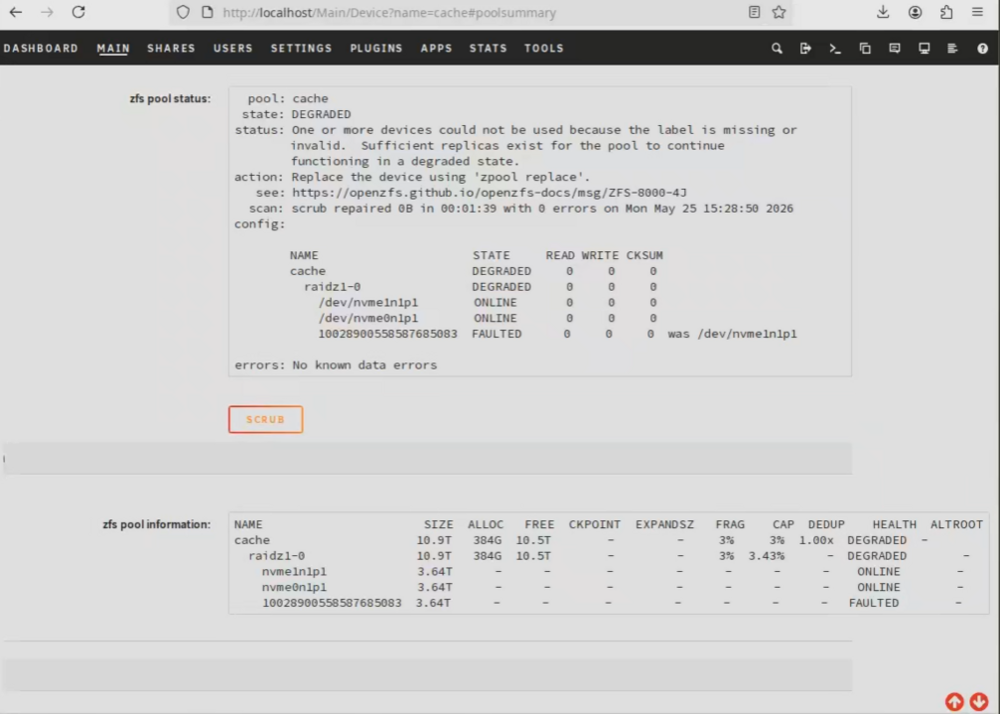
-Setup in question: --2x 4TB NVME drives (PCIE 5x2/4x4) --1x 2TB NVME drive (PCIE running at 4x2 due to motherboard) --Cache is ZFS --Array is fine currently --I Do have appdata backed up on a separate server if needed -Concern: I updated to 7.3.0 with my cache in alert due to me separating the 2 4TB drives from the 2TB drive into different pools for speed. I am fine with the 2TB not being in the cache pool or being in the pool. When I try to do remove the cache pool, recreate it with either 2,3, or 5 I get errors. There has not been a configuration where it is valid. --2 Drives in the pool ZFS filesystem error and is unmountable -- 3 drives in the pool: Pool is online but degraded. It automatically kicks the 2TB and says it is unassigned. When manually putting back in, it says it is too small to replace --- -- 5 Drives in the pool acts just as 3 drives. - If I try to format the 2TB drive, it will always do btrfs when when selecting xfs or zfs. Any thoughts on what I am doing incorrectly or a setting I am missing?