PhoenixAF24
Members
-
Joined
-
Last visited
-
No - I've had it for a couple of months. Hence why I find it strange!
-
I know - that's why I am asking if there was a change recently in licensing because when I purchased it originally, everything worked fine...
-
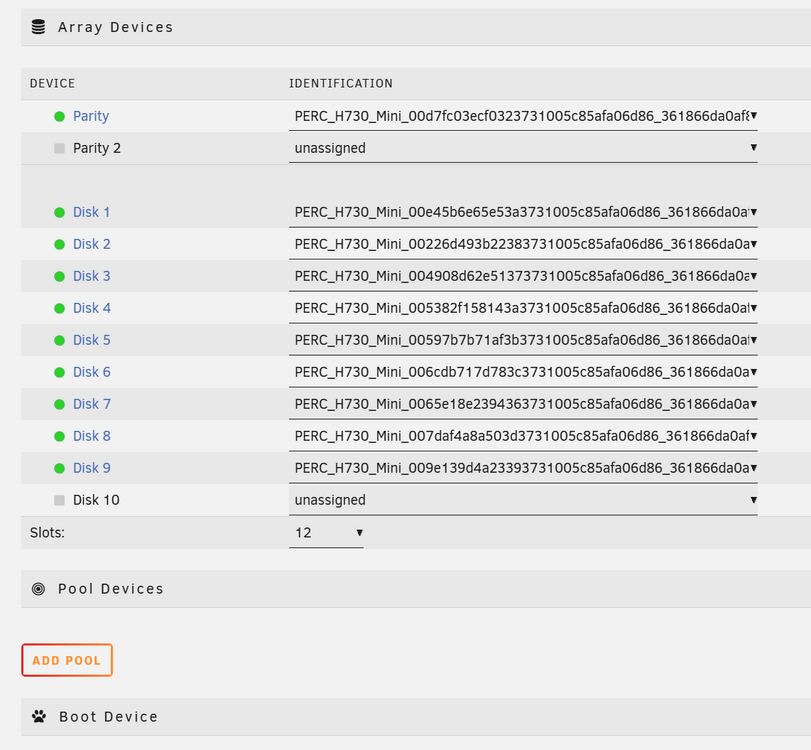
Thanks, Jorge - I've reduced the slot count to 11, but I still cannot assign Parity 2 to anything. In addition, I have the error message "Too many attached devices. Please consider upgrading your registration key" but again, I've not added any new hardware between when it was working and now. Has there been a license change in numbers at all? I noticed that the Starter license is now 6 storage devices... I swear it used to be higher.
-
Maybe I am using the wrong terminology, but as you can see in the screenshot, I am showing Parity 2, but I cannot do anything with it. The same thing applies to Disk 10, it's showing unassigned yet I cannot assign it to anything.
-
I will admit that I am still very new to Unraid. I recently noticed that my Unraid dashboard is showing extra devices when previously it was working just fine. I haven't made any hardware changes so not sure why it would say that: I have run the diagnostics and also attached them to this post. Any assistance is appreciated. Thanks, Brian atlas-diagnostics-20260526-2012.zip