bigmanloowee
Members
-
Joined
-
Last visited
-
I bought the hdd's second hand, but did reformat twice them before putting them into the build. Honestly, I didn't check to see if they had partitions, as I thought reformatting them and Unraids Disk-clear when adding a drive would be enough. Would this be causing the issue? Everything has been functioning fine for about 2 months before this. Thanks for your reply.
-
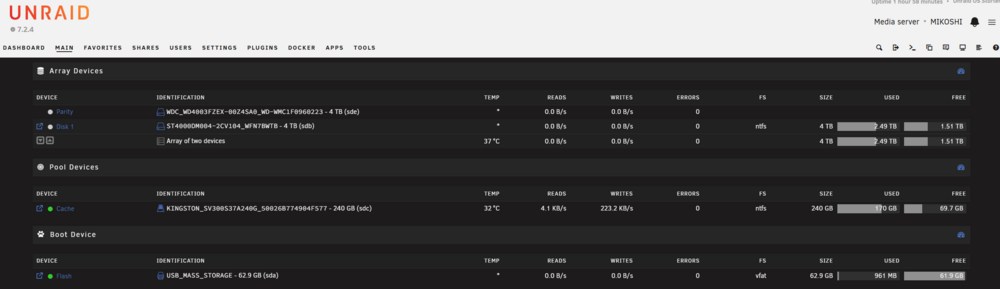
Server decided to freeze one day. It did so for about 12 hours before I decided to shut it down and boot it back up, holding down the power button on the case. Getting back into the server, my drives are now displaying as NTFS, when they were set up and running as XFS. All my data seems to be in completely normal. SMART reports are coming back clean with no errors for HDD's and SSD cache. After this happened, some of my docker containers refuse to start. My current in-brain solution is to backup all my data to a separate drive, and completely start my server again from scratch, as this makes no sense whatsoever and it seems no on else has had this problem before. Anyone's help would be greatly appreciated :) Unraid's log is spamming out these: Jun 4 12:11:06 MIKOSHI kernel: ntfs3: 34 callbacks suppressed Jun 4 12:11:06 MIKOSHI kernel: ntfs3(sdc2): MFT: r=24b41, expect seq=32 instead of 31! Jun 4 12:11:06 MIKOSHI kernel: ntfs3(sdc2): MFT: r=24b41, expect seq=32 instead of 31! Jun 4 12:11:06 MIKOSHI kernel: ntfs3(sdc2): MFT: r=24b41, expect seq=32 instead of 31! Jun 4 12:11:06 MIKOSHI kernel: ntfs3(sdc2): MFT: r=24b41, expect seq=32 instead of 31! Jun 4 12:11:06 MIKOSHI kernel: ntfs3(sdc2): MFT: r=24b41, expect seq=32 instead of 31! Jun 4 12:11:06 MIKOSHI kernel: ntfs3(sdc2): MFT: r=24b41, expect seq=32 instead of 31! Jun 4 12:11:07 MIKOSHI kernel: ntfs3(sdc2): MFT: r=2b458, expect seq=5f instead of 5e! Jun 4 12:11:07 MIKOSHI kernel: ntfs3(sdc2): MFT: r=2b6d1, expect seq=6c instead of 6b! Jun 4 12:11:07 MIKOSHI kernel: ntfs3(sdc2): MFT: r=2c5e7, expect seq=b instead of a! Jun 4 12:11:07 MIKOSHI kernel: ntfs3(sdc2): MFT: r=243de, expect seq=28 instead of 27! blkid output: /dev/sdb4: LABEL_FATBOOT="UNTITLED" LABEL="UNTITLED" UUID="56EE-2788" BLOCK_SIZE="512" TYPE="vfat" PARTUUID="4ed4fee1-7148-41d0-b959-4e8c7dee1a5d" /dev/sdb2: LABEL_FATBOOT="UNTITLED" LABEL="UNTITLED" UUID="78DD-BBB9" BLOCK_SIZE="512" TYPE="vfat" PARTLABEL="Microsoft reserved partition" PARTUUID="471f94f7-c0d3-4219-b14c-42a117ea24f3" /dev/sdb1: UUID="6C14-21F3" BLOCK_SIZE="512" TYPE="vfat" PARTLABEL="EFI system partition" PARTUUID="b98f6fa7-f09d-4d50-9bf9-737edf354c43" /dev/sdc2: LABEL="Kingston 256GB SSD" BLOCK_SIZE="512" UUID="1E16EF8316EF59F3" TYPE="ntfs" PARTLABEL="Basic data partition" PARTUUID="89af403c-e992-4e75-b677-69c57546b444" /dev/sdc1: LABEL_FATBOOT="EFI" LABEL="EFI" UUID="67E3-17ED" BLOCK_SIZE="512" TYPE="vfat" PARTLABEL="EFI System Partition" PARTUUID="a795f397-4d38-475b-84c2-f12926d028e5" /dev/sda1: LABEL_FATBOOT="UNRAID" LABEL="UNRAID" UUID="13F6-2203" BLOCK_SIZE="512" TYPE="vfat" PARTUUID="82dcc880-01" /dev/loop1: BLOCK_SIZE="131072" TYPE="squashfs" /dev/md1p1: BLOCK_SIZE="512" UUID="7588A4FB2F50D30A" TYPE="ntfs" /dev/loop2: UUID="64999a34-47b1-49c5-8d19-dc644ba36afb" BLOCK_SIZE="512" TYPE="xfs" /dev/loop0: BLOCK_SIZE="131072" TYPE="squashfs" lsblk -f output: NAME FSTYPE FSVER LABEL UUID FSAVAIL FSUSE% MOUNTPOINTS loop0 squashfs 4.0 7.5G 3% /usr loop1 squashfs 4.0 7.5G 3% /lib loop2 xfs 64999a34-47b1-49c5-8d19-dc644ba36afb 25.9G 35% /var/lib/docker sda └─sda1 vfat FAT32 UNRAID 13F6-2203 57.7G 2% /boot sdb ├─sdb1 vfat FAT32 6C14-21F3 ├─sdb2 vfat FAT32 UNTITLED 78DD-BBB9 ├─sdb3 ntfs 7588A4FB2F50D30A └─sdb4 vfat FAT32 UNTITLED 56EE-2788 sdc ├─sdc1 vfat FAT32 EFI 67E3-17ED └─sdc2 ntfs Kingston 256GB SSD 1E16EF8316EF59F3 48.6G 78% /mnt/cache sdd └─sdd1 sde └─sde1 ntfs 7588A4FB2F50D30A md1p1 1.4T 62% /mnt/disk1 md2p1 zram0 mikoshi-diagnostics-20260604-1210.zip