lessthanadam
Members
-
Joined
-
Last visited
Everything posted by lessthanadam
-
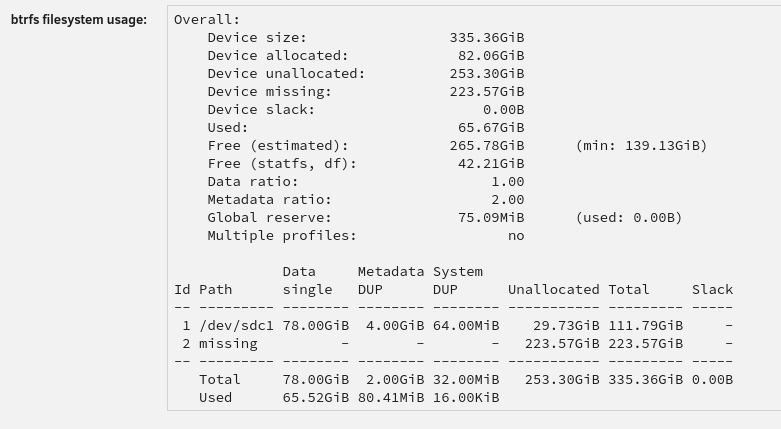
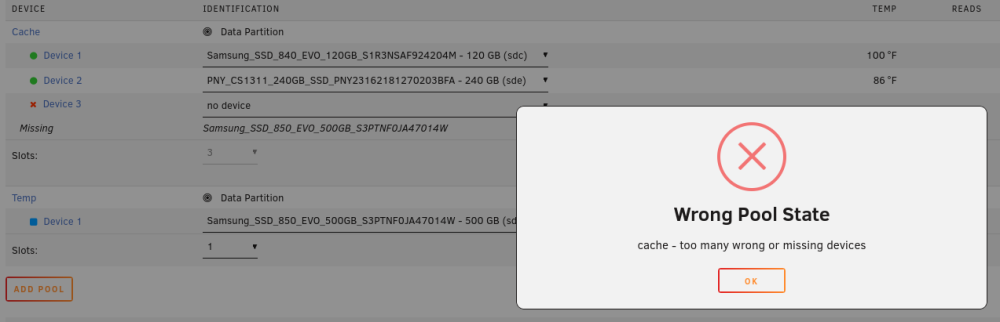
Hello everyone, I upgraded my license to unleashed during the sale, and I've been throwing every spare drive I can find into my server. Previously, my cache pool included two SSDs, one 120GB and one 240GB. Since I didn't need the cache capacity, I had it setup for raid1. Everything was working fine. Then I decided to add a 500GB SSD to my cache. I plugged it in, and added it to my cache. The 500GB was not available, which is kind of what I expected if I was still in raid1 configuration. I tried to change the allocation profile to raid0 or single, and no matter what I do, cannot get it back to normal. Even though the allocation profile is single, the cache data partition shows as degraded: When I try to remove a drive (to a temporary second cache) to make unraid "forget" the previous configuration, I get the following error: I find it especially strange the btrfs filesystem usage shows Id 2 as missing, when the 240GB SSD is still there: I don't know how to remove the degraded cache error. My goal is, without losing my current data in cache, to get to a single allocation profile where I can use all three (120+240+500) drives. Any help you can provide would be greatly appreciated. Diagnostics attached. (I'm aware of the reallocated sector issues in the parity drive, the replacement drive should be here in a day or two). Thanks, Adam diagnostics.zip