





RacOutlaw
Members
-
Joined
-
Last visited
-
Quick follow-up for the Shift folks (Vasa, yeffunraid) - good news and a small correction. I dug into that USB ID, and it turns out 1b1c:0c3f isn't the power supply at all - it's a Corsair iCUE Link AIO LCD (a cooler's hub/LCD). So if you've got an iCUE Link cooler in the system, that's the device that showed up in lsusb. We still need the Shift PSU's actual USB ID. The hopeful part: the plugin already supports the 2025-series Corsair PSUs - the Linux kernel driver and liquidctl both recognize, for example, the "HX1200i Series 2025." So depending on how your Shift enumerates, it may already work, or only need a small addition. I just need the PSU's real ID to tell. Could you grab it for me? In an Unraid terminal, run: lsusb | grep -i 1b1c That lists every Corsair USB device. One is the iCUE Link cooler (product 0c3f or 0c4e) - ignore that one. The power supply will be a different 1b1c:#### entry. If it's not obvious which is which, run: lsusb -v -d 1b1c: 2>/dev/null | grep -iE "idProduct|iProduct" and the product name will be printed next to each ID. Then post the PSU's 1b1c:#### line - ideally open an issue on GitHub so I can track it and update you there: https://github.com/racoutlaw/corsair-psu-center/issues With the real ID I can check in a minute whether it's already supported, a quick add, or something that needs upstream (liquidctl/kernel) support first. Thanks!
-
Hey everyone, and sorry for the silence on these - I honestly didn't realize the posts were here. The forum notifications slipped past me, so a few of these have sat unanswered way too long. Thanks for your patience, and for using the plugin. Going forward, please report any errors or requests on the GitHub issue tracker - that's where I actually get notified and can keep track of things: GitHubIssues · racoutlaw/corsair-psu-centeriCUE-style dashboard and fan control for Corsair HXi/RMi power supplies on Unraid - Issues · racoutlaw/corsair-psu-centerCatching up on what's here: drtweak - that install failure ("'/bin/bash' returned 1", no tab showing) was a known bug in an early build, and it's already fixed in the current release. Reinstall the current version from Community Applications (or the plugin install URL) and it will install cleanly. Sorry that one bit you. Sak - the monitoring side is safe to run alongside another Corsair plugin: this one reads the PSU through the kernel's corsair-psu sensor interface (no USB polling), so it won't interfere with another plugin that's only displaying stats. The one thing to avoid is two plugins trying to control the fan at the same time - pick one to drive the fan. Your HX1200i is supported, so the readouts and curve will work fine. FEMBOY-COW - the AX1600i isn't supported yet; it's a different Corsair series than the HXi/RMi units the plugin currently covers, which is why there are no readouts. I'd like to look into it but can't promise it. If you open an issue on GitHub (link above) I'll track it there. Vasa and yeffunraid - the newer USB-C "Shift" units (HX1200i Shift / HX1000i Shift) use a different USB device ID than the models currently supported. Thanks yeffunraid for grabbing 1b1c:0c3f - that's exactly the detail I needed. Whether I can add them comes down to the Linux side (the corsair-psu driver and liquidctl) recognizing that ID, which I still need to check. It's on my radar - please open an issue on GitHub so I can track it and update you there. Thanks everyone, and again, GitHub issues is the best place for anything going forward.
-
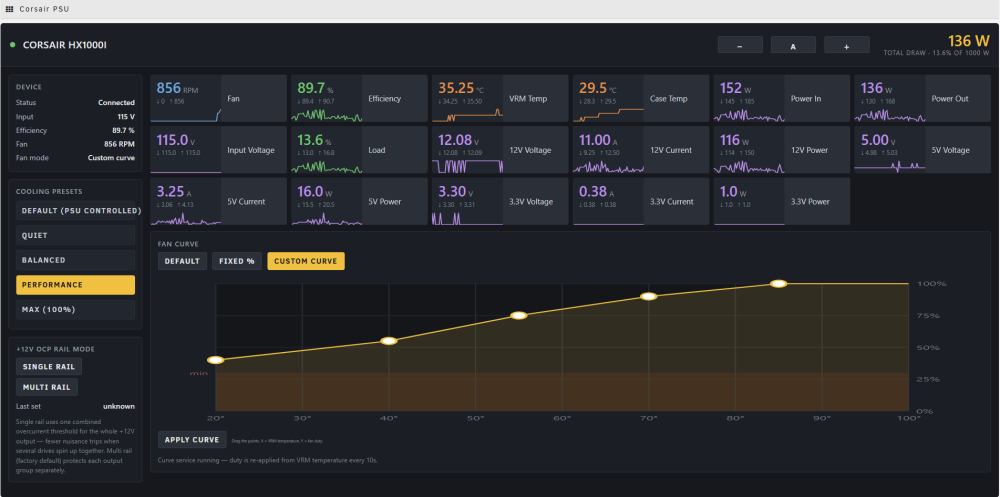
Corsair's iCUE software is Windows-only, so if you've got a Corsair digital PSU in your server you get no monitoring and no fan control at all. I wanted both, so I built this. What it does - Live per-rail voltage, current and power for +12V, +5V and +3.3V - Total power out, estimated power in, efficiency and load - VRM and case temperatures, fan RPM - Every reading has a running min/max and a live sparkline - Fan control: hand it to the PSU firmware, hold a fixed duty, or drag out a custom curve. Presets for Quiet, Balanced, Performance and Max - +12V OCP single/multi rail toggle — single rail means fewer nuisance trips when several drives spin up together - Text size control, since not everyone's running the same size monitor Supported PSUs (model is detected automatically) HX750i, HX850i, HX1000i, HX1000i (2022), HX1200i, HX1200i ATX 3.1, HX1500i, RM650i, RM750i, RM850i, RM1000i An unrecognised Corsair digital PSU still gets full sensor readings and fan control — only efficiency and load% are hidden, since those need model-specific data. It shows n/a rather than making a number up. How it works Sensors come from the in-kernel corsair-psu hwmon driver, so polling costs no USB traffic and can't collide with anything else. The only writes to the PSU are fan duty and OCP mode, and only when you click something. One thing worth knowing: these PSUs can't store a fan curve in firmware — they only accept a fixed duty. So custom curves are driven from Unraid by a small service that re-applies duty from PSU temperature every 10s. That's exactly what iCUE does on Windows. Minimum duty is 30%. It's self-contained — bundles the Python modules it needs, so there's no pip step and no internet needed at install or boot. Uninstall removes everything and hands the fan back to the PSU firmware. Install It's in Community Applications — search for "Corsair PSU Center" in the Apps tab. Or manually, Plugins → Install Plugin → https://raw.githubusercontent.com/racoutlaw/corsair-psu-center/main/corsairpsucenter.plg Then open the CorsairPSUCenter tab. Fair warning on testing I've only got an HX1000i, so that's the only model tested on real hardware, on Unraid 7.2.7. The other eleven share the same detection path and should work, but "should" is doing some heavy lifting there. If you've got a different HXi or RMi, I'd really like to hear whether it detects properly — especially whether the model name, wattage and efficiency look right. Source and issues: https://github.com/racoutlaw/corsair-psu-center Built on liquidctl (https://github.com/liquidctl/liquidctl), which does the hard part of talking to these PSUs. GPL-2.0.
-
Hi — could a moderator grant me permission to start topics in Plugin Support? I've just had my first plugin approved into Community Applications: Corsair PSU Center — an iCUE-style dashboard and fan control for Corsair HXi/RMi digital power supplies. Corsair's own software is Windows-only, so these PSUs normally give you no monitoring or fan control at all on Unraid. CA is flagging a template warning because there's no Plugin Support thread yet, and I'd like somewhere for people to report issues — particularly as I've only been able to test on my own HX1000i out of the 12 supported models. Repo: https://github.com/racoutlaw/corsair-psu-center
