





talmania
Members
-
Joined
-
Last visited
Everything posted by talmania
-
I got no idea. what's your docker run command? I'll see if I can reproduce. Thanks CHBMB! Where would I locate the run command? Getting a bit deeper than I've been before...
-
I've posted earlier in here about general lockups and I have more info. Off a clean shutdown and reboot of the system I'm seeing the following in my plex container docker log when starting it: ------------------------------------- _ _ _ | |___| (_) ___ | / __| | |/ _ \ | \__ \ | | (_) | |_|___/ |_|\___/ |_| Brought to you by linuxserver.io We gratefully accept donations at: https://www.linuxserver.io/index.php/donations/ ------------------------------------- GID/UID ------------------------------------- User uid: 99 User gid: 100 ------------------------------------- [cont-init.d] 10-adduser: exited 0. [cont-init.d] 30-dbus: executing... [cont-init.d] 30-dbus: exited 0. [cont-init.d] 40-chown-files: executing... [cont-init.d] 40-chown-files: exited 0. [cont-init.d] 50-plex-update: executing... No update required [cont-init.d] 50-plex-update: exited 0. [cont-init.d] done. [services.d] starting services Starting dbus-daemon Starting Plex Media Server. Starting Avahi daemon [services.d] done. 6 3000 /config/Library/Application Support d Daemon already running on PID 277 dbus[277]: [system] org.freedesktop.DBus.Error.AccessDenied: Failed to set fd limit to 65536: Operation not permitted No update required [cont-init.d] 50-plex-update: exited 0. [cont-init.d] done. [services.d] starting services Starting dbus-daemon Starting Plex Media Server. Starting Avahi daemon [services.d] done. 6 3000 /config/Library/Application Support d Daemon already running on PID 277 dbus[277]: [system] org.freedesktop.DBus.Error.AccessDenied: Failed to set fd limit to 65536: Operation not permitted Starting Avahi daemon Daemon already running on PID 277 Starting Avahi daemon Daemon already running on PID 277 Starting Avahi daemon Daemon already running on PID 277 Starting Avahi daemon Daemon already running on PID 277 Starting Avahi daemon Daemon already running on PID 277 Starting Avahi daemon Daemon already running on PID 277 Starting Avahi daemon Daemon already running on PID 277 Starting Avahi daemon Daemon already running on PID 277 Starting Avahi daemon Those last lines will repeat until I kill it. Things I've done to this point in an effort to pinpoint the random lockups (where I can ping host but not SSH or get webgui functionality): Full memtest multiple times and for 24 hours plus runs. Removed and rebuilt docker.img multiple times. Running Plex and only Plex docker. Set CPU variable to only use anywhere from 6 down to 3 cores (out of 8 ). Replaced power supply thinking perhaps not enough on the +12v. I just can't stay stable for more than 24 hours with Plex running. At this point I'm ready to replace my hardware (Xeon x3470 on Supermicro X8SIL so it's pretty old) with new hardware in an effort to resolve these months of hard resets and reboots. I've attached my diagnostics log here in the hope it might shed some light--appreciate any feedback! diagnostics-20170101-1140.zip
-
I think Nextcloud has changed the setup a little bit from when I last tried. DOH!!! That's what I get for not reading everything in it's entirety! BINGO!! New instructions worked perfectly--thanks CHBMB! Edit: donations link via apps page doesn't work--found it by your main site. Thanks again for all the hard work you guys do--it does not go unnoticed or unappreciated!!
-
Hey Chuga-- Just wanted to let you know you're not the only one with this issue. I'm in the same boat and I believe something has changed. I had this working several days ago no problems and now I get stuck on the same error as your last post (I had it working then decided to start over yesterday just to clean things up and for learning). Since then no luck getting past the same error you've reported in the post above. I've gone as far as removing everything (including docker.img) and not using templates. I've noticed that when pulling the nextcloud docker from the "apps" tab that the orange helpful notes below each section no longer appear. I've checked in some of the logs (still trying to find out how to get to mariadb syslog!) for nextcloud and there's mention of a 11.0.1 version. My guess is there's been an update as I'm almost certain my previous version was 10.0.2.
-
Thank you VERY much for this! I was excited to see that previous guaranteed lockup behavior wasn't causing the lockup once I set this parameter. Then all of a sudden after repeated testing it locked up again---looking at the cores from the webgui dashboard page I saw that core 6 was reporting 100% (almost no activity on the other cores) and I had specified Plex to use 0-5....which leads me to the point I had configured Crashplan to use 6&7 and enabled it after extensive testing. So reality is I'm looking at a crashplan issue and would have never arrived there without your assistance. I know I had lockups with Plex being the only active docker previously but with this --cpuset-cpus variable I'm able to avoid having the lockups that plagued me as long as I don't have Crashplan running at the same time. Plex cpu0-5 and nothing else: no lockups Crashplan 6-7 and Plex 0-5: 100% on core6 and lockup Thanks! Maybe you need to let unRAID have a core. I'm guessing I can't assign unRAID a core as per the extra parameters and rather the process would be to just leaving one unassigned is enough correct?
-
Thank you VERY much for this! I was excited to see that previous guaranteed lockup behavior wasn't causing the lockup once I set this parameter. Then all of a sudden after repeated testing it locked up again---looking at the cores from the webgui dashboard page I saw that core 6 was reporting 100% (almost no activity on the other cores) and I had specified Plex to use 0-5....which leads me to the point I had configured Crashplan to use 6&7 and enabled it after extensive testing. So reality is I'm looking at a crashplan issue and would have never arrived there without your assistance. I know I had lockups with Plex being the only active docker previously but with this --cpuset-cpus variable I'm able to avoid having the lockups that plagued me as long as I don't have Crashplan running at the same time. Plex cpu0-5 and nothing else: no lockups Crashplan 6-7 and Plex 0-5: 100% on core6 and lockup Thanks!
-
Rebuilt successfully and on my first attempt to scan a Plex library and then navigate WebGui it became unresponsive again. Waited a few minutes then walked away in frustration. Came back maybe 45 minutes later and the webgui acted like nothing had ever gone wrong. Strange...
-
Very similar to you--legacy Supermicro X7 series motherboard with Xeon, 16GB RAM, dual 256gb SSD cache but I've got about 5k media files across 3 or 4 libraries with just over 20% capacity left on the entire array. I hope so too! I'll report back once the array is rebuilt here in a few days--crossing my fingers but not counting on it solving the problem.
-
Hi Talmania, I concur. After re-booting my server and doing a complete Parity Check (w/o issues), I've concluded that when Plex initiates, it seems to tie up the Server's resources. Interestingly after completing the Parity Check and reinitializing Plex (incl restart), I had to log out of my Webloc link and back in to find the "Server" (still do occasionally). It then seemed to find all of my movies, so apparently Plex continued to work in the background despite locking up regular access (either that or while it was checking Parity). I've subsequently added several more movies to my sub-directory w/o incident. It would be interesting if others are seeing this pattern. Are you using MakeMKV-RDP and if so have you had problems "ripping blu ray discs"? Dave Nope just using regular Plex. I've found it starts up just fine and then runs through getting metadata from the most recently added films (sometimes requesting same title 4-5 times in logs). It only seems to occur when I do a rescan on a library and then try to use the unraid webgui. That's the trigger I've found--and it's not like my CPU is taxed, memory is close to being fully allocated or the docker.img is anywhere close to being full either. It's happened almost a dozen times at this point with the only solution being a hard powerdown. The only thing I can think of at this point is the fact that one of my drives is showing a SMART issue reported (hasn't been kicked out of pool yet) with reallocated sector count of 9 (threshold 36). I'll be replacing that drive tonight once the parity check (like the 5th or 6th one at this point--cancelled the others).
-
Interesting reading the past couple of responses here---especially yours Archivist. I've recently had trouble (like the past week or two) with my system as well. I'm finding that with the Plex docker running and doing a directory scan etc it will cause the webui to lock up and the only thing i can do is ping the server. No telnet, webgui, or fileshares. I've been trying different combinations of dockers to see what was causing it and i have it nailed down to plex and plex alone (i only run 3 and one of those is off 80% of the time). Have ran 24-hour plus memtests, reinstalled plex, reinstalled/recreated docker etc. Have run sqlite on the database to check for corruption and it comes back clean. Still more to investigate but it's looking like Plex is the culprit IMO.
-
In case anyone has a similar issue in the future I was able to resolve this by removing and recreating my docker.img file. Works as expected now!
-
Still didn't work for me--back to Needo I guess! Did you apply using your template? If so it defaults back to last source...at least mine did. Manually put the paths in and 400 error still.
-
Good to hear! Thanks for the link--had referenced it before when I went to linuxserver the first time and now you saved me finding it again. Cheers!
-
I think you must have meant /mnt/user/appdata and not /mnt/appdata in your explanation above. /mnt/appdata would actually be a RAM location and not on any disk. You are correct--my bad!
-
tmchow: Wanted to let you know I resolved my issue--I ended up using needo's docker. BUT.....I also neglected to make a change in my template from /mnt/appdata/plexmediaserver to /mnt/cache/appdata/plexmediaserver. I doubt that was the issue but it's the other variable I overlooked when deploying from needo's docker. Some history that may or may not be relevant: I was originally pointed to /mnt/appdata/plexmediaserver and then realized I should have been using /mnt/cache/appdata to keep all the drives from spinning up. I set /mnt/appdata to use cache drive ONLY but still failed. Manually removed all the /mnt/appdata from each drive and then ended up removing plex and image. That's when my issues started exactly like you have---however i was putting in the path as /mnt/cache/appdata until that final time when I forgot to make the switch. Like I said it's probably COMPLETELY irrelevant but that's the entire story...to this point: I found the other issue that was completely driving me crazy involved Plex not being available remotely and found that to be because I had jumbo frames enabled (which I could have sworn I've had enabled for some time--but the second I turned it off I was able to connect remotely) more troubleshooting to come on this front. Hope that helps at least a little!
-
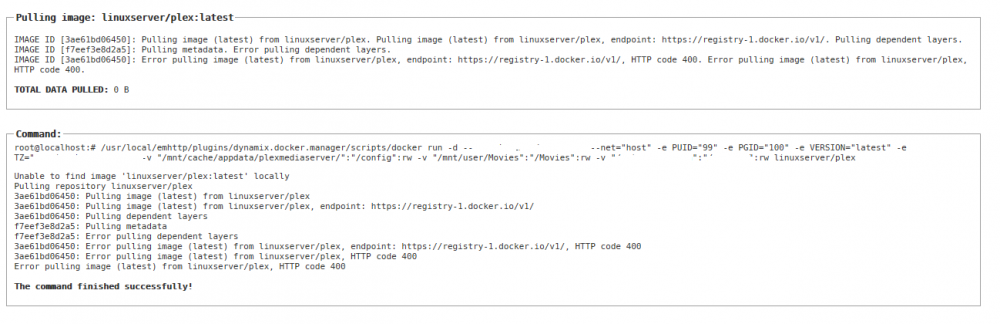
Have tried multiple times now and nothing--wondering if I should try another plex docker? looks to be a docker hub issue to me. So for the docker novices like myself--not a local unraid/docker config issue but rather a docker linuxserver.io plex specific website issue? Just want to make sure...
-
Have tried multiple times now and nothing--wondering if I should try another plex docker?
-
Just as an FYI it appears the site is down--getting HTTP 400 when trying to pull down the image.
-
First my thanks for providing this and the HUGE asset it is! Just updated to the 2016.3.12 version this morning and now get the following error when trying to search for any app: Warning: Invalid argument supplied for foreach() in /usr/local/emhttp/plugins/community.applications/include/exec.php on line 305
-
This is more of a general docker/unraid question but since it is this docker specifically that I have this question about I'll ask it here. I've found that with the path being /mint/cache/appdata that my mover doesn't appear to run. I assumed I needed to set the properties to use cache only but I found that /appdata isn't a share other than on the cache drive. I've reviewed the openvpn-as notes and found nothing. Should I create a share for openvpn-as, assign it as cache only then install the docker using that path for the config? Thanks!
-
Here you go-- I just ran across this last week as well as I was using another source. http://lime-technology.com/forum/index.php?topic=41609.msg394769#msg394769 Hope that helps! EDIT: And I just found my issue as well--for anyone facing a similar issue: there's a VARIABLE you can add (at least for Linuxserver) that states "latest" or "plexpass". I was getting prompted to "install manually" then found the variable under the advanced view of the docker's properties for Plex. Soon as I changed it from latest to plexpass I went from 9.15.2 to 9.15.3 Many thanks to Linuxserver for this repository--MUCH appreciated! Plex has been a huge leap forward for me from the years of using my Dune.
-
And this is exactly why there are clean rooms and data recovery services. Yes it will cost an arm and a leg but I've had to send drives out for corporate executives 4-5 times in my early career and EVERY time the data recovered was near 100%. I hope your friend realized these services were available. $1k would be a very small price to pay for that stuff! :'(
-
I just want to say that in my 15 years of work in IT I've never seen such awesome cabling jobs as I see in this thread. Unreal and simply works of art!!
