willsside
Members
-
Joined
-
Last visited
Everything posted by willsside
-
Thank you for the help! My Main tab now shows up with the parity check log remade. I found a few other config files that were corrupt and replaced those too. Now everything seems to be stable and I have off server backups. Thanks again!
-
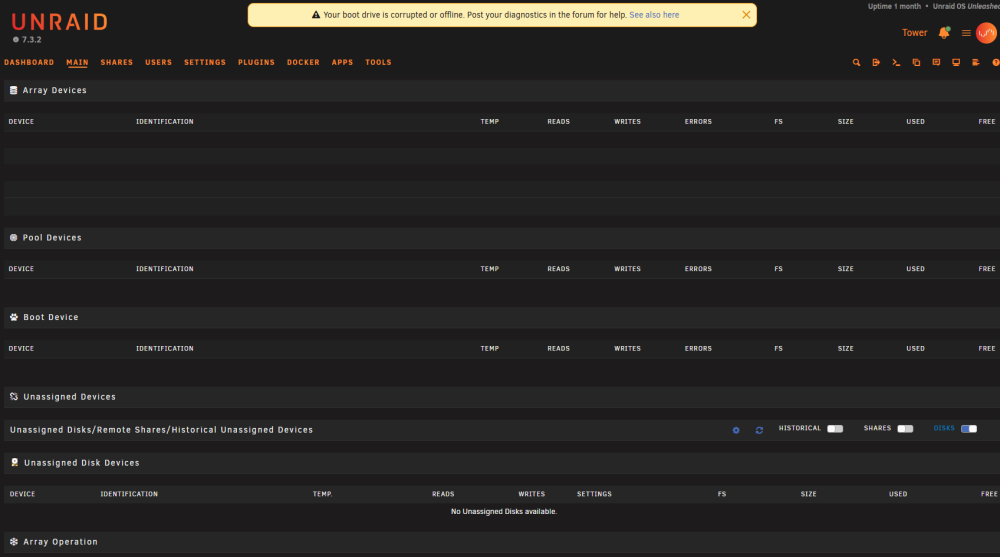
Thank you for the prompt response! I followed your instructions and changed the name of the flash.cfg file, rebooted cleanly. At startup, I saw the main tab populate with all of my disks, but then a few seconds later the main tab reverted back to the blank page I showed before. Attached is an updated diagnostics. However, I am no longer getting an error banner stating that the USB drive is corrupted. I will take better care to backup my config next time. I'll look into Unraid Connect for that purpose! tower-diagnostics-20261008-1114.zip
-
Hey all, I recently had a USB boot drive become corrupt and so I used a recovery tool to download the config folder off of it and copied it to a new usb drive. However, when rebooting unraid with the new USB drive, I get an error message "Your boot drive is corrupted or offline. Post your diagnostics in the forum for help" and my Main tab is blank (image below). I assume the previous usb drive corruption occured in the config folder, but I am not sure how to find it / fix it. Attached is my diagnostics zip. Where should I look to fix this? How do I prevent this from happening again? Should I switch over to SSD boot? I am currently running Unraid 7.3.2. Thank you all in advance! tower-diagnostics-20261008-0958.zip