





Drizzx
Members
-
Joined
-
Last visited
Everything posted by Drizzx
-
We keep communicating about 80% effective in our back and forth messaging here. Let me be more precise What you're asking for has already been tested as I indicated my original post. I have tested Multiple Disks, 9, 12, 13, 14 and 15 all BEFORE and AFTER enabling write cache write cache enabled and disabled This was achieved with the following command: smartctl -s wcache,on /dev/sd#Verified with smartctl -g wcache /dev/sd#I have not left them in this mode because: It made no discernible difference in speed It adds to risk of data loss by having data cached in drives memory The results are roughly the same on all disks. This is not a single disk issue or single disk failure. If you had a chance to review the SMART status, all drives report fine. They are all at the correct, maximum link speed. I see what you're saying about the source disk but that is not the norm. Its been lower in past tests so I'm going to do a bit more testing on that. I did go through the Perc firmware settings and turned on caching which has improved things somewhat. (either that or a reboot). It Pushed the average up to between 65MB and 80MB / sec now I'll post some more details after a bit more testing
-
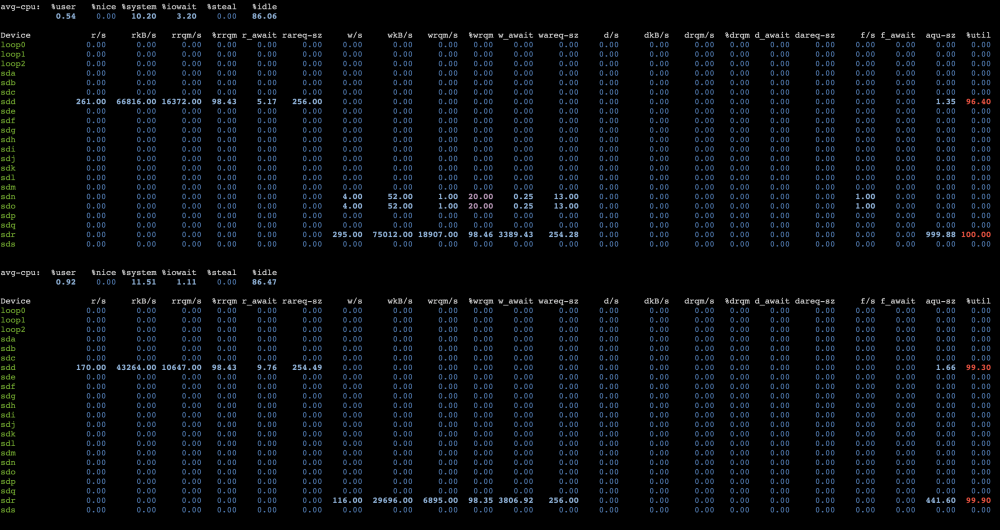
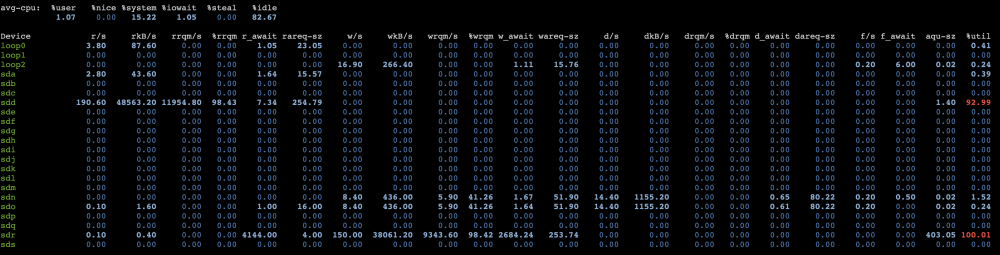
I had experimented on turning on writeback cache on disk 14 to see if it made any difference and it did not.. thats why you see it on for Disk 14 only. But also as explained above, I've tried several source and target disks and the result is the same regardless be it disk 2 -> 14 or 6 -> 9 etc. As I stated above iostat shows 100% busy with 2-11 second write latency and thousands of queued requests on the destination drive. Acting as if the drive is the limiting factor. But we know these drives are capable of significantly higher throughput / You'll see similar results here: These results are, as you can see using Disk 3 (sdd)-> Disk Disk 15 (sdr) The first is the last 2 results from 1 a second snapshot as you indicated this second is a 10 second snapshot. I've also attached the full report iostat.txt When I can shut down all the docker containers I can do this again and repost the results. But I can tell you that I have done that already and it does not change the result.
-
Thanks for responding Turl. IN short. Yes MB. If it were Mb that would be 8 times worse :) Thank you for catching that Yup, I'm aware of those issues - and on the list of things to be cleaned up. (The shares are setup correctly but the cfg files are missing causing the implied message (I believe anyway) I think this happened after the USB drive corrupted once) Yeah sorry if I was unclear above - yes still happening after removing parity -- to see if it was contributing to the slow downs.
-
I've run out of ideas on how to continue to troubleshoot this issue given my limited knowledge. I've seen slow parity checks for some time, but at some point I believe it got a lot worse. But as it happens in the background I wasn't bothered by it enough to look any further. But recently I went to start consolidating data across several drives in preparation to remove/replace some older ones. It was at this point I noticed how significant the problem was. With single disk parity I was getting roughly 30-50Mb/sec data transfer rates disk to disk. Hardware: Dell R730xd, dual E5-2620 v4, 128 GB RAM; Unraid 7.2.4. Controller: PERC H730P Mini in HBA mode, firmware 25.5.9.0001, using megaraid_sas A mix of SATA 6 (no interposers) and SAS drives. Troubleshooting steps so far. I'll skip the steps done specific to testing if parity was causing slow downs as I've removed the parity disk all together to rule that out. That had no discernible change Tested Disk to disk transfer using several different source and destination disks - no discernible change in speed. (These are large 3-10GB files each so its not a seek time related issue) Confirmed PERC PCIe connection is 8 GT/s ×8; Disk 14 negotiates 12 Gb/s, SATA parity 6 Gb/s. (this was the first destination disk I was testing to) Verified SMART status : no uncorrected errors, grown defects, or SAS link errors; (First Disk I was testing to -> ~39°C and only 38% full) Temporarily disabled Disk 14’s background media scan: little or no improvement. Validated it wasn't an issue with RSYNC (Same speeds whether copying Disk -> Disk using command line move or Unbalance All tests were done from /mnt/diskx -> /mnt/disky I've attached Diagnostics while a move is in progress using Unbalanced It seems like, regardless of what drive I'm writing to, the destination drive ends up being busy. iostat frequently shows 100% busy with 2-11 second write latency and thousands of queued requests on the destination drive. Most of these drives are enterprises grade 12Gb SAS drives and they should not be running this slow. All the 10TB SAS drives are Dell certified so there should be no compatibility issues. I don't know if there other hardware settings that could be causing this? rivendell-diagnostics-20261014-1130.zip

