Augusto Borges
Members
-
Joined
-
Last visited
Everything posted by Augusto Borges
-
Hi Jorge, The pendrive I created is a TeamGroup 32 Gb; Initialy I used the "UNRAID USB Creator"; I tried using the last two versions, 7.3.3 and after that I tried 7.3.2; As nothing worked, I tried formatting the pendrive to FAT32, unzipping the file and copying everything to the pendrive, and making the pendrive bootable by running the make_bootable as administrator; My boot settings are already changed to BIOS; When the server boots up, I press F11 to select the usb. The server tells me "boot error"; ChatGPT tells me to right click on "make_bootable" that is inside folder SysLinux, but that file is not there. I am loosing my marbles over this. Can you please help?
-
Hi JorgeB, I will try to do that. I remember seeing only two options, UEFI and BIOS.
-
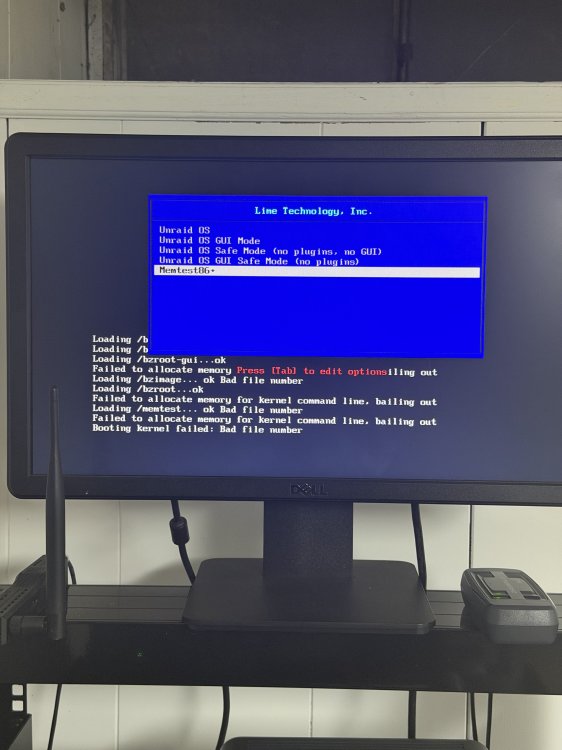
During boot I am getting the following message: "Failed to allocate memory for kernel command line, bailing out." Than, every line after that reads: "Ok. Bad file number." I tested on two servers, same issue. I thought the usb pendrive was the problem, so I created a second pen drive. Same issue. The pendrive is a Samsung 64 Gb, formatted FAT32. The server is a Dell PowerEdge R720, 192 Gb memory, 15 Tb hard drive space (16x Seagate SAS 900 Gb). Can someone please help?