





C.C
Members
-
Joined
-
Last visited
-
I have managed to restore an old database and refreshed scan and it is now working Thank you so much JorgeB for your patience and help - you have been amazing!!!
-
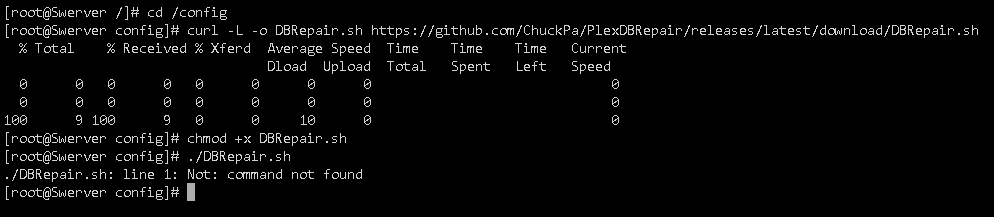
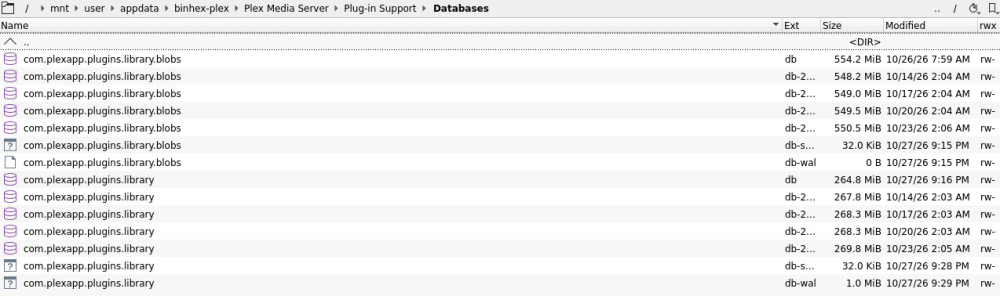
I couldn't get the DBRepair container to work so tried via consol bit it wouldn't execute the DBRepair.sh even though I can see it saved down Consol: I tried looking for old databases - are these previously dated ones what you are referring to? i.e. the one modified on 10/14/26?

-
The fix for Radarr (and Sonarr) worked!! When I ran the plex-debrepair I got the following in the logs Can you advise exactly the fix. I know this has been teaching a bit of teaching a baby to suck its owns thumb but you have been an absolute legend helping me here. Understand this isn't an Unraid issue but just all happened when I updated.

-
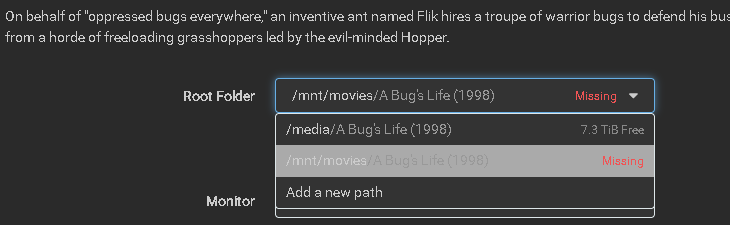
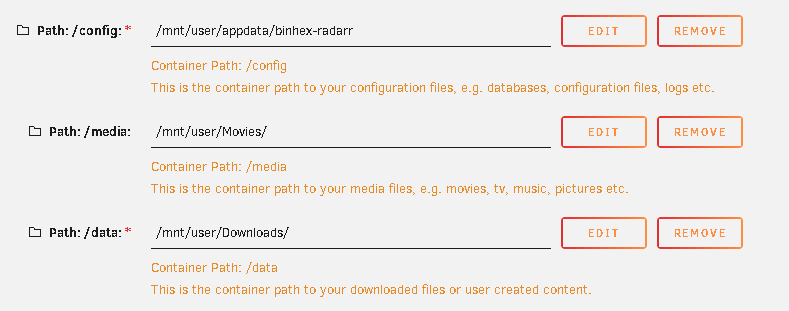
Below are the results of the updated test 1. When running this test, I noted the following when I first went to add a new movie: This is how the paths are mapped for the Radarr container: Once downloaded the Radarr queue shows the following message: These are the logs from Radarr: 2026-10-27 06:57:06.0|Info|DownloadService|Report for A Bug's Life (1998) sent to Deluge from indexer YTS. A Bug's Life (1998) 720p BRRip x264 -YTS 2026-10-27 06:57:11.1|Error|DownloadedMovieImportService|Import failed, path does not exist or is not accessible by Radarr: /downloads/Complete/Masterplan (2026) [1080p] [BluRay] [5.1] [YTS.GG - YTS.BZ]. Ensure the path exists and the user running Radarr has the correct permissions to access this file/folder 2026-10-27 07:01:34.6|Error|DownloadedMovieImportService|Import failed, path does not exist or is not accessible by Radarr: /downloads/Complete/A Bug's Life (1998). Ensure the path exists and the user running Radarr has the correct permissions to access this file/folder 2026-10-27 07:03:04.6|Error|DownloadedMovieImportService|Import failed, path does not exist or is not accessible by Radarr: /downloads/Complete/A Bug's Life (1998). Ensure the path exists and the user running Radarr has the correct permissions to access this file/folder Here are the run logs for each of the dockers: Plex: docker run -d --name='binhex-plex' --net='host' --pids-limit 2048 -e HOST_OS="Unraid" -e HOST_CONTAINERNAME="binhex-plex" -e 'TRANS_DIR'='/config/transcode' -e 'NVIDIA_DRIVER_CAPABILITIES'='all' -e 'NVIDIA_VISIBLE_DEVICES'='' -e 'CLAIM_SERVER'='no' -e 'PLEX_CLAIM'='' -e 'ENABLE_HEALTHCHECK'='yes' -e 'HEALTHCHECK_COMMAND'='' -e 'HEALTHCHECK_ACTION'='' -e 'HEALTHCHECK_HOSTNAME'='google.com' -e 'PUID'='99' -e 'PGID'='100' -e 'UMASK'='000' -l net.unraid.docker.managed=dockerman -l net.unraid.docker.webui='http://[IP]:[PORT:32400]/web' -l net.unraid.docker.icon='https://raw.githubusercontent.com/binhex/templates/main/unraid/binhex/images/plex-icon.png' -v '/mnt/user/appdata/binhex-plex':'/config':'rw' -v '/mnt/user':'/media':'rw' --restart=unless-stopped 'ghcr.io/binhex/arch-plex' d38ed04b0f60da978cc129abbc70e0e19eee8caa06923fa313dbad0857b6efec Radarr: docker run -d --name='binhex-radarr' --net='host' --pids-limit 2048 -e HOST_OS="Unraid" -e HOST_CONTAINERNAME="binhex-radarr" -e 'TCP_PORT_7878'='7878' -e 'ENABLE_HEALTHCHECK'='yes' -e 'HEALTHCHECK_COMMAND'='' -e 'HEALTHCHECK_ACTION'='' -e 'HEALTHCHECK_HOSTNAME'='google.com' -e 'PUID'='99' -e 'PGID'='100' -e 'UMASK'='000' -l net.unraid.docker.managed=dockerman -l net.unraid.docker.webui='http://[IP]:[PORT:7878]' -l net.unraid.docker.icon='https://raw.githubusercontent.com/binhex/templates/main/unraid/binhex/images/radarr-icon.png' -v '/mnt/user/appdata/binhex-radarr':'/config':'rw' -v '/mnt/user/Movies/':'/media':'rw' -v '/mnt/user/Downloads/':'/data':'rw' --restart=unless-stopped 'ghcr.io/binhex/arch-radarr' 40f1de636bbe3a8ead6900a3ab39bf7f06788dce7c74f01697c7aeae3e9506a0 Deluge: docker run -d --name='deluge' --net='bridge' --pids-limit 2048 -e HOST_OS="Unraid" -e HOST_CONTAINERNAME="deluge" -e 'DELUGE_LOGLEVEL'='error' -e 'PUID'='99' -e 'PGID'='100' -e 'UMASK'='022' -l net.unraid.docker.managed=dockerman -l net.unraid.docker.webui='http://[IP]:[PORT:8112]' -l net.unraid.docker.icon='https://raw.githubusercontent.com/linuxserver/docker-templates/master/linuxserver.io/img/deluge-logo.png' -p '8112:8112/tcp' -p '6881:6881/tcp' -p '6881:6881/udp' -p '58846:58846/tcp' -v '/mnt/user/Downloads/':'/downloads':'rw' -v '/mnt/user/':'/1_Unraid_Shares':'rw' -v '/mnt/user/appdata/deluge':'/config':'rw' 'lscr.io/linuxserver/deluge' 43b2a404427a52b80724cd464c6616b5ad732fa5537571e6a2ba1692a2e4525f Following results from the terminal Log file here (scrubbed for private information):



-
Tried the above and have the same issue. Diagnostics attached
-
Attached
-
I updated my unraid server to 7.3.4 on Saturday and on Sunday realised that Plex had not added a new movie that had been added to Radarr Radarr had sent the request to deluge to download - the file had downloaded but not imported over. Initially wasn't a concern as I manually moved the file over. However, Plex then never registered the file. I scanned multiple times and could see Plex scanning the specific folder for that movie - Superbad (2007) - but was not adding to Plex. Plex itself was still fine and I can watch any movie / tv show that was already in the library but won't add new movies or tv shows. I then subsequently checked Sonarr as well as Radarr and did a few trial runs and it downloaded tv shows and movies but was no longer moving completed files to the folders and then when manually added, plex was not picking them up. I have been trying to figure out how to fix this issue as I assume it is permissions based but haven't been able to resolve - even removed all dockers and just added plex... still not resolved. I ran new permissions... still not resolved. Please can someone help me troubleshoot as it is driving me crazy


