MelvinLauwers
Members
-
Joined
-
Last visited
Everything posted by MelvinLauwers
-
Yes, I installed 7.3.4 two days ago. It allowed me to choose a boot name and write numbers.
-
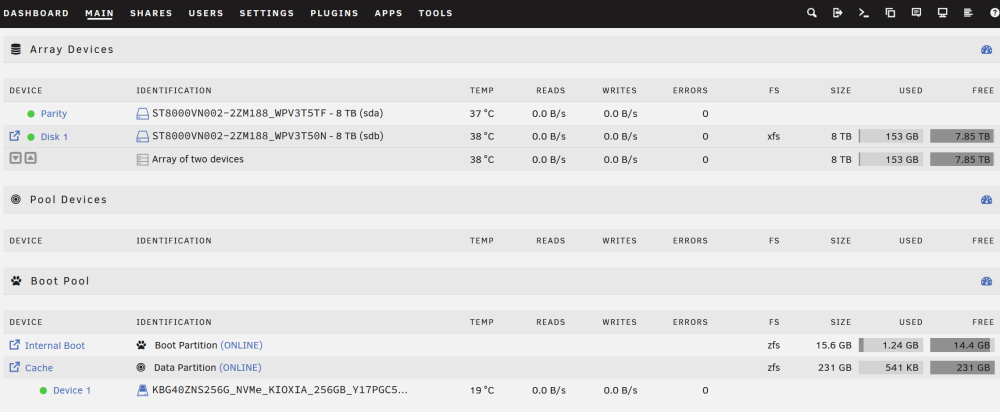
Two days of troubleshooting to be fixed in 10 minutes and due to a user error, FML. I see the problem now, and the fix you gave worked perfectly. I remember setting the name to boot1 in the iso wizard. Don't know why I did it, but I did. It is fixed now, thank you so much!!
-
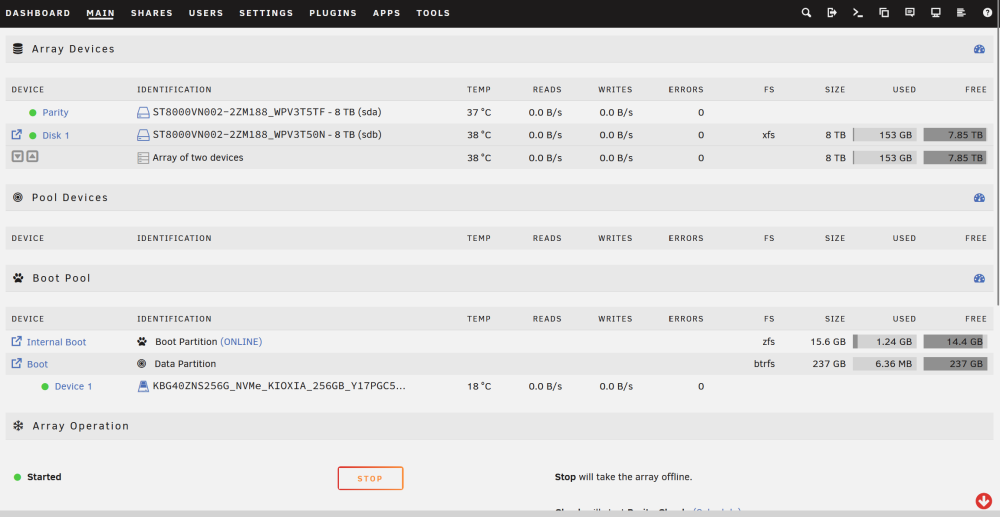
Hi all, I set up a new Unraid 7.3.4 server (Starter license, TPM-based) with internal boot on a single 256 GB KIOXIA NVMe, using the “boot + data partition” option. I want to use the data partition as a cache for shares (appdata, system and so on), but I can’t select it. Setup Unraid 7.3.4, internal boot on one NVMe (single disk, not mirrored) Array: 1x 8 TB parity + 1x 8 TB data disk (XFS), array started The NVMe has the 15.6 GB boot partition (zfs, online) and a data partition of 237 GB What I see The data partition shows under “Boot Pool” as a row named “Boot”. After starting the array I formatted it from the Main tab, and it is now mounted as btrfs with 237 GB. The “Pool Devices” section is empty. When I add or edit a share, the “Primary storage” dropdown only lists “Array”. The boot pool’s data partition is not offered. “Add Pool” and the internal boot tool in Tools both say no compatible devices are available (I assume because the NVMe is already assigned). The blue “Boot” link on the data partition row goes back to the Main tab. The link icon to its left opens the file browser. What I tried Hard refresh of the Shares page Checked that user shares are enabled in Global Share Settings Stopped and restarted the array Question According to the Internal Boot FAQ, the remaining capacity of a “boot + data” device can be used as a normal pool. How do I make this data partition selectable as primary storage for shares (as a cache)? Is this a configuration step I missed, or a known limitation or bug in 7.3.4? tower-diagnostics-20261028-1528.zip