VoltTech
Members
-
Joined
-
Last visited
Everything posted by VoltTech
-
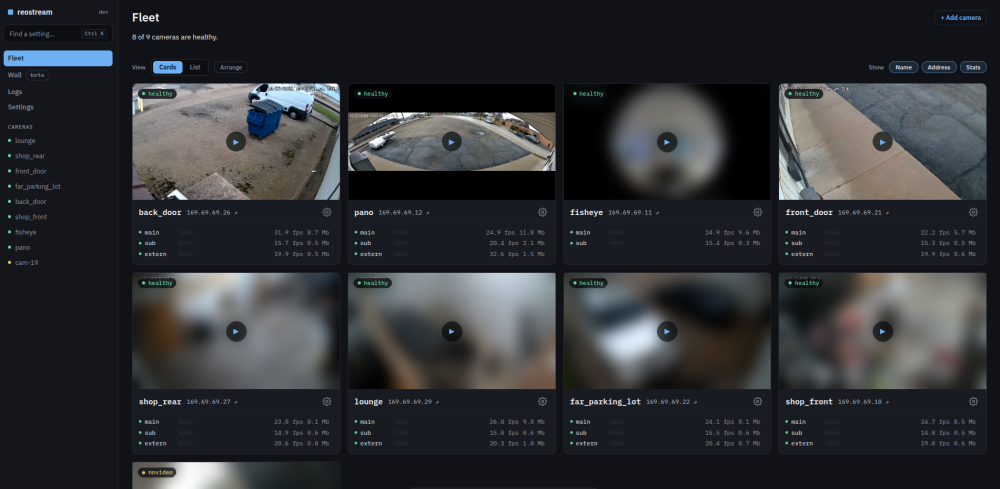
This is the support thread for reostream in Community Apps. What it is reostream connects to your Reolink cameras the same way the Reolink app and NVR do (their own protocol, Baichuan) and serves a clean RTSP stream to Frigate, Blue Iris, Home Assistant or anything else that takes RTSP. A lot of Reolink models have a rough RTSP server (smearing, timestamp jumps, dropped frames), and this skips it completely. It also gives you one web page for your cameras: almost every setting from the Reolink app, battery cameras (they sleep until needed), two-way talk, SD card recordings, the camera's own person/vehicle/motion alerts into MQTT and Frigate, and cameras behind a Reolink NVR or Home Hub. It never decodes video, so it's light on CPU (about a 16 MB container). Install 1. Community Apps, search reostream, install. 2. Leave the ports as they are unless something else uses them: 8560 (streams), 8561 (RTSP), 8562 (web page). 3. Open the web page (port 8562), claim it with the token from the container log, and the setup page will find your cameras. 4. In Frigate, use the RTSP addresses shown under Settings (it shows a ready-made Frigate config). Getting help Post here or open an issue on GitHub. It helps a lot if you include: - your camera model and firmware (shown at the top of the camera's page in reostream) - the reostream version - the container log from around when the problem happens Good to know - Give your cameras a password. A Reolink NVR or Home Hub with "automatically add devices in LAN" turned on will take over any camera with no password and change it to one only the NVR knows. - Battery cameras: the Reolink app is still needed once to put them on your Wi-Fi. Links GitHub (code, docs, issues): https://github.com/VoltTech21/reostream Setup guide: https://github.com/VoltTech21/reostream/blob/main/docs/setup.md I built reostream with help from AI and I support it myself. I'm on this thread, GitHub and Reddit pretty much every day, and everything is tested on my own cameras.