




-
This is the output of your command root@Tower:~# btrfs inspect-internal dump-tree -b 588300288 /dev/sdc1 | head -n 5 btrfs-progs v7.1 leaf 588300288 items 183 free space 2009 generation 1454853 owner EXTENT_TREE leaf 588300288 flags 0x1(WRITTEN) backref revision 1 fs uuid ffc5eb94-0c3d-43ae-aa1c-f4dabc1d052e chunk uuid 453e1b2a-d72a-4bc1-b7d2-f369e8532391 the file that failed : (An unexpected error is keeping you from copying the file. if you continue to receive this error, you can use the error code to search for help bnlabla error 0x80070780: The file cannot be accessed by the system) ipc-socket qbittorent.log qbittorent.log.bak19 qbittorent.log.bak20 qbittorent.log.bak21 qbittorent.log.bak22 qbittorent.log.bak23 mongodb-27117.sock ipc-socket and the qbittorrent all came from qbittorrent mongodb-27117 came from unifi-os The other one (few) was permissions problem
-
so here is the new diag when i saw the error I took the initiative to backup Some file was failling to copy but really unrelevant one (0 kb one, log file..), I didn't note them ... Sorry to ask again but just to be 100% sure, it's failling ram that create those corruption in cache ? or my ssd need to be considered to be replaced too ? EDIT: i'm doing a save again to cleary identified the files blocking Question, could I have a situation where my ram with xmp was unstable, create this metadata error. I then remove xmp, let's assume my ram is now stable, but this corruption is what is still creating issues ? tower-diagnostics-20261106-1651.zip
-
Bios resetted factory Everything start after a reboot, here is the scrub : UUID: ffc5eb94-0c3d-43ae-aa1c-f4dabc1d052e Scrub started: Fri Nov 6 14:14:30 2026 Status: finished Duration: 0:06:32 Total to scrub: 161.89GiB Rate: 422.95MiB/s Error summary: verify=8 Corrected: 0 Uncorrectable: 8 Unverified: 0 and yes I downloaded the diag before restarting, now the coreFreq should be gone (i'm not seeing it anymore in the plugin page)
-
Hi and thank you for your long response 1. Tell us when you disabled XMP, and whether it was already off on Nov 2 to 4. If it was still on, XMP is a good suspect. If it was already off, XMP cannot explain these crashes. I disabled it exactly the 1st of november 2. Load BIOS defaults, with no XMP and no CPU overclock or undervolt. Beside the xmp no customisation was made on this computer, but I will make sure by setting default again. To be honest after disabling xmp I didn't check if the voltage was set to 1.35 accordingly. I should review the settings the motherboard set for the ram (beside the lower frequences as expected) 3. Uninstall the CoreFreq plugin for this test. It loads a low-level kernel module and the package dates from 2024, so I want it out of the picture. Done 4. Run the server with only one stick, or half of them if you have four, and use it normally for 3 or 4 days. Your server was logging a crash about every 8 hours, so that is enough time. Then swap to the other stick and repeat. A real workload is a better test here than more Memtest. I will try that, by the way by desinstalling coreFreq I figure out docker crashed again, just in case if you want to confirm your diagnostic I put a zip file up to date 5. After each run, post new diagnostics, and tell us your exact RAM kit and how many sticks you have. G.SKILL TridZ K2 3200mhz 4x16go I will grab the exact reference if it's needed, I will also try an RMA process in paralelle to figure out if by any chance they can be replaced tower-diagnostics-20261106-1045.zip
-
could have been it corrupted because previously I was running my ram with xmp. since then I disabled it, but my cache somehow need to be "repaired" ?
-
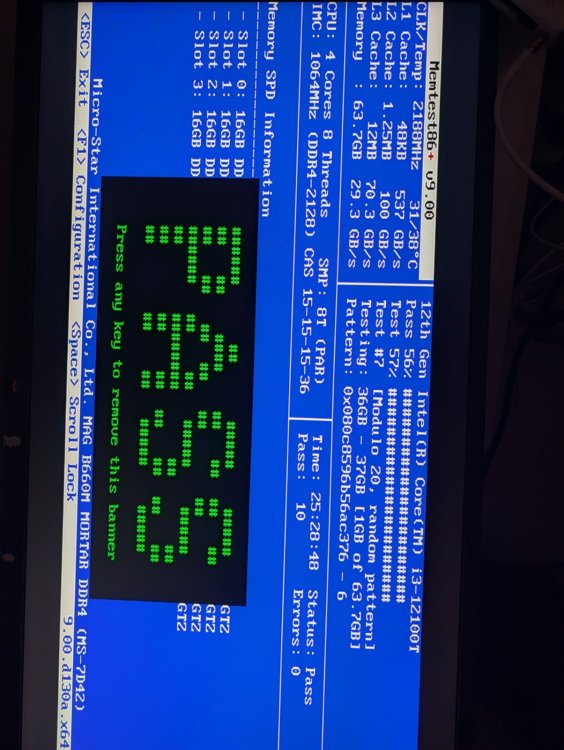
Thank you for your answer, RAM could have made the cache drive to be corrupted it's what you mean ? I understand you suspect the RAM, it's the feedback I got also from discord BUT I runned memtest three times, One time for a single pass (no time for more at the moment) a Second time for 4 pass 10 hours totals those two times using memtest86 v6 And this one 25 hours 10 pass with v9 and if you look at their changelog, v9 bring more tests, more stressfull and suppose to detect error sooner. considering 15 pass OK, how much pass or time I should test my ram to be 100% sure it is not the RAM ...
-
Hello, Since few days/weeks now, I have really weird behavior mainly related to docker, some container stop to work for no obvious reasons. Initially my docker was using a btrfs vdisk and logs was throwing /dev/loop2 btrfs error, which was related to docker.img After few time I switch to directory and reinstall all my container but some docker container continue to stop without any warning and sometimes it even refused to restart and I have to restart the NAS As suggested by discord officel unraid server, I run successfully memtest86+ v9 for a total of 25 hours without any error reported. XMP is not enable. tower-diagnostics-20261104-1752.zip I took the diagnotics zip file last time I got trouble you can find it attached. Thank you very much for your help

View in the app
A better way to browse. Learn more.
