Matthewjackson446
Members
-
Joined
-
Last visited
-
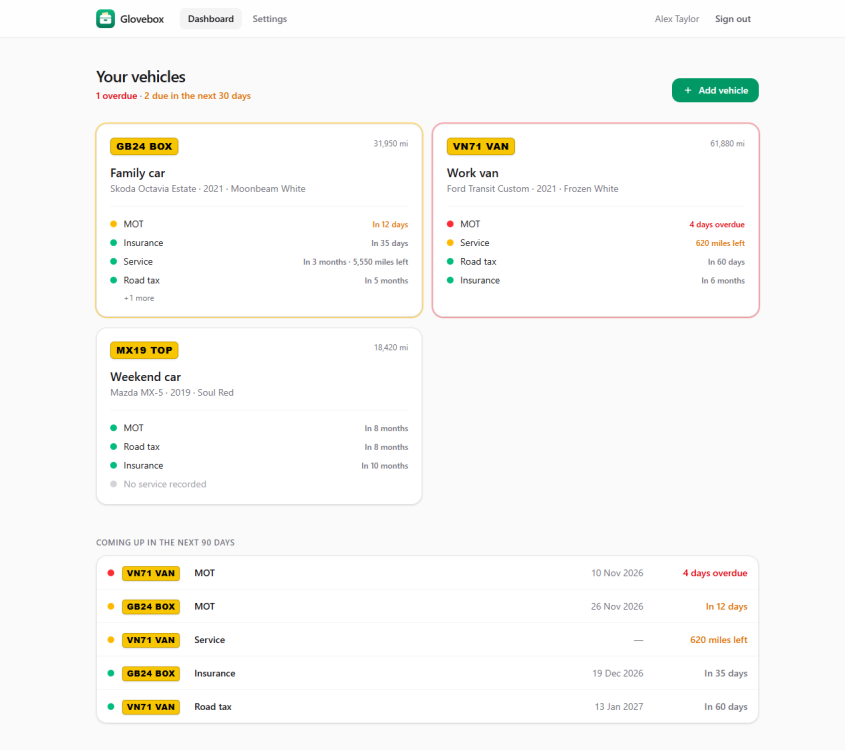
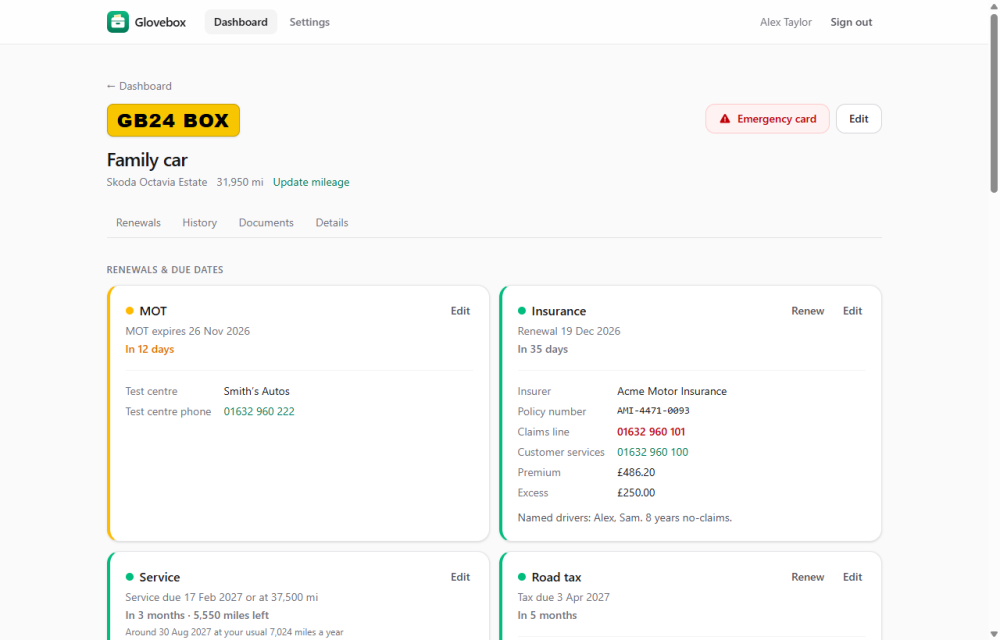
Glovebox keeps track of your vehicles' renewals and paperwork, and reminds you before anything runs out. GitHub: https://github.com/matthewjackson446/GloveBox Releases and changelog: https://github.com/matthewjackson446/GloveBox/releases Image: ghcr.io/matthewjackson446/glovebox:latest WHAT IT DOES • Tracks MOT, road tax, insurance, servicing (by date or mileage), breakdown cover, warranty and finance, colour-coded by when each is due. • Stores policy and membership numbers, claims lines, premiums and excesses alongside the dates. • Sends a daily reminder digest by email, ntfy, Gotify, Discord or webhook. Each user picks how far ahead (60/30/14/7/3/1 days, and overdue) and where. No repeat reminders. • Private calendar link for Google, Apple or Outlook Calendar. • Service history with costs and receipts, a mileage log, and document uploads (V5C, certificates, receipts). • "Renew" a policy to roll it on a year and keep a price history. • Roadside emergency card: one-tap 999, breakdown and claims lines, VIN, locking wheel nut code, emergency contacts. • Optional DVLA and DVSA lookups (UK): fill in vehicle details from the registration, and refresh tax and MOT dates, SORN status and MOT history every night. Bring your own free API keys; the app shows how to get them. • Multi-user, with per-vehicle sharing (owner / can edit / can view). INSTALLING Glovebox has been submitted to Community Apps. Until it appears in the Apps tab, install it from the template: 1. Open the Unraid terminal and run: wget -O /boot/config/plugins/dockerMan/templates-user/my-Glovebox.xml https://raw.githubusercontent.com/matthewjackson446/glovebox/main/unraid/glovebox.xml 2. Go to Docker → Add Container, choose Glovebox from the Template list, check the port (default 8080) and appdata path (default /mnt/user/appdata/glovebox), then Apply. 3. Open the WebUI. The first visit creates the admin account; add other people under Settings → Users. Everything (the SQLite database and uploaded documents) lives in the appdata folder, so your normal appdata backup covers it. SETTING UP REMINDERS • Settings → Server (admin): daily send time, your public URL (for links in notifications), and SMTP if anyone wants email. SMTP can also be set with the SMTP_* variables under "Show more settings" in the template. • Settings → Reminders (each user): choose lead times and add channels, then press "Send test". • Gmail: smtp.gmail.com, port 587, STARTTLS, with an app password. SMTP2GO: mail.smtp2go.com, port 2525, STARTTLS, using the SMTP user's own password. DVLA AND DVSA KEYS (OPTIONAL, UK) Glovebox doesn't come with keys; each install uses keys issued to whoever runs it. Both are free: • DVLA Vehicle Enquiry Service: https://register-for-ves.driver-vehicle-licensing.api.gov.uk/ • DVSA MOT History: https://documentation.history.mot.api.gov.uk/mot-history-api/register Paste them into Settings → Server → Vehicle lookups and press Test. Step-by-step instructions are on that page. REVERSE PROXY It works on plain http://<server-ip>:<port> and behind Nginx Proxy Manager, SWAG or Cloudflare over HTTPS, with no extra settings. Point the proxy at http://<unraid-ip>:<port>. If you see "Bad Gateway", check the Forward Hostname has no stray spaces or tabs. UPDATING When the Docker tab shows an update, click Apply Update. Your data is kept and the database upgrades itself. :latest follows releases; :edge follows every change on main. GETTING HELP Post here with: • your Glovebox version (bottom of the Settings page) • what you did and what happened • any errors from the container log (Docker tab → Glovebox icon → Logs) Please remove API keys, passwords and email addresses before posting logs. Bugs and feature requests are also welcome on GitHub: https://github.com/matthewjackson446/GloveBox/issues