




Skip to content
View in the app

A better way to browse. Learn more.

Unraid

A full-screen app on your home screen with push notifications, badges and more.

To install this app on iOS and iPadOS
  1. Tap the Share icon in Safari
  2. Scroll the menu and tap Add to Home Screen.
  3. Tap Add in the top-right corner.
To install this app on Android
  1. Tap the 3-dot menu (⋮) in the top-right corner of the browser.
  2. Tap Add to Home screen or Install app.
  3. Confirm by tapping Install.

LookAtMyC

Members
  • Joined

  • Last visited

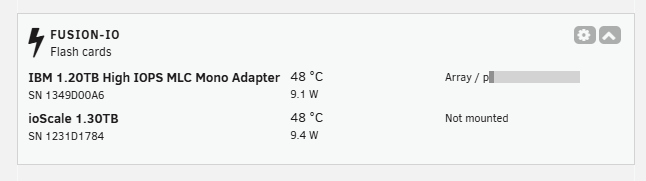
  1. my unraid system memory allocation is "System: 5.38 GiB" with and without fusion io drives mounted. seems like that is no issue
  2. I have submitted a community app driver for this. if they accept it you can just install the community app to have your fusionio drives useable in unraid starting with v7.1.4. If a new unraid version with a new kernel is released a day after the release the driver is build and automatically available via the community app again without any required action from you. community app name probably: unraid-fusionio or fusionio driver If they don't approve the community app you can manually install it as a plugin from my GitHub repo: https://github.com/LookAtMyC/unraid-fusionio

Account

Navigation

Search

Search

Configure browser push notifications

Chrome (Android)
  1. Tap the lock icon next to the address bar.
  2. Tap Permissions → Notifications.
  3. Adjust your preference.
Chrome (Desktop)
  1. Click the padlock icon in the address bar.
  2. Select Site settings.
  3. Find Notifications and adjust your preference.