




Skip to content
View in the app

A better way to browse. Learn more.

Unraid

A full-screen app on your home screen with push notifications, badges and more.

To install this app on iOS and iPadOS
  1. Tap the Share icon in Safari
  2. Scroll the menu and tap Add to Home Screen.
  3. Tap Add in the top-right corner.
To install this app on Android
  1. Tap the 3-dot menu (⋮) in the top-right corner of the browser.
  2. Tap Add to Home screen or Install app.
  3. Confirm by tapping Install.

racer7

Members
  • Joined

  • Last visited

  1. Thanks for confirming all!
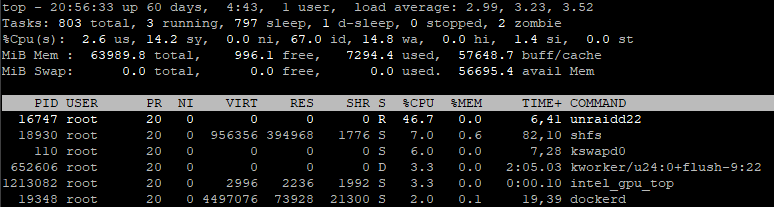
  2. 100% assuming this is legit, but I don't remember seeing an "unraidd22" process running on my server before. Searching Google and the forums for the name does not return any results, either. Is this the standard unraid daemon? It's using between ~40-100% of one core on my box. Running v7.2.0 currently. EDIT: I had the bright idea of running "ps -aux |grep unraid" and see that there's a process for every disk, unraidd0 to unraidd22. I'm guessing d22 is just Disk 22, which was probably in use at that time. Am I assuming correctly? CPU time is highest on unraidd0, which would coincide with my parity drive. Just want to confirm.
Account

Navigation

Search

Search

Configure browser push notifications

Chrome (Android)
  1. Tap the lock icon next to the address bar.
  2. Tap Permissions → Notifications.
  3. Adjust your preference.
Chrome (Desktop)
  1. Click the padlock icon in the address bar.
  2. Select Site settings.
  3. Find Notifications and adjust your preference.