rpearson
Members
-
Joined
-
Last visited
-
Thanks for the lead to Midnight Commander and for the link to best practices for converting from RFS to XFS. I am reading through the link, and trying to absorb it. For me - I did not understand that restore actually restored exactly what was there before - down to the file system. Thanks again.
-
Thanks for your help - I sincerely appreciate it. I do not have any Smart Warnings showing. But I do not really have another copy of the important things on the unRaid array - so will back them up on another disk pronto. I apologize for this question in advance - but how is the best way to "copy all files from one of the other disks to the new XFS disk"? I do not really have visibility to the individual files and have spread my shares across disks to better utilize the space. Thanks again for your help.
-
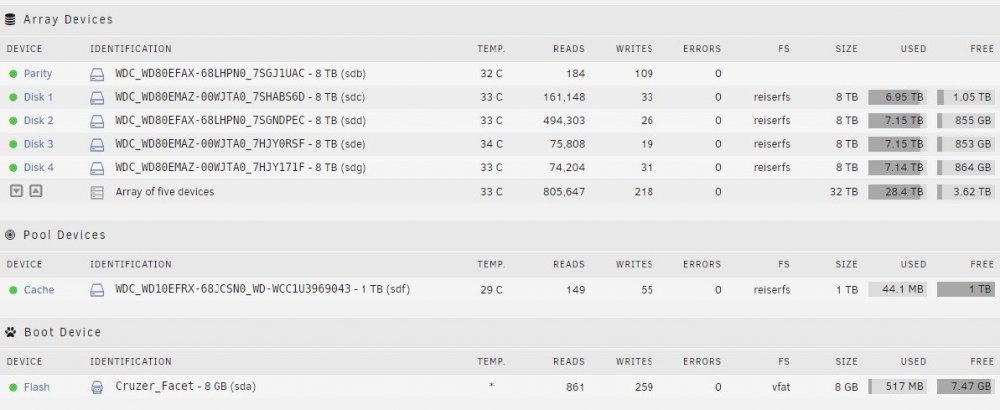
I have an unRaid system with an array of 5 devices (an 8 Tb Parity Disk and 4 each 8 Tb disks, plus a 1 Tb Cache) running on a small Supermicro X7SPA-H board with an Intel Atom processor. I have added bigger disks as I filled the original disks. Otherwise, this array has been running trouble-free since 2013, and it is absolutely the BEST software I have ever used. I am planning to move this all to a Supermicro board with dual Intel Xeon LGA2011v2 processors. When I first installed unRaid, I used reiserfs as my file system. Before I move it over - I have considered migrating to XFS because I have read that XFS is more reliable, and faster (for more than 2 disks). I don't really want to buy more than another 1 or 2 disks. I had a couple of questions: 1. Is this change to XFS worth making? 2. I wondered if I could simply 1. go to <Settings> <Disk Settings> <Default File System> and set default to XFS, shut down the array, remove and replace a disk, and restart and rebuild the array (will it rebuild with XFS if I set the default)? Then move to the next disk until I finished rebuilding all 4 disks? Does it hurt to change the default, even though it has previously been reiserfs. 3. Assuming this is worth doing, Is there a better way to do it (I have been thinking of a Netcat Tar Pipe onto a new disk on a different, temporary unRaid instance and then run through all 4 disks) approach - but am way over my head there). I apologize if there is a topic on this - but I could not seem to find one. Thanks, Richard