





mlody11
Members
-
Joined
-
Last visited
-
May be a bit early still because I have gone 2 weeks between errors but I think they've been occurring more frequently lately so I think the ipvlan vs macvlan might have solved it.
-
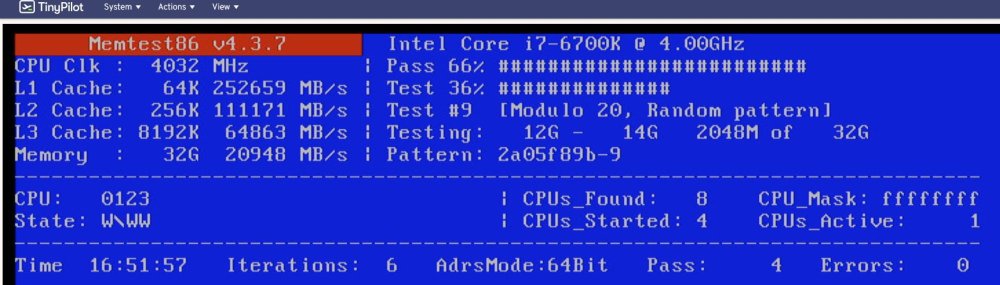
Sure, I keep them on a Splunk server so here is the csv export for it. Attached is the overnight memtest result too. crash_logs.csv I should add... I did some research and I am running custom static IPs and docker access to the host. So, about 10 minutes ago I switch to ipvlan instead of macvlan for docker.
-
The CPU is, what is fairly old now, i7 6700K. None of it is overclocked. Its running with 4 sticks of 8GB RAM. The memtest has done 2 passes at this point, 0 errors. Really stumped on what is happening.
-
I've been dealing with the Unraid kernel going into panic for many weeks now and I don't what to do at this point. Here is what I've done so far. 1) replaced power supply 2) replaced motherboard 3) replaced memory 4) replaced CPU (but with same type) 5) switch from SATA multiplier to SAS controller (all drives are on the SAS controller except for the NVME drives) Still getting kernel panics. Please help. Diagnostics attached. doing memtest again but the memory was replaced... so I'd be amazed. tower-diagnostics-20221105-1336.zip
-
But something must have caused the corruption problem since its a very fresh install, after replacing the memory and power supply. Would a filesystem check reveal the source of the corruption?
-
That drive was wiped fresh about 2 days ago.
-
Understood on the port multiplier, this thing has been running like this for about 2 years, with the port multiplier so unless something changed to now cause an issue with that, seems like that wouldn't be it. nvme0n1p1 is a nvme drive attached to the m2 connector on the motherboard. If that is causing an issue... motherboard would be the issue? Because there are no cable and no port multipliers on that port.
-
I have not done a memtest on my new memory, I guess its possible to have 2 bad batches of memory but I didn't think it would be likely. I can do that... Attached is the diagnostics. tower-diagnostics-20220920-0916.zip
-
Having sporadic issues with the server. I had numerous issues initially with BTRFS errors. I replaced the memory and the errors persisted. I replaced the power supply, the errors persisted. I wiped the cache pools, all of which were BTRFS file systems... turned one into XFS (this one stopped becoming an issue), but I need the others to be BTRFS because I need a pool of drives. The errors persists, below is sample. Any thoughts on what to troubleshoot next? I also removed a drive that I thought might be causing this issue but now a different drive is complaining. In fact, seems like 2 of them. Machine is an i7 6700K <2>Sep 19 16:10:54 Tower kernel: BTRFS: error (device sdi1) in write_all_supers:4369: errno=-5 IO failure (errors while submitting device barriers.) <3>Sep 19 16:10:54 Tower kernel: ata14.02: status: { DRDY DF ERR } <3>Sep 19 16:10:54 Tower kernel: ata14.02: status: { DRDY DF ERR } <3>Sep 19 16:10:54 Tower kernel: ata14.02: status: { DRDY DF ERR } <2>Sep 19 16:10:54 Tower kernel: BTRFS: error (device sdi1: state EA) in cleanup_transaction:1982: errno=-5 IO failure <3>Sep 19 16:10:54 Tower kernel: BTRFS error (device sdi1): bdev /dev/sdl1 errs: wr 0, rd 0, flush 1, corrupt 0, gen 0 <3>Sep 19 16:10:54 Tower kernel: I/O error, dev sdl, sector 0 op 0x1:(WRITE) flags 0x800 phys_seg 0 prio class 0 <3>Sep 19 16:10:54 Tower kernel: ata14.02: error: { ABRT } <3>Sep 19 16:10:54 Tower kernel: res 71/04:00:00:00:00/00:00:00:00:00/00 Emask 0x1 (device error) <3>Sep 19 16:10:54 Tower kernel: ata14.02: error: { ABRT } <3>Sep 19 16:10:54 Tower kernel: res 71/04:00:00:00:00/00:00:00:00:00/00 Emask 0x1 (device error) <3>Sep 19 16:10:54 Tower kernel: ata14.02: error: { ABRT } <3>Sep 19 16:10:54 Tower kernel: res 71/04:00:00:00:00/00:00:00:00:00/00 Emask 0x1 (device error) <4>Sep 19 16:10:54 Tower kernel: ata14.02: NCQ disabled due to excessive errors <3>Sep 19 16:10:53 Tower kernel: ata14.02: status: { DRDY DF ERR } <3>Sep 19 16:10:53 Tower kernel: ata14.02: status: { DRDY DF ERR } <3>Sep 19 16:10:53 Tower kernel: ata14.02: status: { DRDY DF ERR } <3>Sep 19 16:10:53 Tower kernel: ata14.02: error: { ABRT } <3>Sep 19 16:10:53 Tower kernel: res 71/04:00:00:00:00/00:00:00:00:00/00 Emask 0x1 (device error) <3>Sep 19 16:10:53 Tower kernel: ata14.02: error: { ABRT } <3>Sep 19 16:10:53 Tower kernel: res 71/04:00:00:00:00/00:00:00:00:00/00 Emask 0x1 (device error) <3>Sep 19 16:10:53 Tower kernel: ata14.02: error: { ABRT } <3>Sep 19 16:10:53 Tower kernel: res 71/04:00:00:00:00/00:00:00:00:00/00 Emask 0x1 (device error) <13>Sep 19 16:04:25 Tower root: Error response from daemon: error while removing network: network br0 id feb81cce98f28c20f684eaa33e288035dcede3e461c88eb536ae334b3f1e40f0 has active endpoints <2>Sep 19 12:21:40 Tower kernel: BTRFS: error (device sdi1: state EA) in cleanup_transaction:1982: errno=-5 IO failure <3>Sep 19 12:21:40 Tower kernel: ata14.02: status: { DRDY DF ERR } <3>Sep 19 12:21:40 Tower kernel: ata14.02: status: { DRDY DF ERR } <3>Sep 19 12:21:40 Tower kernel: ata14.02: error: { ABRT } <3>Sep 19 12:21:40 Tower kernel: res 71/04:00:00:00:00/00:00:00:00:00/00 Emask 0x1 (device error) <3>Sep 19 12:21:40 Tower kernel: ata14.02: error: { ABRT } <3>Sep 19 12:21:40 Tower kernel: res 71/04:00:00:00:00/00:00:00:00:00/00 Emask 0x1 (device error) <3>Sep 19 12:21:40 Tower kernel: ata14.02: error: { ABRT } <3>Sep 19 12:21:40 Tower kernel: ata14.02: error: { ABRT } <2>Sep 19 12:21:40 Tower kernel: BTRFS: error (device sdi1) in write_all_supers:4369: errno=-5 IO failure (errors while submitting device barriers.) <3>Sep 19 12:21:40 Tower kernel: BTRFS error (device sdi1): bdev /dev/sdl1 errs: wr 0, rd 0, flush 1, corrupt 0, gen 0 <3>Sep 19 12:21:40 Tower kernel: I/O error, dev sdl, sector 0 op 0x1:(WRITE) flags 0x800 phys_seg 0 prio class 0 <3>Sep 19 12:21:40 Tower kernel: ata14.02: error: { ABRT } <3>Sep 19 12:21:40 Tower kernel: res 71/04:00:00:00:00/00:00:00:00:00/00 Emask 0x1 (device error) <3>Sep 19 12:21:40 Tower kernel: ata14.02: error: { ABRT } <3>Sep 19 12:21:40 Tower kernel: res 71/04:00:00:00:00/00:00:00:00:00/00 Emask 0x1 (device error) <3>Sep 19 12:21:40 Tower kernel: ata14.02: status: { DRDY DF ERR } <4>Sep 19 12:21:40 Tower kernel: ata14.02: NCQ disabled due to excessive errors <3>Sep 19 12:21:40 Tower kernel: ata14.02: status: { DRDY DF ERR } <3>Sep 19 12:21:40 Tower kernel: ata14.02: status: { DRDY DF ERR } <3>Sep 19 12:21:40 Tower kernel: res 71/04:00:00:00:00/00:00:00:00:00/00 Emask 0x1 (device error) <3>Sep 19 12:21:40 Tower kernel: ata14.02: status: { DRDY DF ERR } <3>Sep 19 12:21:40 Tower kernel: res 71/04:00:00:00:00/00:00:00:00:00/00 Emask 0x1 (device error)
-
So, even if its a single type pool, if I write 10 gb within 15 minutes, it will evenly distribute that 10gb across 5 drives within 15 minutes, effectively stopping any drive from going to sleep. So, it doesn't even matter where the metadata is stored.
-
Hi, I run a btrfs pool of 5 disk for use as an NVR storage and I try to sleep as many disks as possible because 5 disks running non-stop can amount to some electricity. I've been tinkering with things and I'm wondering about options. I noticed that when I write anything to the pool of 5, it spins up all of the drives. This is presumably because the metadata is setup in a RAID0 configuration. Is there any way to change that to single when using a cache pool? As an alternative, I noticed synology has an option to move the metadata to a SDD. Is that a possibility with a BTRFS pool? If we could run two or more "unraid pools," I'd choose that option so here's to hoping that is in the release pipeline

