





John K
Members
-
Joined
-
Last visited
-
I am also trying to do this. Does anyone know of a way to disable the spin down via the command line so it can be included in a script? Thanks very much in advance.
-
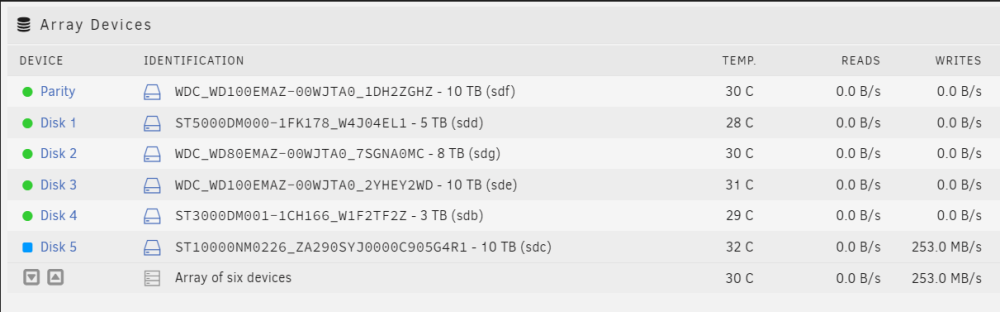
I'm happy to report that my 4Kn drive is now performing as expected. Originally, I low level formatted the drive using sg_format to disable Protection Type 2 which appeared to work normally. This time around, I re-formatted the drive using openSeaChest_FormatUnit. I re-ran all of the commands above to check sector sizes and such and cannot find any differences, so I really don't know why the drive is behaving differently after formatting with openSeaChest versus sg_format. It could just be coincidence. Nonetheless, I'm happy to declare victory. Thanks very much for all the help.
-
Unless anyone else has troubleshooting suggestions, I may start over, low level formatting the drive and then letting Unraid zero it again. I very much appreciate all of the help, Jorge.
-
When I was doing the disk clear through Unraid, the system was very quiet. I had Docker containers and VMs stopped. The write performance would never get higher than 50-60 MB/s, even for brief periods. One odd behavior, which I mentioned in my original post, was if I booted the system with the 4Kn drive unassigned, a pre-clear (using the preclear plugin) would run at 200-250 MB/s. If I then assigned the drive, started an Unraid disk clear (which ran at ~50 MB/s), stopped the disk clear, unassigned the drive, and then ran the pre-clear again, the zeroing performance would max out at ~50 MB/s instead of 200-250 MB/s. It seems as if once Unraid accessed the drive, the performance was capped until the system was rebooted. I should also note that Unraid didn't recognize the drive as zero'ed after running the pre-clear (I tried both the pre-clear plugin and the Docker container). Unraid always wants to clear the disk itself. root@Filer:~# lspci -d 1000: -vv 01:00.0 Serial Attached SCSI controller: Broadcom / LSI SAS2008 PCI-Express Fusion-MPT SAS-2 [Falcon] (rev 03) Subsystem: Dell 6Gbps SAS HBA Adapter Control: I/O- Mem+ BusMaster+ SpecCycle- MemWINV- VGASnoop- ParErr- Stepping- SERR- FastB2B- DisINTx+ Status: Cap+ 66MHz- UDF- FastB2B- ParErr- DEVSEL=fast >TAbort- <TAbort- <MAbort- >SERR- <PERR- INTx- Latency: 0, Cache Line Size: 64 bytes Interrupt: pin A routed to IRQ 16 IOMMU group: 15 Region 0: I/O ports at 6000 [disabled] [size=256] Region 1: Memory at 85540000 (64-bit, non-prefetchable) [size=64K] Region 3: Memory at 85500000 (64-bit, non-prefetchable) [size=256K] Expansion ROM at 85400000 [disabled] [size=1M] Capabilities: [50] Power Management version 3 Flags: PMEClk- DSI- D1+ D2+ AuxCurrent=0mA PME(D0-,D1-,D2-,D3hot-,D3cold-) Status: D0 NoSoftRst+ PME-Enable- DSel=0 DScale=0 PME- Capabilities: [68] Express (v2) Endpoint, MSI 00 DevCap: MaxPayload 4096 bytes, PhantFunc 0, Latency L0s <64ns, L1 <1us ExtTag+ AttnBtn- AttnInd- PwrInd- RBE+ FLReset+ SlotPowerLimit 0W DevCtl: CorrErr+ NonFatalErr+ FatalErr+ UnsupReq+ RlxdOrd+ ExtTag+ PhantFunc- AuxPwr- NoSnoop+ FLReset- MaxPayload 256 bytes, MaxReadReq 512 bytes DevSta: CorrErr- NonFatalErr- FatalErr- UnsupReq- AuxPwr- TransPend- LnkCap: Port #0, Speed 5GT/s, Width x8, ASPM L0s, Exit Latency L0s <64ns ClockPM- Surprise- LLActRep- BwNot- ASPMOptComp- LnkCtl: ASPM Disabled; RCB 64 bytes, Disabled- CommClk+ ExtSynch- ClockPM- AutWidDis- BWInt- AutBWInt- LnkSta: Speed 5GT/s, Width x8 TrErr- Train- SlotClk+ DLActive- BWMgmt- ABWMgmt- DevCap2: Completion Timeout: Range BC, TimeoutDis+ NROPrPrP- LTR- 10BitTagComp- 10BitTagReq- OBFF Not Supported, ExtFmt- EETLPPrefix- EmergencyPowerReduction Not Supported, EmergencyPowerReductionInit- FRS- TPHComp- ExtTPHComp- AtomicOpsCap: 32bit- 64bit- 128bitCAS- DevCtl2: Completion Timeout: 50us to 50ms, TimeoutDis- LTR- 10BitTagReq- OBFF Disabled, AtomicOpsCtl: ReqEn- LnkCtl2: Target Link Speed: 5GT/s, EnterCompliance- SpeedDis- Transmit Margin: Normal Operating Range, EnterModifiedCompliance- ComplianceSOS- Compliance Preset/De-emphasis: -6dB de-emphasis, 0dB preshoot LnkSta2: Current De-emphasis Level: -6dB, EqualizationComplete- EqualizationPhase1- EqualizationPhase2- EqualizationPhase3- LinkEqualizationRequest- Retimer- 2Retimers- CrosslinkRes: unsupported Capabilities: [d0] Vital Product Data pcilib: sysfs_read_vpd: read failed: No such device Not readable Capabilities: [a8] MSI: Enable- Count=1/1 Maskable- 64bit+ Address: 0000000000000000 Data: 0000 Capabilities: [c0] MSI-X: Enable+ Count=15 Masked- Vector table: BAR=1 offset=0000e000 PBA: BAR=1 offset=0000f800 Capabilities: [100 v1] Advanced Error Reporting UESta: DLP- SDES- TLP- FCP- CmpltTO- CmpltAbrt- UnxCmplt- RxOF- MalfTLP- ECRC- UnsupReq- ACSViol- UEMsk: DLP- SDES- TLP- FCP- CmpltTO- CmpltAbrt- UnxCmplt- RxOF- MalfTLP- ECRC- UnsupReq- ACSViol- UESvrt: DLP+ SDES+ TLP- FCP+ CmpltTO- CmpltAbrt- UnxCmplt- RxOF+ MalfTLP+ ECRC- UnsupReq- ACSViol- CESta: RxErr- BadTLP- BadDLLP- Rollover- Timeout- AdvNonFatalErr- CEMsk: RxErr- BadTLP- BadDLLP- Rollover- Timeout- AdvNonFatalErr+ AERCap: First Error Pointer: 00, ECRCGenCap+ ECRCGenEn- ECRCChkCap+ ECRCChkEn- MultHdrRecCap- MultHdrRecEn- TLPPfxPres- HdrLogCap- HeaderLog: 00000000 00000000 00000000 00000000 Capabilities: [138 v1] Power Budgeting <?> Kernel driver in use: mpt3sas Kernel modules: mpt3sas
-
Interestingly, booting on just the single drive with a fresh Unraid USB stick, I see full-speed write performance. In case helpful, I've attached diags from the test system. Other thoughts on how to determine the root cause? Thanks. root@Tower:/mnt/disk1# dd if=/dev/zero of=test2.img bs=1G count=1 oflag=dsync 1+0 records in 1+0 records out 1073741824 bytes (1.1 GB, 1.0 GiB) copied, 4.85953 s, 221 MB/s tower-diagnostics-20230223-1535.zip

-
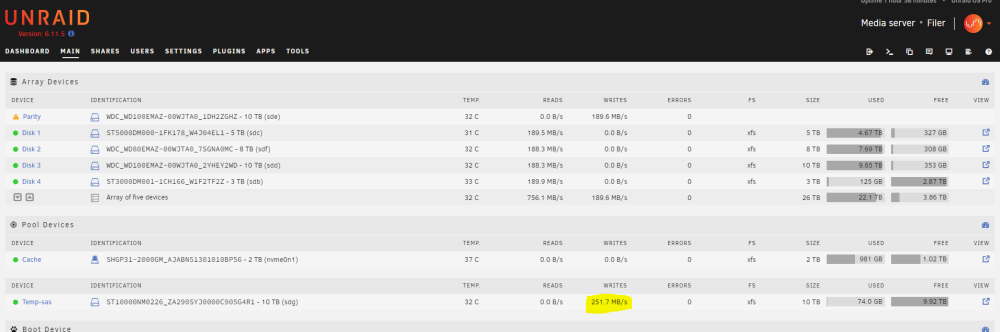
OK! Back on track with troubleshooting of the original issue... I assigned the 4Kn SAS disk to a new cache pool and retested the write speed. It performed at the speed that I would expect from the drive. So it definitely seems to be md related. Can you think of any further tests to try to narrow down why? Do you see any value in booting from a freshly made Unraid USB stick with just the 4Kn SAS drive connected? Would a single drive Unraid "array" use the md driver? Thanks for your ongoing help, JorgeB. root@Filer:/mnt/temp-sas# dd if=/dev/zero of=/mnt/temp-sas/test1.img bs=1G count=2 oflag=dsync 2+0 records in 2+0 records out 2147483648 bytes (2.1 GB, 2.0 GiB) copied, 9.59568 s, 224 MB/s
-
A hard lesson that I won't soon forget! 🙂 You may be on to something with xfs. root@Filer:/dev# blkid /dev/sda1: LABEL_FATBOOT="UNRAID" LABEL="UNRAID" UUID="272B-4CE1" BLOCK_SIZE="512" TYPE="vfat" /dev/loop1: TYPE="squashfs" /dev/sdf1: UUID="0913c306-1a66-45c8-b8c5-9bd222024830" BLOCK_SIZE="512" TYPE="xfs" PARTUUID="6af48176-ab7d-4256-a4c3-0cc7b2e1571a" /dev/nvme0n1p1: UUID="6aab72e1-6b1e-4d71-841b-198c562e1d64" BLOCK_SIZE="512" TYPE="xfs" PARTUUID="a363d4e2-01" /dev/sdd1: UUID="58cb496c-f9dd-481f-9759-4bb2253c004a" BLOCK_SIZE="512" TYPE="xfs" PARTUUID="71ca7a66-f8cb-4a1c-ae4e-d081cbf4fdb6" /dev/sdb1: UUID="bad831f6-443f-47d7-acd7-0312135edcd7" BLOCK_SIZE="512" TYPE="xfs" PARTUUID="b9ee617a-18c6-4901-b7f5-5d0b77ab2c33" /dev/loop0: TYPE="squashfs" /dev/sdc1: UUID="a853f64b-4308-435f-ab54-6b7f6da06779" BLOCK_SIZE="512" TYPE="xfs" PARTUUID="407d5887-5172-4e57-969b-a8d93c729f09" /dev/sdg1: PARTUUID="4080ed17-b0b3-4fb6-990e-162d6605431f" /dev/sde1: PARTUUID="92515382-768b-4460-b640-626af0ecc063" Should I simply change the file system under the cache disk settings to xfs and try to restart? Thanks again.
-
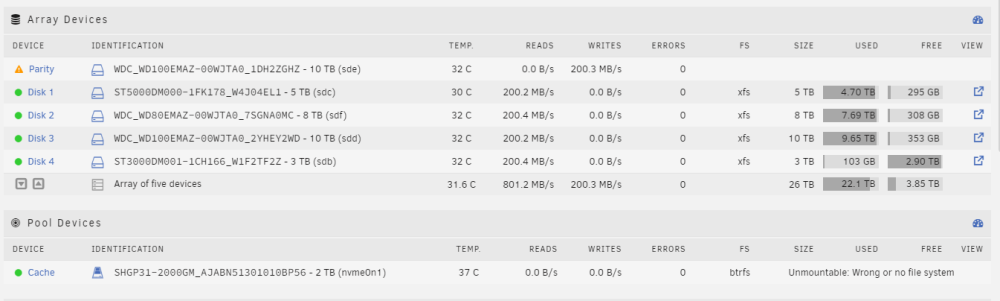
I fear that I didn't understand how to do this and have now hosed up my cache disk. I tried to add the disk to my cache pool, but when I did this and started the array, both disks showed "Unmountable: No pool uuid". Worried that I did something wrong, I tried to reverse my steps, removed the second disk from my cache pool, and set it down to a size of 1 drive. My one original cache disk continued to show No pool uuid. I then stopped the array and rebooted. After the reboot, the one original drive now shows "Unmountable: Wrong or no file system" as shown below. Syslog shows the following: Feb 23 12:12:02 Filer emhttpd: shcmd (718): mount -t btrfs -o noatime,space_cache=v2 /dev/nvme0n1p1 /mnt/cache Feb 23 12:12:02 Filer root: mount: /mnt/cache: wrong fs type, bad option, bad superblock on /dev/nvme0n1p1, missing codepage or helper program, or other error. After searching other posts, I tried to restore my superblock from the backup. root@Filer:/dev# btrfs-select-super -s 1 /dev/nvme0n1p1 No valid Btrfs found on /dev/nvme0n1p1 ERROR: open ctree failed Is there anything else I can try as I would really like to recover the data if I can. Note that I never issued a format on the cache disk, so I'm hoping that there is still some hope. Thanks.
-
Are there steps that you can recommend to get confident that the issue is caused by the 512K sectors on a 4Kn drive? If this is causing the significant write performance decrease, I think the community would benefit from this being broadly known. With 4Kn drives becoming more and more common, people my want to avoid them. (I know I would have.) Thanks very much for your continued help on this.
-
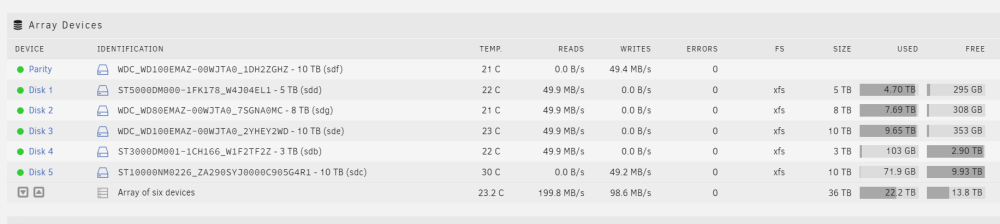
The disk write speed is unchanged. But one odd thing (I think) is that the disk write speed of my new disk (Disk 5) causes all of my other data disks to read at the same speed. Perhaps this is part of the parity calculation process when parity write is enabled? I don't think I've seen that before. root@Filer:/# dd if=/dev/zero of=/mnt/disk5/test1.img bs=1G count=2 oflag=dsync 2+0 records in 2+0 records out 2147483648 bytes (2.1 GB, 2.0 GiB) copied, 40.7871 s, 52.7 MB/s
-
The drive finished clearing and formatting. Below is the requested fdisk -l. root@Filer:/mnt/disk5# fdisk -l /dev/md5 Disk /dev/md5: 9.1 TiB, 10000831295488 bytes, 19532873624 sectors Units: sectors of 1 * 512 = 512 bytes Sector size (logical/physical): 512 bytes / 512 bytes I/O size (minimum/optimal): 512 bytes / 512 bytes To test if performance is normal after the format is finished, I ran dd if=/dev/zero of=/mnt/disk5/test1.img bs=1G count=2 oflag=dsync. As shown in the screenshot below, the 4Kn SAS drive seems to be still maxing out at 50 MB/s. Any thoughts are much appreciated.

-
Thanks very much, @JorgeB. It looks like I need to wait for the disk clear to finish in a couple of days before I can give the output of fdisk. Below is the output while the disk clear is in progress. (BTW, I moved the drive to slot 5 during other troubleshooting attempts). I will follow-up once it is done. root@Filer:/dev# fdisk -l /dev/md5 fdisk: cannot open /dev/md5: Input/output error In case it helps, as another test, I added the 4Kn drive as my second parity drive to see what the parity build speed would be. It similarly ran at the degraded ~50 MB/s.
-
Hi folks, I'm trying to get to the bottom of a write performance issue on a new SAS drive. I've exhausted all of the troubleshooting steps I can find on the internet. I hoping that someone here might be able to give me some additional ideas. The problem: I added a Seagate 10 TB 4Kn SAS drive (ST10000NM0226) to my system and initially ran a pre-clear using the Preclear Plugin to stress test the drive. The drive ran well with write speeds when zeroing of 115-250 MB/s. I then added the drive as an additional data drive in my array and Unraid wanted to run a disk-clear which it started, but the write speed doesn't get above about 50 MB/s. Interestingly, if I cancel Unraid's disk clear and try to run another pre-clear zeroing pass, the Preclear Plugin will only get the same 50 MB/s. If I reboot my Unraid box, the Preclear Plugin will once again run at ~250 MB/s until Unraid's disk clear accesses the drive - and then write performance maxes out at ~50 MB/s. Things I've tried so far: - Upgraded LSI SAS2008 SAS controller firmware from 19.00.00 to 20.00.07. - Shut down docker and VMs. - Booted in safe mode. - Moved the drive in question to a different SAS connector. - Confirmed the SAS controller is connected to the PCIe bus at x8. - Confirmed no obvious errors appearing in syslog This is the first SAS drive and first 4K native logical sector size drive in my array. The only thing that I can think of now is that the 4K sector size of the new SAS drive mixed with my other (SATA) drives which are 512 logical sector size might be causing the issue. To test this, I'm thinking about making a new Unraid flash and bring it up with just the one SAS drive (assuming it will come up with one drive) and see if Unraid's disk clear is similarly slow without the 512 byte logical sector size drives. Additional troubleshooting: I connected an old 3TB SATA drive with a 512 sector size to the SAS controller along with the 10 TB SAS disk. When I added only the 3 TB disk to the array and Unraid cleared the disk, the write speed was a health ~200 MB/s. I then cancelled the disk clear and added both the 3 TB and 10 TB disk to the array. When the disk clear started, both disks started clearing at 50 MB/s. It is looking more and more that joining a 4Kn sector drive to an array with 512 sectors causes the clearing speed to be very slow. Time will tell whether once the clearing finishes, if the drive will then allow writes at full speed. Any thoughts would be greatly appreciated! John filer-diagnostics-20230218-1634.zip




