





dexdiman
Members
-
Joined
-
Last visited
-
For anyone else that comes across this post. I tried what @Linguafoeda described above but it wasn't working for me. Dockers said they were running but I couldn't open them and their logs were filled with permission denied errors. I stopped the docker service. Copied the docker and appdata folder to another location. Not necessarily needed, but just in case. (for me they were located in /mnt/user/appdata and /appdata/docker) Opened the web terminal and ran: newperms /mnt/user/appdata Which runs: chmod -R u-x,go-rwx,go+u,ugo+X /mnt/user/appdata chown -R nobody:users /mnt/user/appdata chmod -R 777 /mnt/user/appdata As you can see, it runs the 'chmod -R 777' command, which I ran earlier, like the OP did, and the dockers were still having issues. Maybe, for my instance, the other permission commands needed to run first. I don't really know. (Found this command in the reddit post provided in the OP's note) Started the docker service. Reinstalled the dockers via apps->previous apps Everything came back up like nothing happened. I do backup my appdata folder frequently and doing a restore didn't fix the issue either. The issue is with the permissions for the appdata folder itself and the backup process either doesn't backup permissions or backs up the docker folders inside the appdata folder (so appdata permissions wouldn't get backed up anyway). Thanks @Linguafoeda for discovering this info. Just wanted to add another potential solution to your post.
-
It's not a hardware issue, or at least a hardware failing issue. I downgraded back to 6.12.4 on Friday and the system has been running totally fine since. I haven't changed any hardware, dockers, VMs, or settings other than the OS upgrade/downgrade. This is my core Unraid server and it doesn't get updated very often due to unwanted downtime. Is 6.12.4 to 6.12.8 to much of a jump? My other Unraid server is running 6.12.8 fine but I do upgrade that one at every update.
-
Here is the syslog I would like to add that all dockers, VMs, services, etc are not accessible as well when the server is locked up. syslog-192.168.15.10.log
-
I've enabled syslog and will updated after a lockup.
-
Since I updated to 6.12.8 Unraid has locked up at some point during the middle of the night (I know it locks up between 10pm and 6am). The next morning I wouldn't be able to access the web interface or physically log into the server. I would type the username into the console press enter and after 60 seconds a message would say that it timed out and the username field would reappear. I would have to manually press the power button on the server turning it off and back on before I could access the server at all again. Then the server would function fine until some point in the night again starting the whole process over. This has been happening everyday since I updated to 6.12.8. I have seen a few threads about switching from macvlan to ipvlan in the docker network settings. I did that about a week ago and am still experiencing the lockups. alderaan-diagnostics-20240305-0925.zip
-
Any bits of insight?
-
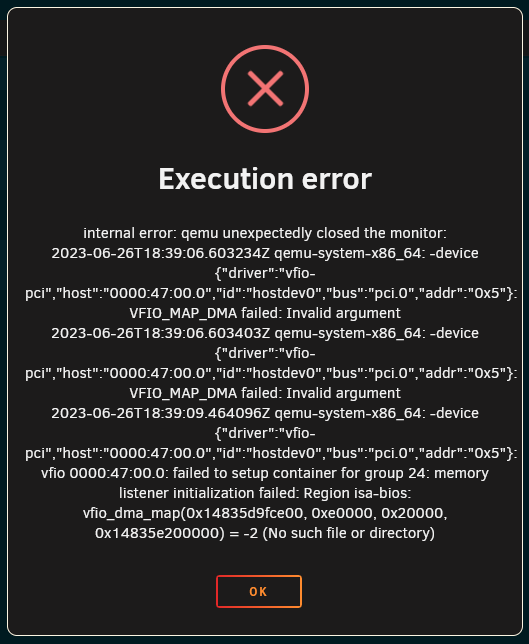
I've been a longtime user of Unraid and VMs but this is my first time trying to pass a GPU through to a VM and I can't seem to figure out what the issue is. I'd appreciate some help getting this going. I've read lots of forums and watched many videos and at this point I feel like I'm still missing a piece. Thanks. IOMMU is enabled: I've ticked the GPU and it's audio device under system devices and clicked "Bind selected to VFIO at boot": I've set "PCIe ACS override" to "Downstream" and set "VFIO allow unsafe interrupts" to "yes" based off some other forum threads: But when I start the VM I get a page of errors: Here is the VM config: <?xml version='1.0' encoding='UTF-8'?> <domain type='kvm'> <name>remote gaming</name> <uuid>a7409034-92df-e328-f170-999fb6dbaba8</uuid> <metadata> <vmtemplate xmlns="unraid" name="Windows 10" icon="windows.png" os="windows10"/> </metadata> <memory unit='KiB'>8388608</memory> <currentMemory unit='KiB'>8388608</currentMemory> <memoryBacking> <nosharepages/> </memoryBacking> <vcpu placement='static'>4</vcpu> <cputune> <vcpupin vcpu='0' cpuset='50'/> <vcpupin vcpu='1' cpuset='54'/> <vcpupin vcpu='2' cpuset='51'/> <vcpupin vcpu='3' cpuset='55'/> </cputune> <os> <type arch='x86_64' machine='pc-i440fx-7.1'>hvm</type> <loader readonly='yes' type='pflash'>/usr/share/qemu/ovmf-x64/OVMF_CODE-pure-efi.fd</loader> <nvram>/etc/libvirt/qemu/nvram/a7409034-92df-e328-f170-999fb6dbaba8_VARS-pure-efi.fd</nvram> </os> <features> <acpi/> <apic/> <hyperv mode='custom'> <relaxed state='on'/> <vapic state='on'/> <spinlocks state='on' retries='8191'/> <vendor_id state='on' value='none'/> </hyperv> </features> <cpu mode='host-passthrough' check='none' migratable='on'> <topology sockets='1' dies='1' cores='2' threads='2'/> <cache mode='passthrough'/> <feature policy='require' name='topoext'/> </cpu> <clock offset='localtime'> <timer name='hypervclock' present='yes'/> <timer name='hpet' present='no'/> </clock> <on_poweroff>destroy</on_poweroff> <on_reboot>restart</on_reboot> <on_crash>restart</on_crash> <devices> <emulator>/usr/local/sbin/qemu</emulator> <disk type='file' device='disk'> <driver name='qemu' type='raw' cache='writeback'/> <source file='/mnt/disks/VM_Storage/remote gaming/vdisk1.img'/> <target dev='hdc' bus='sata'/> <serial>vdisk1</serial> <boot order='1'/> <address type='drive' controller='0' bus='0' target='0' unit='2'/> </disk> <controller type='usb' index='0' model='ich9-ehci1'> <address type='pci' domain='0x0000' bus='0x00' slot='0x07' function='0x7'/> </controller> <controller type='usb' index='0' model='ich9-uhci1'> <master startport='0'/> <address type='pci' domain='0x0000' bus='0x00' slot='0x07' function='0x0' multifunction='on'/> </controller> <controller type='usb' index='0' model='ich9-uhci2'> <master startport='2'/> <address type='pci' domain='0x0000' bus='0x00' slot='0x07' function='0x1'/> </controller> <controller type='usb' index='0' model='ich9-uhci3'> <master startport='4'/> <address type='pci' domain='0x0000' bus='0x00' slot='0x07' function='0x2'/> </controller> <controller type='pci' index='0' model='pci-root'/> <controller type='sata' index='0'> <address type='pci' domain='0x0000' bus='0x00' slot='0x03' function='0x0'/> </controller> <controller type='virtio-serial' index='0'> <address type='pci' domain='0x0000' bus='0x00' slot='0x04' function='0x0'/> </controller> <interface type='bridge'> <mac address='52:54:00:16:05:27'/> <source bridge='br7'/> <model type='virtio-net'/> <address type='pci' domain='0x0000' bus='0x00' slot='0x02' function='0x0'/> </interface> <serial type='pty'> <target type='isa-serial' port='0'> <model name='isa-serial'/> </target> </serial> <console type='pty'> <target type='serial' port='0'/> </console> <channel type='unix'> <target type='virtio' name='org.qemu.guest_agent.0'/> <address type='virtio-serial' controller='0' bus='0' port='1'/> </channel> <input type='tablet' bus='usb'> <address type='usb' bus='0' port='1'/> </input> <input type='mouse' bus='ps2'/> <input type='keyboard' bus='ps2'/> <audio id='1' type='none'/> <hostdev mode='subsystem' type='pci' managed='yes'> <driver name='vfio'/> <source> <address domain='0x0000' bus='0x47' slot='0x00' function='0x0'/> </source> <address type='pci' domain='0x0000' bus='0x00' slot='0x05' function='0x0'/> </hostdev> <hostdev mode='subsystem' type='pci' managed='yes'> <driver name='vfio'/> <source> <address domain='0x0000' bus='0x47' slot='0x00' function='0x1'/> </source> <address type='pci' domain='0x0000' bus='0x00' slot='0x06' function='0x0'/> </hostdev> <memballoon model='none'/> </devices> </domain>



-
It seems to be working now suddenly. I forced powered off my server (via the power button) and powered it back on and now the array is starting and error is gone. Even though I rebooted a half dozen times previously during troubleshooting. Anyone encounter this error before or know how I might prevent it in the future?
-
I powered off my unraid server to upgrade the UPS. When I powered the server back on, I was unable to start the array. As far as I can see the array is fine but when I click the "Start" array button I see a very strange message appear in the logs. May 25 10:19:29 Coruscant nginx: 2023/05/25 10:19:29 [error] 6598#6598: *21730 connect() to unix:/var/run/emhttpd.socket failed (11: Resource temporarily unavailable) while connecting to upstream, client: 192.168.2.74, server: , request: "POST /update.htm HTTP/2.0", upstream: "http://unix:/var/run/emhttpd.socket:/update.htm", host: "192.168.15.1", referrer: "https://192.168.15.1/Main" I'm also working to get the diagnostic file but it's hanging during the compile and not creating one.
-
I figured it out. I have two Unraid servers and used to use Portainer. I had it setup for one instance of Portainer to be able to manage both servers. I had added this line to the docker.cfg to allow docker to be managed remotely. DOCKER_OPTS="-H unix:///var/run/diocker.sock -H tcp://0.0.0.0:2376" I removed this line and it appears to be working now. Not sure why this decided to be a problem now. I stopped using Portainer awhile ago and have rebooted unraid since then. 🤷♂️
-
I booted into safe mode and am still seeing the same error.
-
What would that tell me booting into safe made? If the error is gone then it might be a plug-in or something like that? If the error persists then it something up with my Unraid config?
-
I've done that a few times and this error still appears.
-
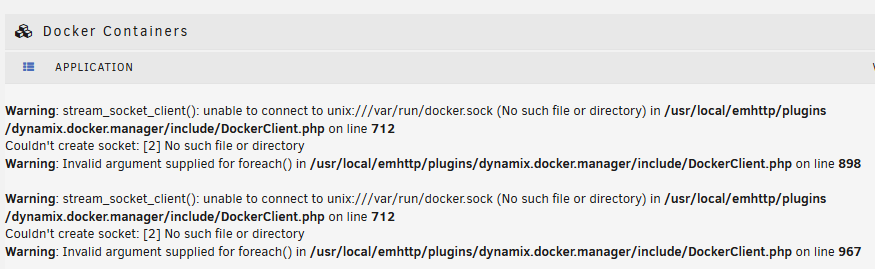
Lost power for less than a second and the unraid server went down. Rebooted and now I'm seeing this error. I've tried the most common solutions to this error by recreated docker.img, recreated the USB stick, and ran a memtest (passed). Nothing seems to fix it so it must be something else. alderaan-diagnostics-20230122-2048.zip
-
Yeah maybe. Who knows. I work in IT Infrastructure and see this kind of thing all the time. User tries a bunch of troublshooting - they call me - I try the same things they did and one of them fixes the issue. LOL.


