grsnow
Members
-
Joined
-
Last visited
Everything posted by grsnow
-
Well, it looks like "No Errors Logged" during the Extended Self Test. What do you think best steps are to move forward? I was thinking about rebuilding the drive back onto itself per these instructions (https://docs.unraid.net/unraid-os/manual/storage-management/#rebuilding-a-drive-onto-itself) after shutting down the server and reseating the connections. I have a 20TB replacement drive showing up on Thursday, just in case.
-
This is gonna take awhile. It's only at 20%.
-
The Extended Test is Running now. Do the Diagnostics show anything useful?
-
The title pretty much says it all. I missed an email warning from 3.5 days ago that told me it was disabled and being emulated. There haven't been any changes to the server lately (hardware wise) other than an upgrade from v6.12.10 to 7.01 a week ago (which went without a hitch and only took about 10 minutes). Short SMART Self Test shows no problem with the disk. Is this disk actually bad or might it be a cable problem. I did have a cable problem last year but it showed itself as UDMA SMART Errors, but this looks different. I've attached my "unraid-diagnostics-20250512-0009.zip" file. Thanks for any help you can provide. unraid-diagnostics-20250512-0009.zip
-
For anyone that is using this template and wondering why your docker instance is no longer doing it's scheduled Speedtest runs, here is why. There is no longer a settings page in the docker app itself and all settings are now handled with Environment Variables. Per this webpage: https://github.com/alexjustesen/speedtest-tracker/releases/tag/v0.20.0 you now have to specify all of your settings in the template by creating each of the following variables (with examples): APP_TIMEZONE=America/New_York DISPLAY_TIMEZONE=America/New_York SPEEDTEST_SCHEDULE= # can be represented as a cron schedule same as before. SPEEDTEST_SERVERS= # you can add one or many servers separated by a comma (i.e. "123456,654321,987654"). PRUNE_RESULTS_OLDER_THAN=0 # the default is 0 which disables result pruning, this value is in days. Mine stopped working on June 8th and I only just today noticed that there were no new data points being generated until I made these changes. When v0.20.0 first came out, I did update to LSIO's version, but I don't remember seeing the remarks about the Environment Variables at the time. I recommend that the Unraid Template also be updated with these Environment Variables by the maintainer as well. Good luck out there...
-
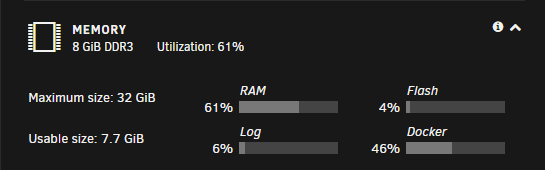
I just saw this error pop up today from the Fix Common Problems plug-in and it instructed me to post a diagnostics report to the forum so that the users could pick it apart and find my problem Interestingly in "Dashboard" on the server it says I'm only using 61% RAM. Anyway, here is my attached Diagnostics Report...thanks for any help you can provide. unraid-diagnostics-20230403-2252.zip