jessetn
Members
-
Joined
-
Last visited
Everything posted by jessetn
-
Thank you for the help. Recreated the docker.img just fine, and after a bit of fiddling with VM settings, got my VM's back up using their vdisks. For future me or other's reference, follow JorgeB's advice and make sure docker.img and libvirt.img's are backed up as well, not just appdata or your VM disks!
-
I don't have a backup of the libvirt.img but I do of the actual VM. From the logs, is there a way to tell how the corruption happened so I can prevent it in the future? Didn't have any power loss or drive failures
-
Was having some weird issues with a few containers, ultimately didn't really have time to dive in troubleshooting so I rebooted the server. Parity check started automatically after reboot, now docker and vm service both won't start. So I disable both while parity check ran. 2 days later after parity check finishes and 100k+ error corrections, Docker and VM services still won't start. Jul 1 08:28:54 kernel: BTRFS info (device loop2): using crc32c (crc32c-intel) checksum algorithm Jul 1 08:28:54 kernel: BTRFS info (device loop2): using free space tree Jul 1 08:28:54 kernel: BTRFS error (device loop2): parent transid verify failed on logical 30556160 mirror 1 wanted 937 found 935 Jul 1 08:28:54 kernel: BTRFS error (device loop2): parent transid verify failed on logical 30556160 mirror 2 wanted 937 found 935 Jul 1 08:28:54 kernel: BTRFS warning (device loop2): failed to read root (objectid=4): -5 Jul 1 08:28:54 kernel: BTRFS error (device loop2): open_ctree failed Jul 1 08:28:54 root: mount: /etc/libvirt: wrong fs type, bad option, bad superblock on /dev/loop2, missing codepage or helper program, or other error. Jul 1 08:28:54 root: dmesg(1) may have more information after failed mount system call. Jul 1 08:28:54 root: mount error Pretty sure I'll need to recreate docker.img, I've had to before, but this is the first time libvirt also won't start. I'm aware I had/have a lidarr configuration problem which is the cause of my docker image being large. Just going to end up removing it when I get docker working again. diagnostics-20240701-0915.zip
-
I found New Config referenced a few times but more related to disaster recovery, so I shied away. I will definitely try this out!
-
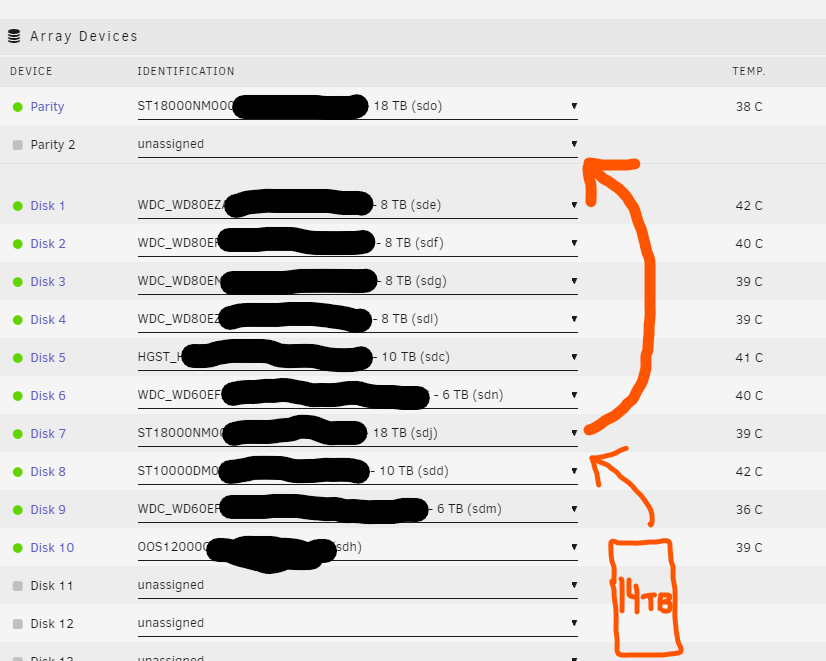
TLDR: I need to promote an 18TB array drive as a 2nd parity, and replace it on the array with a smaller 14TB drive. Short story long... I purchased 2x 18TB drives last year. I did the "parity swap" dance with a 12TB drive. Instead of being actually smart and adding the other 18TB drive as a 2nd parity right then and there, I didn't. (to be fair, I was waiting on a HDD caddy for more mounting space) Fast forward to one of my 6TB array drives failing a few months later, so I panic-swapped it to my only spare drive, the other 18TB, so my kids could continue to watch their precious Coco on repeat on Plex. I picked up 2x 14TB drives during the holiday sales. I'd like to now replace the 18TB array drive with one of the new 14TB drives, so I can utilize the 18TB as a secondary parity drive. However, I find myself a little stuck not being able to replace the 18TB array drive with anything smaller (understandable) From my understanding, the failed drive or disk swap parity dance doesn't really apply since I would be reducing the total size of the array, but surely there's a "safe" way to accomplish this? TIA!