





kabzo
Members
-
Joined
-
Last visited
-
Sorry, no idea. Probably a permissions thing I'd imagine. should I check the permisions inside of docker image or just the data/ folder?
-
Hey guys, I am a happy user of this docker, just I am not able to delete multiple folders. It always finnishes with ERROR deleting folder. What is weired, in my log I have no error message. in data/nextcloud logs is no error message. I have set the loglevel on 2. I have tried changing it to even 0 but clearly still no error messages. I tried to rescan all files from commandline but that hasnt halped either. I even tried deleting all entries from oc_file_locks but still no help. Do u have any idea why this happend and why my logs are empty? Thank
-
the problem is with database, how can i automatically backup database?? for data folder i can use crashplan.
-
Thanks worked perfectly. I got one more question though. Is there a possibility to regularky (weekly) backup whole nextcloud (meaning all data folder, installation AND MySQL database) to another share? I searched a lot but i havent found any feasible automated combination.
-
Hello guys, I am one of the super happy users of this container. Just recently very weird thing happend to me. I am not able to delete multiple folders from nextcloud. They appear in web interface but not in client (logs are empty). I googled and I figured that possible solution is to run: sudo -u www-data php occ files:scan I have trubbles to understand how can I execute such a command in the container. I would be happy if anyone could give me a hint. Thank you!
-
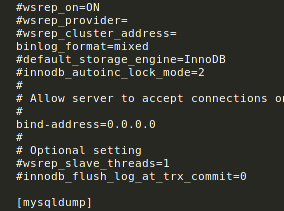
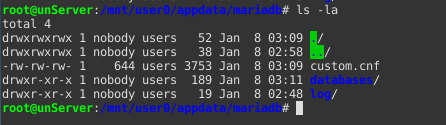
Thanks for fast reply, I figured it out. One more command I needed: chmod 644 custom.cnf this after chown, it worked!
-
Thank you for your fast reply, but this I have done already before and no help. I followed all your steps from totaly clear install with no other docker installations and clear shares.
-
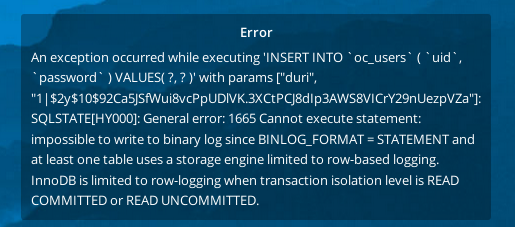
http://lime-technology.com/forum/index.php?topic=50090.msg524760#msg524760 Thank you for your reply, I tried all I could but i stucked on the same error as chuga. I have restarted everything, tried to reedit mariand cfg save and reaply chown 644 but no succes Here I am giving a picture of my appdata/mariadb
-
Hello guys, I tryied to install nextcloud with mariadb as it stands here: https://www.linuxserver.io/2016/07/28/installing-nextcloud-on-unraid/ Just when I try to create an admin user and link the database I get following error: Error while trying to create admin user: Failed to connect to the database: An exception occured in driver: SQLSTATE[HY000] [1049] Unknown database 'nextcloud' Can someone please help me with this? Thanks!
