Thunder
Members
-
Joined
-
Last visited
-
Thanks for all help, JorgeB
-
Hi JorgeB, I wasn't sure if the array had to stopped/started, but it made no difference to the result.
-
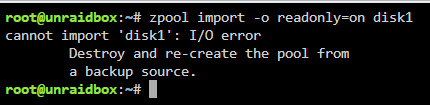
I was wondering if someone has had the same problem or are able to help with this problem. This has happen in the last week or so, after I upgraded to Version. 7.0 this may not connected. I also had a problem with one of my cache disks, which I was able to bring back online myself. I have tried "zpool import", "zpool import disk1". I have replaced disk 1 and rebuild array once, At this point, I didn't to format this disk because possible loos of data. I am not sure what to do for the next step? I would like to keep the data on the array if possible. unraidbox-diagnostics-20250221-1107.zip
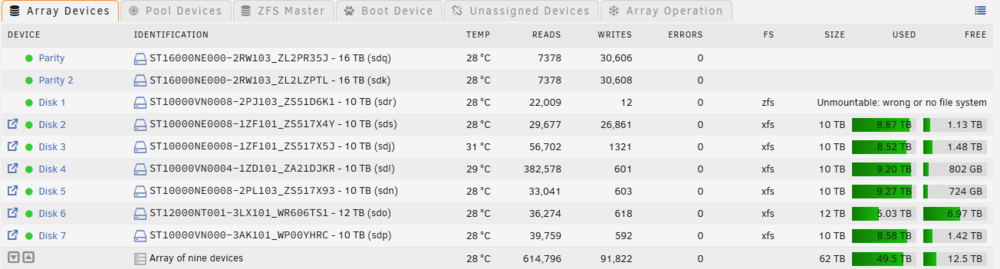
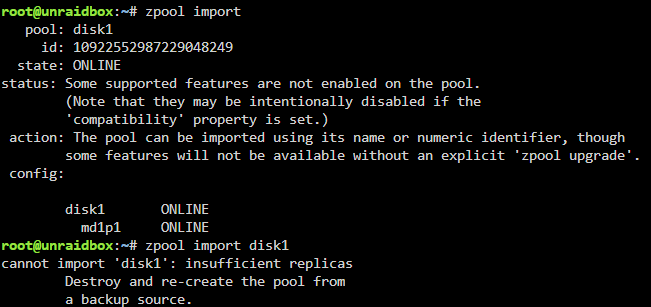

-
Thanks JorgeB for your help, That worked a treat......
-
Sorry, does this mean that I drop this disk 1 out of array and use "unassigned disk" to mount the disk out of maintenance mode? Or do I start to the array as normal and access this disk
-
Does this looks promising.
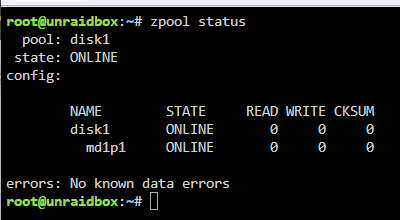
-
I type this command in maintenance mode and here is the result and I didn't see any change in the syslog. unraidbox-syslog-20240228-0726.zip unraidbox-diagnostics-20240228-1827.zip
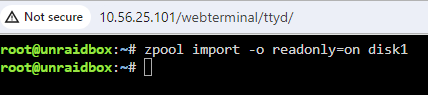
-
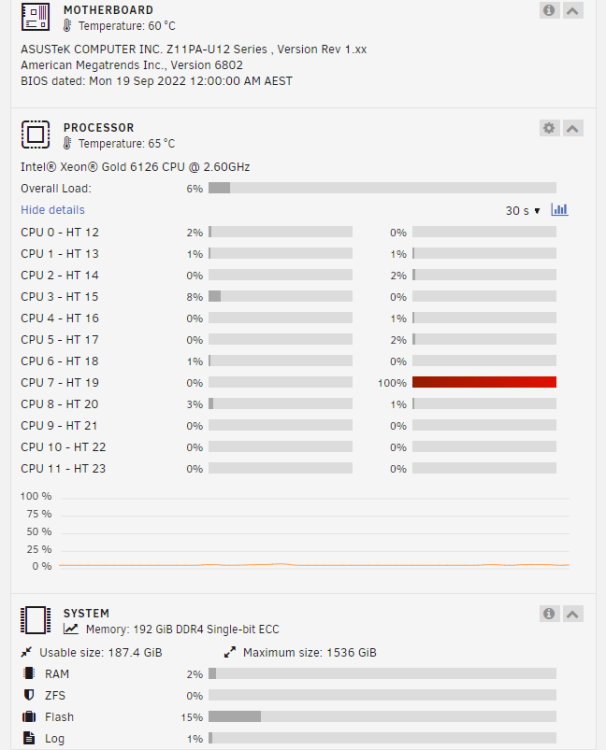
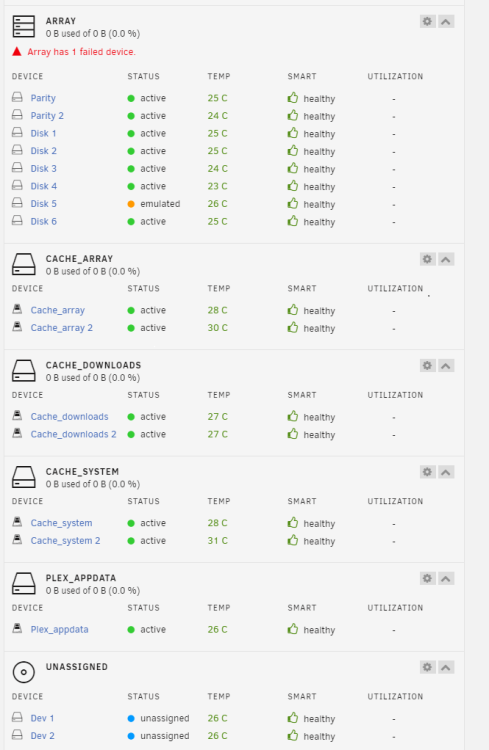
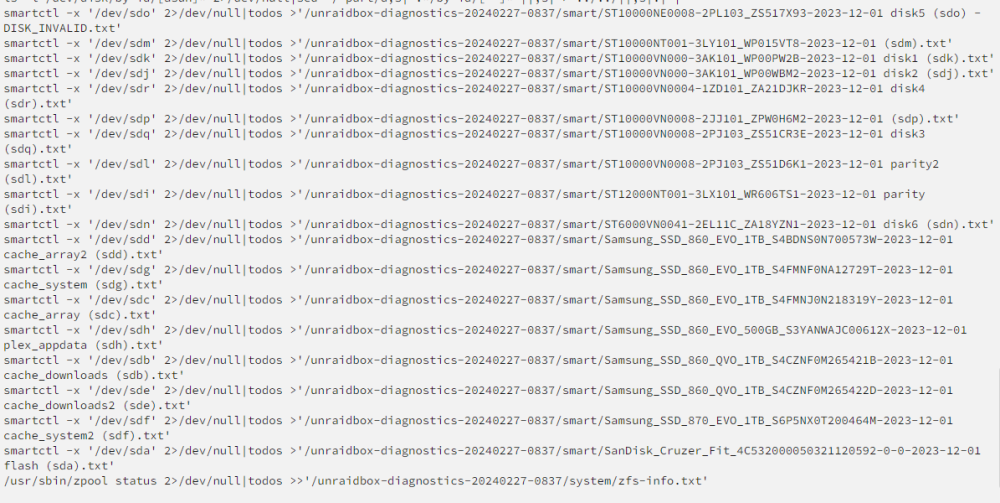
I am stuck between a rock and a hard place with my Unraid server and wondering if someone can help me and point me in the right direction. I have the following system. Intel® Xeon® Gold 6126 CPU @ 2.60GHz 192 GiB DDR4 Single-bit ECC Parity Disk 1 - Seagate 12TB NAS Parity Disk 2 - Seagate 10TB NAS Array Disk 1 to 5 - Seagate 10TB NAS Array Disk 6 - Seagate 6TB NAS 4 Cache array - 3 x 2 x Samsung 1TB SSD - 1 x Samsung 500GB SSD The history - I recently converted disk 1 and all my cache disks to ZFS file system, without any problems following Spaceinvader tutorials. Since then disk 5 had failed due to an old disk and a second time due to a fault cable (Which I have replaced now). I have not run a new parity check since then and it is still valid. The problem - I am trying to rebuild disk 5 from the valid parity, but the system is hanging for days without any read/write, but one cpu core is pegged 100%. At one point I got some wrong information and I have wiped all my cache disks, this will not a problem if I can save disk 1 as it has the ZFS snapshots on it. What Happening - Start in maintenance mode, I am able to download the diagnostics files without a problem (See attached). unassigned devices is working normally. I am able to stop the array normally. But when I start the array normally, it gets stuck "Array Starting - Mounting disks" and I can not do anything with array. Once again unassigned devices is working normally. Starting array normally - Feb 27 19:15:35 unraidbox avahi-daemon[17112]: Server startup complete. Host name is unraidbox.local. Local service cookie is 3262916861. Feb 27 19:15:36 unraidbox avahi-daemon[17112]: Service "unraidbox" (/services/ssh.service) successfully established. Feb 27 19:15:36 unraidbox avahi-daemon[17112]: Service "unraidbox" (/services/smb.service) successfully established. Feb 27 19:15:36 unraidbox avahi-daemon[17112]: Service "unraidbox" (/services/sftp-ssh.service) successfully established. Feb 27 19:15:44 unraidbox SysDrivers: SysDrivers Build Complete Feb 27 19:15:47 unraidbox emhttpd: shcmd (1538513): /usr/local/sbin/set_ncq sdi 1 Feb 27 19:15:47 unraidbox kernel: mdcmd (31): set md_num_stripes 1280 Feb 27 19:15:47 unraidbox kernel: mdcmd (32): set md_queue_limit 80 Feb 27 19:15:47 unraidbox kernel: mdcmd (33): set md_sync_limit 5 Feb 27 19:15:47 unraidbox kernel: mdcmd (34): set md_write_method Feb 27 19:15:47 unraidbox emhttpd: shcmd (1538514): echo 128 > /sys/block/sdi/queue/nr_requests Feb 27 19:15:47 unraidbox emhttpd: shcmd (1538515): /usr/local/sbin/set_ncq sdk 1 Feb 27 19:15:47 unraidbox emhttpd: shcmd (1538516): echo 128 > /sys/block/sdk/queue/nr_requests Feb 27 19:15:47 unraidbox emhttpd: shcmd (1538517): /usr/local/sbin/set_ncq sdj 1 Feb 27 19:15:47 unraidbox emhttpd: shcmd (1538518): echo 128 > /sys/block/sdj/queue/nr_requests Feb 27 19:15:47 unraidbox emhttpd: shcmd (1538519): /usr/local/sbin/set_ncq sdq 1 Feb 27 19:15:47 unraidbox emhttpd: shcmd (1538520): echo 128 > /sys/block/sdq/queue/nr_requests Feb 27 19:15:47 unraidbox emhttpd: shcmd (1538521): /usr/local/sbin/set_ncq sdr 1 Feb 27 19:15:47 unraidbox emhttpd: shcmd (1538522): echo 128 > /sys/block/sdr/queue/nr_requests Feb 27 19:15:47 unraidbox emhttpd: shcmd (1538523): /usr/local/sbin/set_ncq sdo 1 Feb 27 19:15:47 unraidbox emhttpd: shcmd (1538524): echo 128 > /sys/block/sdo/queue/nr_requests Feb 27 19:15:47 unraidbox emhttpd: shcmd (1538525): /usr/local/sbin/set_ncq sdn 1 Feb 27 19:15:47 unraidbox emhttpd: shcmd (1538526): echo 128 > /sys/block/sdn/queue/nr_requests Feb 27 19:15:47 unraidbox emhttpd: shcmd (1538527): /usr/local/sbin/set_ncq sdl 1 Feb 27 19:15:47 unraidbox emhttpd: shcmd (1538528): echo 128 > /sys/block/sdl/queue/nr_requests Feb 27 19:15:47 unraidbox kernel: mdcmd (35): start STOPPED Feb 27 19:15:47 unraidbox kernel: unraid: allocating 41350K for 1280 stripes (8 disks) Feb 27 19:15:47 unraidbox kernel: md1p1: running, size: 9766436812 blocks Feb 27 19:15:47 unraidbox kernel: md2p1: running, size: 9766436812 blocks Feb 27 19:15:47 unraidbox kernel: md3p1: running, size: 9766436812 blocks Feb 27 19:15:47 unraidbox kernel: md4p1: running, size: 9766436812 blocks Feb 27 19:15:47 unraidbox kernel: md5p1: running, size: 9766436812 blocks Feb 27 19:15:47 unraidbox kernel: md6p1: running, size: 5860522532 blocks Feb 27 19:15:47 unraidbox emhttpd: shcmd (1538529): udevadm settle Feb 27 19:15:47 unraidbox emhttpd: Opening encrypted volumes... Feb 27 19:15:47 unraidbox emhttpd: shcmd (1538530): touch /boot/config/forcesync Feb 27 19:15:48 unraidbox emhttpd: Mounting disks... Feb 27 19:15:48 unraidbox emhttpd: mounting /mnt/disk1 Feb 27 19:15:48 unraidbox emhttpd: shcmd (1538531): mkdir -p /mnt/disk1 Feb 27 19:15:48 unraidbox emhttpd: /usr/sbin/zpool import -f -d /dev/md1p1 2>&1 Feb 27 19:15:51 unraidbox emhttpd: pool: disk1 Feb 27 19:15:51 unraidbox emhttpd: id: ????????????????? Feb 27 19:15:51 unraidbox emhttpd: shcmd (1538532): /usr/sbin/zpool import -f -N -o autoexpand=on -d /dev/md1p1 ????????????????? disk1 Feb 27 19:15:56 unraidbox kernel: VERIFY3(0 == dmu_buf_hold_array(os, object, offset, size, FALSE, FTAG, &numbufs, &dbp)) failed (0 == 5) Feb 27 19:15:56 unraidbox kernel: PANIC at dmu.c:1123:dmu_write() Feb 27 19:15:56 unraidbox kernel: Showing stack for process 22191 Feb 27 19:15:56 unraidbox kernel: CPU: 2 PID: 22191 Comm: txg_sync Tainted: P O 6.1.74-Unraid #1 Feb 27 19:15:56 unraidbox kernel: Hardware name: ASUSTeK COMPUTER INC. Z11PA-U12 Series/Z11PA-U12 Series, BIOS 6802 09/19/2022 Feb 27 19:15:56 unraidbox kernel: Call Trace: Feb 27 19:15:56 unraidbox kernel: <TASK> Feb 27 19:15:56 unraidbox kernel: dump_stack_lvl+0x44/0x5c Feb 27 19:15:56 unraidbox kernel: spl_panic+0xd0/0xe8 [spl] Feb 27 19:15:56 unraidbox kernel: ? dmu_buf_hold_array_by_dnode+0x279/0x41c [zfs] Feb 27 19:15:56 unraidbox kernel: ? preempt_latency_start+0x2b/0x46 Feb 27 19:15:56 unraidbox kernel: ? _raw_spin_lock+0x13/0x1c Feb 27 19:15:56 unraidbox kernel: ? _raw_spin_unlock+0x14/0x29 Feb 27 19:15:56 unraidbox kernel: ? dnode_rele_and_unlock+0x67/0xb6 [zfs] Feb 27 19:15:56 unraidbox kernel: ? dmu_buf_hold_array.constprop.0+0x7b/0xa2 [zfs] Feb 27 19:15:56 unraidbox kernel: ? dmu_buf_hold_array_by_dnode+0x24d/0x41c [zfs] Feb 27 19:15:56 unraidbox kernel: dmu_write+0x77/0xf0 [zfs] Feb 27 19:15:56 unraidbox kernel: ? _raw_spin_lock+0x13/0x1c Feb 27 19:15:56 unraidbox kernel: space_map_write+0x19c/0x605 [zfs] Feb 27 19:15:56 unraidbox kernel: ? zap_lookup_norm+0x9b/0xcb [zfs] Feb 27 19:15:56 unraidbox kernel: metaslab_flush+0x199/0x326 [zfs] Feb 27 19:15:56 unraidbox kernel: spa_flush_metaslabs+0x2bf/0x334 [zfs] Feb 27 19:15:56 unraidbox kernel: spa_sync+0x7c9/0xd12 [zfs] Feb 27 19:15:56 unraidbox kernel: txg_sync_thread+0x1f3/0x375 [zfs] Feb 27 19:15:56 unraidbox kernel: ? __kmem_cache_free+0xb0/0xf5 Feb 27 19:15:56 unraidbox kernel: ? txg_fini+0x1c2/0x1c2 [zfs] Feb 27 19:15:56 unraidbox kernel: ? __thread_exit+0x13/0x13 [spl] Feb 27 19:15:56 unraidbox kernel: thread_generic_wrapper+0x57/0x65 [spl] Feb 27 19:15:56 unraidbox kernel: kthread+0xe4/0xef Feb 27 19:15:56 unraidbox kernel: ? kthread_complete_and_exit+0x1b/0x1b Feb 27 19:15:56 unraidbox kernel: ret_from_fork+0x1f/0x30 Feb 27 19:15:56 unraidbox kernel: </TASK> Running diagnostics download during normal start - it hangs in the same place each time - But completes during maintenance mode. Finally, I not know if this is the cause or problem, but the "zfs-info.txt" file has no information in it unraidbox-diagnostics-20240227-0755.zip unraidbox-syslog-20240226-2050.zip