






Can0n
Members
-
Joined
-
Last visited
-
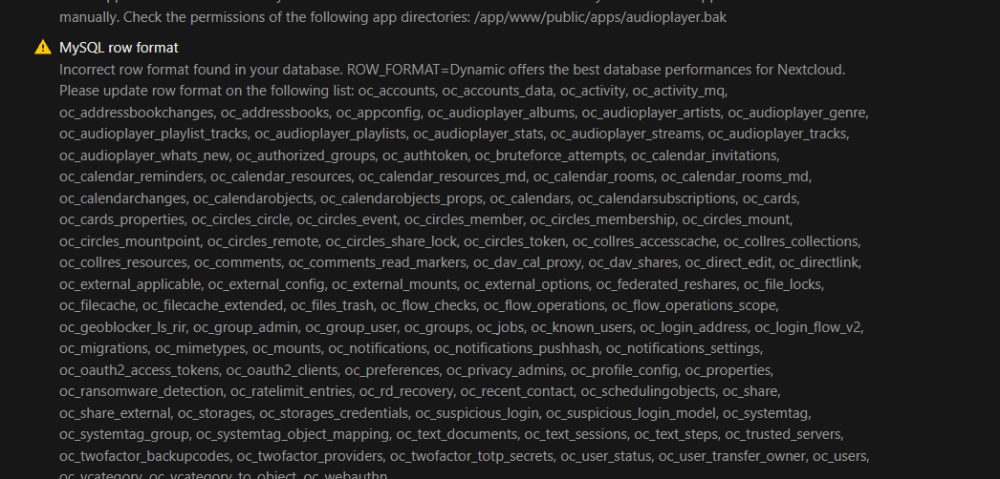
Followed this to a tee and restarted still see the error in NextCloud but tables in MariaDB are showing Dynamic MariaDB [nextcloud]> SELECT CONCAT('ALTER TABLE ', table_name, ' ROW_FORMAT=DYNAMIC;') -> FROM information_schema.tables -> WHERE table_schema = 'nextcloud'; +----------------------------------------------------------------+ | CONCAT('ALTER TABLE ', table_name, ' ROW_FORMAT=DYNAMIC;') | +----------------------------------------------------------------+ | ALTER TABLE oc_accounts ROW_FORMAT=DYNAMIC; | | ALTER TABLE oc_accounts_data ROW_FORMAT=DYNAMIC; | | ALTER TABLE oc_activity ROW_FORMAT=DYNAMIC; | | ALTER TABLE oc_activity_mq ROW_FORMAT=DYNAMIC; | | ALTER TABLE oc_addressbookchanges ROW_FORMAT=DYNAMIC; | | ALTER TABLE oc_addressbooks ROW_FORMAT=DYNAMIC; | | ALTER TABLE oc_appconfig ROW_FORMAT=DYNAMIC; | | ALTER TABLE oc_appconfig_ex ROW_FORMAT=DYNAMIC; | | ALTER TABLE oc_audioplayer_albums ROW_FORMAT=DYNAMIC; | | ALTER TABLE oc_audioplayer_artists ROW_FORMAT=DYNAMIC; | | ALTER TABLE oc_audioplayer_genre ROW_FORMAT=DYNAMIC; | | ALTER TABLE oc_audioplayer_playlist_tracks ROW_FORMAT=DYNAMIC; | | ALTER TABLE oc_audioplayer_playlists ROW_FORMAT=DYNAMIC; | | ALTER TABLE oc_audioplayer_stats ROW_FORMAT=DYNAMIC; | | ALTER TABLE oc_audioplayer_streams ROW_FORMAT=DYNAMIC; | | ALTER TABLE oc_audioplayer_tracks ROW_FORMAT=DYNAMIC; | | ALTER TABLE oc_audioplayer_whats_new ROW_FORMAT=DYNAMIC; | | ALTER TABLE oc_authorized_groups ROW_FORMAT=DYNAMIC; | | ALTER TABLE oc_authtoken ROW_FORMAT=DYNAMIC; | | ALTER TABLE oc_bruteforce_attempts ROW_FORMAT=DYNAMIC; | | ALTER TABLE oc_calendar_invitations ROW_FORMAT=DYNAMIC; | | ALTER TABLE oc_calendar_reminders ROW_FORMAT=DYNAMIC; | | ALTER TABLE oc_calendar_resources ROW_FORMAT=DYNAMIC; | | ALTER TABLE oc_calendar_resources_md ROW_FORMAT=DYNAMIC; | | ALTER TABLE oc_calendar_rooms ROW_FORMAT=DYNAMIC; | | ALTER TABLE oc_calendar_rooms_md ROW_FORMAT=DYNAMIC; | | ALTER TABLE oc_calendarchanges ROW_FORMAT=DYNAMIC; | | ALTER TABLE oc_calendarobjects ROW_FORMAT=DYNAMIC; | | ALTER TABLE oc_calendarobjects_props ROW_FORMAT=DYNAMIC; | | ALTER TABLE oc_calendars ROW_FORMAT=DYNAMIC; | | ALTER TABLE oc_calendars_federated ROW_FORMAT=DYNAMIC; | | ALTER TABLE oc_calendarsubscriptions ROW_FORMAT=DYNAMIC; | | ALTER TABLE oc_cards ROW_FORMAT=DYNAMIC; | | ALTER TABLE oc_cards_properties ROW_FORMAT=DYNAMIC; | | ALTER TABLE oc_circles_circle ROW_FORMAT=DYNAMIC; | | ALTER TABLE oc_circles_event ROW_FORMAT=DYNAMIC; | | ALTER TABLE oc_circles_member ROW_FORMAT=DYNAMIC; | | ALTER TABLE oc_circles_membership ROW_FORMAT=DYNAMIC; | | ALTER TABLE oc_circles_mount ROW_FORMAT=DYNAMIC; | | ALTER TABLE oc_circles_mountpoint ROW_FORMAT=DYNAMIC; | | ALTER TABLE oc_circles_remote ROW_FORMAT=DYNAMIC; | | ALTER TABLE oc_circles_share_lock ROW_FORMAT=DYNAMIC; | | ALTER TABLE oc_circles_token ROW_FORMAT=DYNAMIC; | | ALTER TABLE oc_collres_accesscache ROW_FORMAT=DYNAMIC; | | ALTER TABLE oc_collres_collections ROW_FORMAT=DYNAMIC; | | ALTER TABLE oc_collres_resources ROW_FORMAT=DYNAMIC; | | ALTER TABLE oc_comments ROW_FORMAT=DYNAMIC; | | ALTER TABLE oc_comments_read_markers ROW_FORMAT=DYNAMIC; | | ALTER TABLE oc_dav_absence ROW_FORMAT=DYNAMIC; | | ALTER TABLE oc_dav_cal_proxy ROW_FORMAT=DYNAMIC; | | ALTER TABLE oc_dav_shares ROW_FORMAT=DYNAMIC; | | ALTER TABLE oc_direct_edit ROW_FORMAT=DYNAMIC; | | ALTER TABLE oc_directlink ROW_FORMAT=DYNAMIC; | | ALTER TABLE oc_ex_apps ROW_FORMAT=DYNAMIC; | | ALTER TABLE oc_ex_apps_daemons ROW_FORMAT=DYNAMIC; | | ALTER TABLE oc_ex_apps_routes ROW_FORMAT=DYNAMIC; | | ALTER TABLE oc_ex_apps_talk_bots ROW_FORMAT=DYNAMIC; | | ALTER TABLE oc_ex_deploy_options ROW_FORMAT=DYNAMIC; | | ALTER TABLE oc_ex_event_handlers ROW_FORMAT=DYNAMIC; | | ALTER TABLE oc_ex_occ_commands ROW_FORMAT=DYNAMIC; | | ALTER TABLE oc_ex_settings_forms ROW_FORMAT=DYNAMIC; | | ALTER TABLE oc_ex_speech_to_text ROW_FORMAT=DYNAMIC; | | ALTER TABLE oc_ex_speech_to_text_q ROW_FORMAT=DYNAMIC; | | ALTER TABLE oc_ex_task_processing ROW_FORMAT=DYNAMIC; | | ALTER TABLE oc_ex_text_processing ROW_FORMAT=DYNAMIC; | | ALTER TABLE oc_ex_text_processing_q ROW_FORMAT=DYNAMIC; | | ALTER TABLE oc_ex_translation ROW_FORMAT=DYNAMIC; | | ALTER TABLE oc_ex_translation_q ROW_FORMAT=DYNAMIC; | | ALTER TABLE oc_ex_ui_files_actions ROW_FORMAT=DYNAMIC; | | ALTER TABLE oc_ex_ui_scripts ROW_FORMAT=DYNAMIC; | | ALTER TABLE oc_ex_ui_states ROW_FORMAT=DYNAMIC; | | ALTER TABLE oc_ex_ui_styles ROW_FORMAT=DYNAMIC; | | ALTER TABLE oc_ex_ui_top_menu ROW_FORMAT=DYNAMIC; | | ALTER TABLE oc_external_applicable ROW_FORMAT=DYNAMIC; | | ALTER TABLE oc_external_config ROW_FORMAT=DYNAMIC; | | ALTER TABLE oc_external_mounts ROW_FORMAT=DYNAMIC; | | ALTER TABLE oc_external_options ROW_FORMAT=DYNAMIC; | | ALTER TABLE oc_federated_invites ROW_FORMAT=DYNAMIC; | | ALTER TABLE oc_federated_reshares ROW_FORMAT=DYNAMIC; | | ALTER TABLE oc_file_locks ROW_FORMAT=DYNAMIC; | | ALTER TABLE oc_file_metadata ROW_FORMAT=DYNAMIC; | | ALTER TABLE oc_filecache ROW_FORMAT=DYNAMIC; | | ALTER TABLE oc_filecache_extended ROW_FORMAT=DYNAMIC; | | ALTER TABLE oc_files_lock ROW_FORMAT=DYNAMIC; | | ALTER TABLE oc_files_metadata ROW_FORMAT=DYNAMIC; | | ALTER TABLE oc_files_metadata_index ROW_FORMAT=DYNAMIC; | | ALTER TABLE oc_files_reminders ROW_FORMAT=DYNAMIC; | | ALTER TABLE oc_files_trash ROW_FORMAT=DYNAMIC; | | ALTER TABLE oc_files_versions ROW_FORMAT=DYNAMIC; | | ALTER TABLE oc_flow_checks ROW_FORMAT=DYNAMIC; | | ALTER TABLE oc_flow_operations ROW_FORMAT=DYNAMIC; | | ALTER TABLE oc_flow_operations_scope ROW_FORMAT=DYNAMIC; | | ALTER TABLE oc_geoblocker_ls_rir ROW_FORMAT=DYNAMIC; | | ALTER TABLE oc_group_admin ROW_FORMAT=DYNAMIC; | | ALTER TABLE oc_group_user ROW_FORMAT=DYNAMIC; | | ALTER TABLE oc_groups ROW_FORMAT=DYNAMIC; | | ALTER TABLE oc_job_classes_registry ROW_FORMAT=DYNAMIC; | | ALTER TABLE oc_job_runs ROW_FORMAT=DYNAMIC; | | ALTER TABLE oc_jobs ROW_FORMAT=DYNAMIC; | | ALTER TABLE oc_known_users ROW_FORMAT=DYNAMIC; | | ALTER TABLE oc_login_address ROW_FORMAT=DYNAMIC; | | ALTER TABLE oc_login_flow_v2 ROW_FORMAT=DYNAMIC; | | ALTER TABLE oc_login_ips_aggregated ROW_FORMAT=DYNAMIC; | | ALTER TABLE oc_migrations ROW_FORMAT=DYNAMIC; | | ALTER TABLE oc_mimetypes ROW_FORMAT=DYNAMIC; | | ALTER TABLE oc_mounts ROW_FORMAT=DYNAMIC; | | ALTER TABLE oc_notifications ROW_FORMAT=DYNAMIC; | | ALTER TABLE oc_notifications_pushhash ROW_FORMAT=DYNAMIC; | | ALTER TABLE oc_notifications_settings ROW_FORMAT=DYNAMIC; | | ALTER TABLE oc_notifications_webpush ROW_FORMAT=DYNAMIC; | | ALTER TABLE oc_oauth2_access_tokens ROW_FORMAT=DYNAMIC; | | ALTER TABLE oc_oauth2_clients ROW_FORMAT=DYNAMIC; | | ALTER TABLE oc_open_local_editor ROW_FORMAT=DYNAMIC; | | ALTER TABLE oc_photos_albums ROW_FORMAT=DYNAMIC; | | ALTER TABLE oc_photos_albums_collabs ROW_FORMAT=DYNAMIC; | | ALTER TABLE oc_photos_albums_files ROW_FORMAT=DYNAMIC; | | ALTER TABLE oc_preferences ROW_FORMAT=DYNAMIC; | | ALTER TABLE oc_preferences_ex ROW_FORMAT=DYNAMIC; | | ALTER TABLE oc_preview_locations ROW_FORMAT=DYNAMIC; | | ALTER TABLE oc_preview_versions ROW_FORMAT=DYNAMIC; | | ALTER TABLE oc_previews ROW_FORMAT=DYNAMIC; | | ALTER TABLE oc_privacy_admins ROW_FORMAT=DYNAMIC; | | ALTER TABLE oc_profile_config ROW_FORMAT=DYNAMIC; | | ALTER TABLE oc_properties ROW_FORMAT=DYNAMIC; | | ALTER TABLE oc_ransomware_detection ROW_FORMAT=DYNAMIC; | | ALTER TABLE oc_ratelimit_entries ROW_FORMAT=DYNAMIC; | | ALTER TABLE oc_rd_recovery ROW_FORMAT=DYNAMIC; | | ALTER TABLE oc_reactions ROW_FORMAT=DYNAMIC; | | ALTER TABLE oc_recent_contact ROW_FORMAT=DYNAMIC; | | ALTER TABLE oc_schedulingobjects ROW_FORMAT=DYNAMIC; | | ALTER TABLE oc_sec_signatory ROW_FORMAT=DYNAMIC; | | ALTER TABLE oc_share ROW_FORMAT=DYNAMIC; | | ALTER TABLE oc_share_external ROW_FORMAT=DYNAMIC; | | ALTER TABLE oc_shares_limits ROW_FORMAT=DYNAMIC; | | ALTER TABLE oc_storages ROW_FORMAT=DYNAMIC; | | ALTER TABLE oc_storages_credentials ROW_FORMAT=DYNAMIC; | | ALTER TABLE oc_suspicious_login ROW_FORMAT=DYNAMIC; | | ALTER TABLE oc_suspicious_login_model ROW_FORMAT=DYNAMIC; | | ALTER TABLE oc_systemtag ROW_FORMAT=DYNAMIC; | | ALTER TABLE oc_systemtag_group ROW_FORMAT=DYNAMIC; | | ALTER TABLE oc_systemtag_object_mapping ROW_FORMAT=DYNAMIC; | | ALTER TABLE oc_taskprocessing_tasks ROW_FORMAT=DYNAMIC; | | ALTER TABLE oc_text2image_tasks ROW_FORMAT=DYNAMIC; | | ALTER TABLE oc_text_documents ROW_FORMAT=DYNAMIC; | | ALTER TABLE oc_text_sessions ROW_FORMAT=DYNAMIC; | | ALTER TABLE oc_text_steps ROW_FORMAT=DYNAMIC; | | ALTER TABLE oc_textprocessing_tasks ROW_FORMAT=DYNAMIC; | | ALTER TABLE oc_trusted_servers ROW_FORMAT=DYNAMIC; | | ALTER TABLE oc_twofactor_backupcodes ROW_FORMAT=DYNAMIC; | | ALTER TABLE oc_twofactor_providers ROW_FORMAT=DYNAMIC; | | ALTER TABLE oc_twofactor_totp_secrets ROW_FORMAT=DYNAMIC; | | ALTER TABLE oc_twofactor_webauthn_regs ROW_FORMAT=DYNAMIC; | | ALTER TABLE oc_user_status ROW_FORMAT=DYNAMIC; | | ALTER TABLE oc_user_transfer_owner ROW_FORMAT=DYNAMIC; | | ALTER TABLE oc_users ROW_FORMAT=DYNAMIC; | | ALTER TABLE oc_vcategory ROW_FORMAT=DYNAMIC; | | ALTER TABLE oc_vcategory_to_object ROW_FORMAT=DYNAMIC; | | ALTER TABLE oc_webauthn ROW_FORMAT=DYNAMIC; | | ALTER TABLE oc_webhook_listeners ROW_FORMAT=DYNAMIC; | +----------------------------------------------------------------+ 159 rows in set (0.002 sec)
-
resolved with UnRAID 7.2.3
-
I do find it odd it impacts Chrome on my Windows 11 PC but not chrome on my Pixel 9 XL Pro
-
Thank you @JorgeB
-
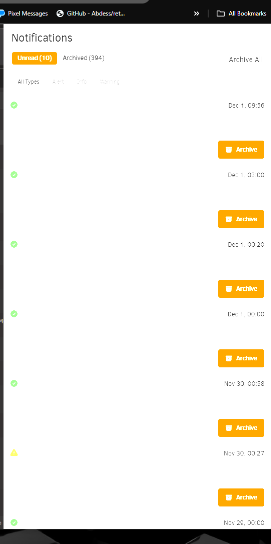
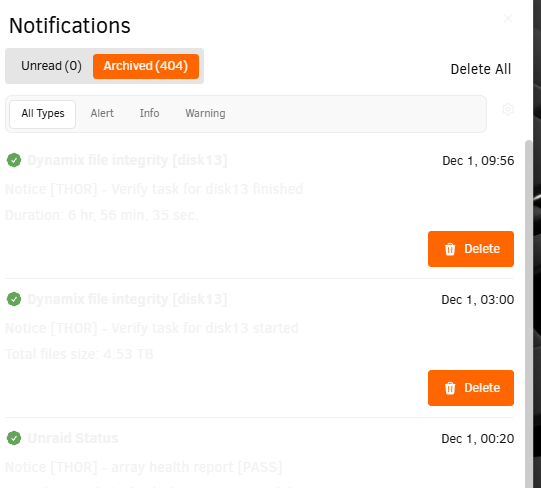
using chrome with unraid 7.2.2 i noticed both in HDR and SDR on my monitor notification are unreadable Using HDR Removed HDR using SDR
-
I use WD/Hitachi mostly due to the advanced replacement when they do fail. Seagate has been a huge let down for me often having 1-2 failures per year....WD i tend to get 5-8years out of but when they do fail I just do Advanced RMA and get a new drive shipped to be then replace and ship failed one back
-
Running latest I see dynamic is no long let available just enable and disable but it's sticks now
-
Not much other than they're looking into it and it will be fixed in a few weeks with a patch, but they're looking at integrating the connect application with the operating system as well and that might take priority. In the meantime, I just use wireguard on my phone to access it when I'm not at home, but it would be nice to have connect so I can use my work computer with the bigger screens.
-
I'm going to look at posting in discord. They're not looking at their forums apparently
-
Logs attached logs.gtar
-
Noticed my remote access won't stay set to dynamic with with a specific port I set it then hit save and if I leave the page and come back it's disabled again.
-
thank you never thought to kill the process first i did run: /etc/rc.d/rc.nginx stop got the successly stopped message then ran: /etc/rc.d/rc.nginx start it started fine. its only happened twice so far so really not sure what caused it and why first time required a full reboot to get it back while second time it self recovered in 5min I have set port down on the on board ethernet eth1 and that should hopefully prevent those spamming messages.. i do run syslog too so could look at those logs when time permits thank you for the suggestions i will try and see if they work if i see this happen again
-
That's all very odd...i am aware of the Disk 9 Write caching and I am adding and replacing drives very frequently lately the go file has been like that for years without issues. almost all of it is commented out the docker-shell is just a small script that lets me via via CLI press a number to access any running docker containers cli it was introduced by spaceInvader1 some years ago. the log file was set set larger to accommodate some issues i had a long time ago. I do not have IPv6 enabled on my network or unRAID so that's very odd. I am using IPvlan as MacVLAN had issues a version or two back. eth0 is my 10gbps NIC and eth1 is the on board 1gbps NIC i would think nothing is wrong there since its been working for just over a year in this configuration. either way its something that recently happening and hasn't since the last recovery....very odd
-
just happened again this time however it recovered on its own after about 5 min thor-diagnostics-20240424-1214.zip
-
Weird issue tonight login page was fine once i logged in just had a generic chrome page not available (tried incognito to rule out cookies) tried restarting/reloading, stopping and starting on nginx no change. connect said my server was offline. found a handy command to stop the array since i new my docker container were still running. this saved me from having to do a parity check on reboot. CSRF=$(cat /var/local/emhttp/var.ini | grep -oP 'csrf_token="\K[^"]+') curl -k --data "startState=STARTED&file=&csrf_token=${CSRF}&cmdStop=Stop" http://localhost/update.htm diagnostics attached any insight is greatly appreciated thor-diagnostics-20240422-2016.zip



