




Skip to content
View in the app

A better way to browse. Learn more.

Unraid

A full-screen app on your home screen with push notifications, badges and more.

To install this app on iOS and iPadOS
  1. Tap the Share icon in Safari
  2. Scroll the menu and tap Add to Home Screen.
  3. Tap Add in the top-right corner.
To install this app on Android
  1. Tap the 3-dot menu (⋮) in the top-right corner of the browser.
  2. Tap Add to Home screen or Install app.
  3. Confirm by tapping Install.

terrence.rose

Members
  • Joined

  • Last visited

  1. Finally got the chance to test this and yes that is now working (V2026.05.07) on Unraid 7.2.5.
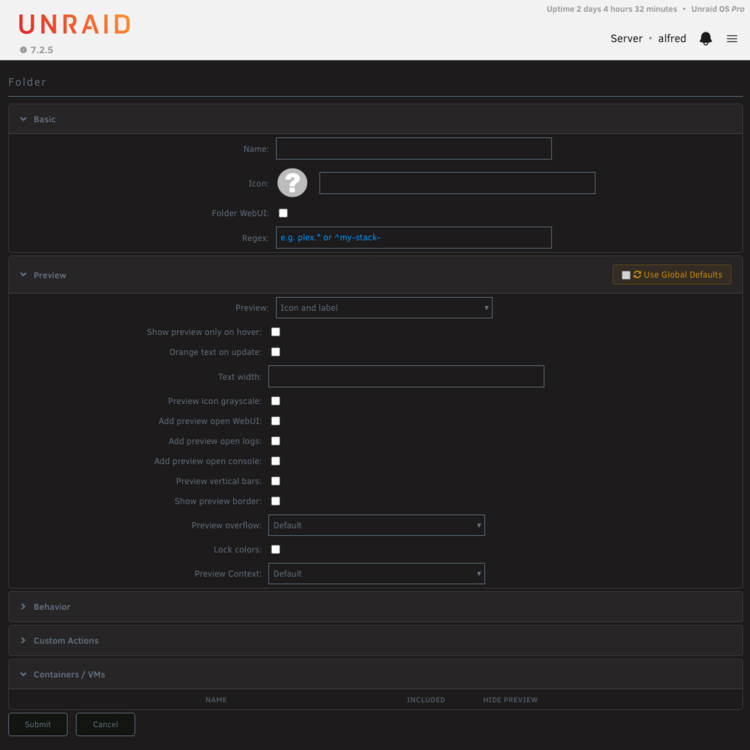
  2. FolderView2 I should have mentioned that the screenshot above was from an InPrivate window from Edge on macOS. I also tried from a reset Safari session and get the same results.
  3. I just installed the new version of the plugin after removing the old plugin and removing all my existing folders. Why I didn't migrate is beyond me... I'm getting a strange issue, when I create a folder, none of my docker containers appear in the Containers/VMs box. The same goes when I edit the folder, nothing shows up and the name of the folder is blank: Any ideas? Thanks for working on the plugin and supporting us also!

Account

Navigation

Search

Search

Configure browser push notifications

Chrome (Android)
  1. Tap the lock icon next to the address bar.
  2. Tap Permissions → Notifications.
  3. Adjust your preference.
Chrome (Desktop)
  1. Click the padlock icon in the address bar.
  2. Select Site settings.
  3. Find Notifications and adjust your preference.
