




Skip to content
View in the app

A better way to browse. Learn more.

Unraid

A full-screen app on your home screen with push notifications, badges and more.

To install this app on iOS and iPadOS
  1. Tap the Share icon in Safari
  2. Scroll the menu and tap Add to Home Screen.
  3. Tap Add in the top-right corner.
To install this app on Android
  1. Tap the 3-dot menu (⋮) in the top-right corner of the browser.
  2. Tap Add to Home screen or Install app.
  3. Confirm by tapping Install.

electrodad

Members
  • Joined

  • Last visited

  1. Well I just figured out my PW by process of elimination.
  2. I'm assuming I would have to be able to logon via command line to access rename the config file?
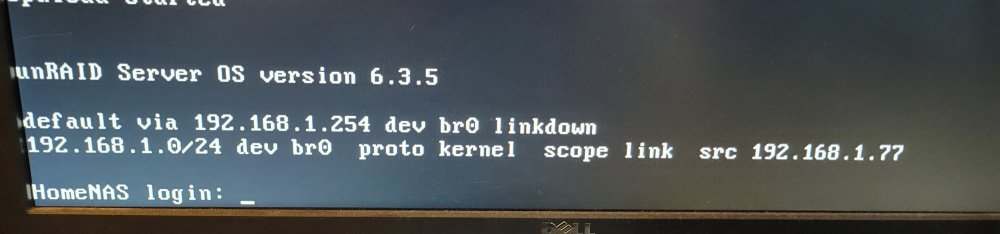
  3. Hi all, I recently changed ISPs and have a new gateway. My old gateway was 192.168.1.254 and my new gateway is 10.0.0.1 ...I have tried to ping my unraid server 192.168.1.77 with no success. Also it has been a while since I needed to access the gui to the server thus I have forgot my user and pw. I should have written it down. I have a monitor and keyboard connected to access the command line but still have not figured out my user and pw. Any help is appreciated.
Account

Navigation

Search

Search

Configure browser push notifications

Chrome (Android)
  1. Tap the lock icon next to the address bar.
  2. Tap Permissions → Notifications.
  3. Adjust your preference.
Chrome (Desktop)
  1. Click the padlock icon in the address bar.
  2. Select Site settings.
  3. Find Notifications and adjust your preference.