





HZCH
Members
-
Joined
-
Last visited
-
I checked, but there's no "lost+found" share created, neither there are "lost+found" shares on any HDD from the array. Does it mean the repairs showed nothing had to be repaired, or that I somehow didn't repair anything? The array is synced. the "only" new SMART error is the #5 Reallocated sector count with 8 as a raw value.
-
So after stumbling on this post with a similar issue, I looked at the whole diagnostics, found the syslog.txt, and searched for the name of the drive, because I didn't understand the logic. I found the command, type xfs_repair -n /dev/md2p1, and it gave me the same check log as with the check button in the GUI. I redid the repair with xfs_repair /dev/md2p1, and decided the file system was OK... I've then followed the guide to rebuild a drive onto itself. I am now waiting its rewritting for the next 5 hours... Let's hope the new HDD I've build will serve as a second parity drive 😁 And thank you @trurl for pointing to the diagnostics!
-
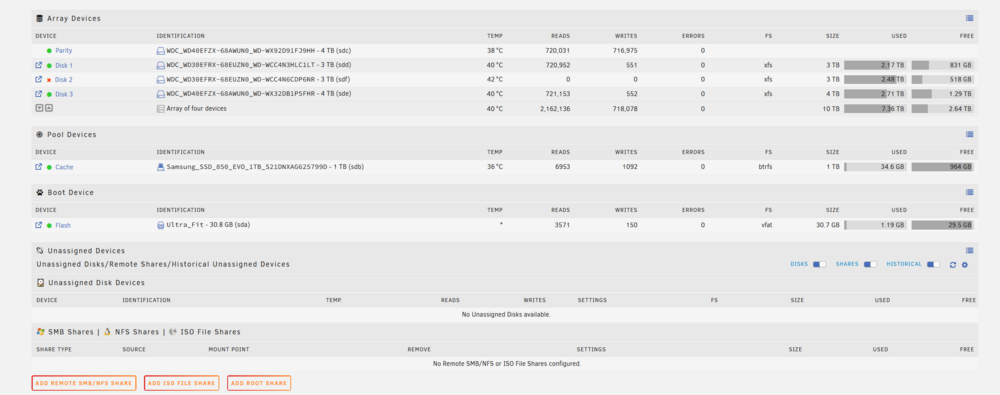
As I was reading your answer, the server was shutting down 😞 I've put the diagnostics in attached, as with the screenshot. I must add, I use unRAID 7.0.0. My issues started yesterday afternoon, when I restarted the server after a week off. Also, I decided to tackle the cable issues from the cache drive by buying new sata cables. unnode304-diagnostics-20250216-2039.zip What should I've typed? With -n, I wanted to see what would happen with the name "sdf" instead of "mdX", but without actually do something to the drive
-
HZCH changed their profile photo
-
Hi everyone! I am a noob. And I am dealing with a disabled HDD. I think it happened after a dirty shut down of my unRAID setup that I mainly use for Plex at home. As I clicked to spin it up, of course nothing happened. Tl;dr: Issue is I can't repair the file system from the GUI options, and therefore, I'm not absolutely sure the HDD is dead - because I'm a noob SMART doesn't say much about obvious issues (see attached report) Options field in the GUI doesn't appear despite being in maintenance mode Using command xfs_repair -v /dev/md[disk] in terminal, I can't enter the proper disk name Using xfs_repair -n sdf (sdf being the single disk F, name that appear in the GUI), the error "bad primary superblock" appears, Now I'm lost. Is the HDD toast? Should I just pop in a new one? Proper question First, I check the SMART state but nothing seems to not work. It supposedly means nothing, but (see attachement) all I see is the 200 Multi zone error rate at 6. Then I followed the official guide to deal with repairing the file system, as a disabled HDD generally happens after a dirty shut down. I restarted in maintenance mode, and launched the xfs_repair through the GUI. It gave me... nothing wrong? At least if I read correctly the report (attached). Not seeing the options field that'd let me launch a file system repair anyway, I restarted the server, thinking I had done something wrong, relaunched a repair from the GUI... Nothing happened still. So I launched the terminal (after looking for it for five minutes), and imput "xfs_repair -v /dev/mdx". Of course it couldn't work, as I didn't write the HDD number... "Disk 2" is the disabled drive, so I wrote "md2" instead. Except I never managed to write the correct command. It always says there's no such fil directory when I write "md2", "mddisk2", "md_disk_2", "mddisk 2", "md 2", "md disk 2", "md_2"... Feeling extremely dumb, and considering any command prompt amounts to dark magic, I decided to use the HDD identification "sdf", but with the "-n" option instead, as the unRAID guide warns about breaking parity when actually repairing the drive as a single drive instead of a part of a parity (I guess?). So I used "xfs_repair -n /dev/sdf". It gave me the following: Phase 1 - find and verify superblock... bad primary superblock - bad magic number !!! attempting to find secondary superblock... .found candidate secondary superblock... unable to verify superblock, continuing... And then, a bunch of points. And at last, nothing happened. I am overwhelmed: Firstly, why isn't there an options field in the disk settings tab, that would help me command a proper file system repair? What did I do wrong? Secondly, should I keep on trying to repair the file system, or the superblock issue means I should just pop in a new HDD and repair the parity? Thirdly, I see temperature warnings. Could any of this be related to overheating, knowing that the SMART log don't show any mechanical issue? I'm trying to understand what happens, because if the disabling isn't related to a drive failure, changing it won't help... Thank you all for your help and hindsight! 25.02.16 SMART report.txt 25.02.16 xfs_repair.txt

